xueayi/dsh-opencode-go-usage ↗★ 0
@xueayi/dsh-opencode-go-usage
OpenCode Go plan usage monitor for DeepSeek Harness: real-time 5h-rolling / weekly / monthly quota in a floating web dock
安装
$
npx -p @deepseek-ai/dsh dsh plugin --profile web add github:xueayi/dsh-opencode-go-usage说明文档
阅读完整 README ↗dsh-opencode-go-usage
DeepSeek Harness 的 OpenCode Go 计划用量监控插件:Web GUI 右下角悬浮用量坞, 实时显示 5h 滚动 / 本周 / 本月三个额度窗口的已用百分比与重置倒计时。
数据来自 OpenCode 官方配额 API(GET https://opencode.ai/zen/go/v1/usage,
Bearer API Key 认证,无需 workspace id、无需 Cookie)。
安装
# 从 npm 安装(Web GUI 对应 web profile):
dsh plugin --profile web add @xueayi/dsh-opencode-go-usage
# 或本地路径:
dsh plugin --profile web add /path/to/dsh-opencode-go-usage
# 升级到最新版:
dsh plugin --profile web update @xueayi/dsh-opencode-go-usage
安装后重启对应 profile(Web UI 即 dsh web)。
配置
推荐途径:在 Web 设置 → 模型 中选择「官方渠道 · OpenCode Go」并填入 API Key,之后无需任何配置即可使用。
插件每次刷新通过 ctx.credentials 解析 apiKeyEnv 指定的凭据引用(默认
OPENCODE_GO_API_KEY),也可手动把 Key 存入 ~/.dsh/.credentials.yaml
或环境变量:
- insert:
    - id: opencode-go-usage
      name: '@xueayi/dsh-opencode-go-usage'
      config:
        apiKeyEnv: OPENCODE_GO_API_KEY
        refreshMs: 60000
| 字段 | 类型 | 默认值 | 说明 |
|---|---|---|---|
apiKeyEnv | string | OPENCODE_GO_API_KEY | 凭据引用 |
apiKey | string | — | 直接指定 Key(不推荐) |
endpoint | string | https://opencode.ai/zen/go/v1/usage | 配额接口 |
refreshMs | number | 60000 | 自动刷新间隔 |
timeoutMs | number | 10000 | 单次请求超时 |
用量坞
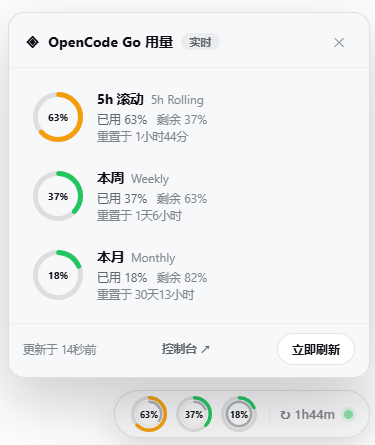
右下角一枚毛玻璃悬浮坞(Web shell 没有右下角插槽,采用 body portal 挂载):
- 徽章(收起态):三个迷你双层圆环直接显示三项配额——外环为已用
百分比(按阈值着色:<60% 绿 / ≥60% 橙 / ≥85% 红),内环为窗口剩余
时间(品牌蓝,随窗口周期实时递减);旁附 5h 滚动窗口的秒级精确倒计时
(
↻3h25m)与实时状态点。