AFunDog/dsh-sidebar-git-graph ↗★ 0
@zeng/dsh-sidebar-git-graph
在右侧栏提供只读的Git提交历史分支合并图谱 适合需要在DSH内直观查看当前会话代码仓库Git提交历史的开发者。
安装
npx -p @deepseek-ai/dsh dsh plugin --profile web add github:AFunDog/dsh-sidebar-git-graph说明文档
阅读完整 README ↗dsh-sidebar-git-graph


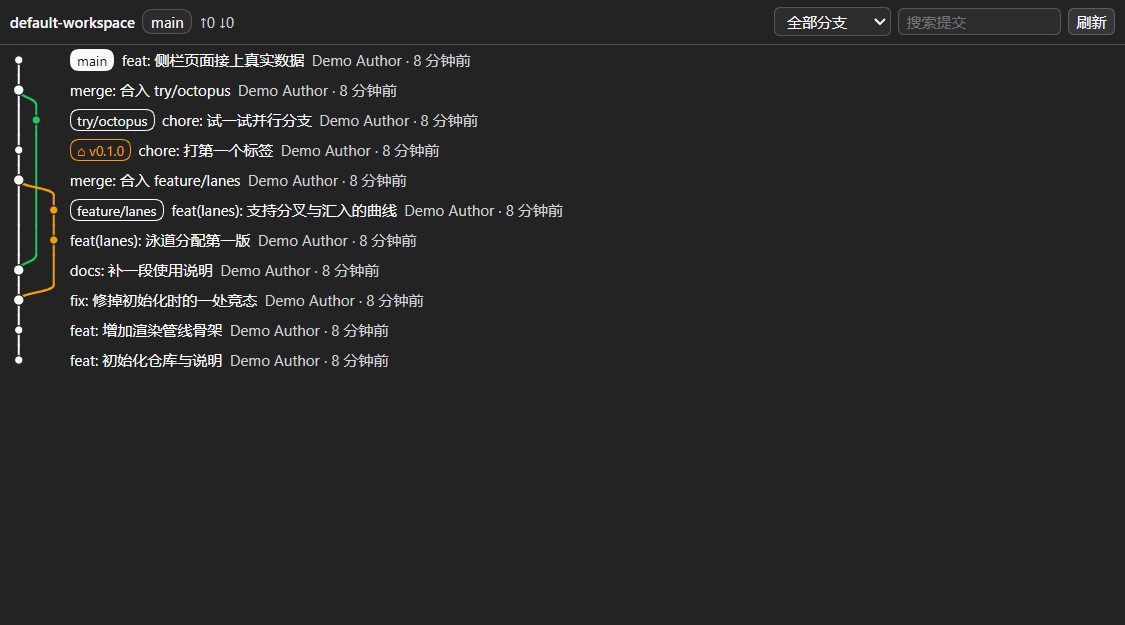
A right-sidebar page for DSH (DeepSeek Harness) that draws the current session's repository as a branches-and-merges commit graph — VS Code style: colored lanes, bezier curves where branches split and merge, ref chips, per-commit details.
Read-only. It never runs checkout, commit, reset, rebase, fetch or push.
The only git commands it runs are rev-parse, status, for-each-ref and log.
Features
- Branch/merge relationships at a glance — one lane per concurrent line of history, curved connectors where a branch forks or merges back, thicker dots on merge commits, and the HEAD lane emphasized.
- Ref chips per commit — local branch / remote branch / tag, with the current branch filled in the theme's brand color and the theme's matching on-brand foreground.
- One workspace, several repositories — a workspace often holds more than one repository (this
project's own checkout has a nested one under
vendor/@zeng/). The header then grows a picker listing every repository it found; the choice is remembered per workspace. A workspace that is itself only a subdirectory of a repository works too — the enclosing repository is offered as well. Discovery never leaves the workspace: it scans downwards, bounded by depth, directory count, repository count and a time budget. - Header at a glance — repository name, current branch,
↑ahead ↓behind, dirty-file count. - Commit search — highlights matches and steps through them (the graph stays intact; it never re-lays-out a filtered list).
- Details on click — full sha, author + email, absolute time, parents, participating refs.
- Virtualized list — a 2000-commit window still renders only the visible rows; nothing is requested while the page is not the visible tab.
- Honest error states — not a git repository / no
gitonPATH/ no workspace / trust fence refused / git failed each get their own message instead of a blank page. - Zero dependencies, no build step — the host half is plain ESM, the browser half is a
single hand-written client-bundle file. What you read in
lib/is what runs.
Install
dsh plugin --profile web add github:AFunDog/dsh-sidebar-git-graph
Then restart dsh web (the host half adds a route) and hard-refresh the browser. Open the right
sidebar and pick Git graph — from the + menu when dsh-better-sidebar is installed, or from
the sidebar's guide page on a bare DSH (the + control is not drawn while that pane already
holds the guide tab). The page follows the session you are viewing:
switch sessions and it re-reads that session's workspace.
Pin a version, or install from a local clone
# pin a tag (recommended: lockfiles record the resolved commit)
dsh plugin --profile web add github:AFunDog/dsh-sidebar-git-graph#v0.2.0

# from a local clone (absolute path only — relative paths are rejected by spec parsing)
dsh plugin --profile web add /path/to/dsh-sidebar-git-graph
With or without dsh-better-sidebar
The page works both ways, and picks automatically:
| Your setup | What happens |
|---|---|
| dsh-better-sidebar installed | The page registers through its public ctx.betterSidebar.registerTab service: it shows up in the + menu, gets a card in Settings → Side cards (with an on/off switch and a per-plugin setting for the commit window), and appears under Git graph. |
| Bare DSH | The page registers with DSH's own sidebar tab type (ctx.sidebarRightTabs + the sidebar.right.pane.tab slot) — same column, same + menu, minus the settings card. |
The service contract is re-stated locally (only registerTab / openTab are used) and is
activated with ctx.inject, never a static inject: a statically declared service that is
absent would park this plugin's fiber, which shows up as "works after a hot reload, gone after
a restart".
How it works
lib/index.js      host half  — POST /dsh-sidebar-git-graph/api, git execution, trust fence
lib/git-read.js   host half  — pure: argv builders + parsers (importable by plain node)
lib/repos.js      host half  — "how many repositories are in this workspace" discovery
lib/workspace.js  host half  — sessionId → working directory, workspace allow-list, fence
lib/client.js     browser half — tab registration, lane layout, SVG rendering (single file)
test/             zero-dependency tests (node scripts/test.mjs runs them all)
- The browser half reads the session's working directory and asks the host for a snapshot.
- The host resolves which workspace belongs to that session (session service → persisted
workspace table → workspace registry → newest session directory), refuses paths that are
neither registered nor the session's own cwd, then picks the repository to draw: the one the
browser named (if it passes the fence and
rev-parseagrees it is a repository root), else the one containing the workspace, else the first one it finds inside the workspace. It runs the four read-only commands with a sanitized environment, a 10 s timeout and a 48 MiB output cap, and answers with{ repo, repos[], selection, refs, commits[{ sha, parents, author, email, time, subject, refs }] }. - The browser half lays the commits out into lanes with one pass over
--topo-orderhistory and renders SVG bezier connectors under a virtualized row list.
The layout function and the geometry builder are pure and exposed on the plugin's internals
so the test suite can drive them without a browser.
Settings
| Setting | Where | Default | Meaning |
|---|---|---|---|
| Commits loaded per read | Settings → Side cards → Git graph → feature settings (dsh-better-sidebar only) | 400 | 100–2000. Bigger is more complete and slower on first read. |
| Repository scan depth | same place | 5 | 0–8. How deep to look for repositories to offer in the picker; 0 means "no scan — only the repository the working directory is in". Lower it if a huge workspace reports an incomplete list. |
| History scope | page header | all branches | All branches or current branch only. |
| Commit search | page header | — | Highlights matches and steps through them. |
Limitations
- Read-only by design. No checkout/commit/push. To change branches, use another tool.
- The window is bounded (up to 2000 commits per read, default 400); older history is reported as truncated rather than silently dropped.
- Repository discovery is bounded, and it scans the filesystem. Depth, directory count,
repository count and elapsed time are all capped; hitting a cap is reported in the page instead
of being hidden, and lowering the scan depth is the fix. Directories that never hold repositories
of interest (
node_modules,target,.venv, build output, …) are not descended into — though each of them is still stat'd once, so a repository that happens to be namedbuildis still found. - The picker only offers what is reachable from the workspace — the workspace itself, something
inside it, or the repository that encloses it. The host refuses any other path even if the
browser asks for it, and re-checks with
rev-parsethat the path really is a repository root. - Search does not filter the graph — filtering would break lane continuity, which is the whole point of the page; matches are highlighted and stepped through instead.
- Lane colors are derived from DSH theme tokens with
color-mix(). On a browser withoutcolor-mix(), lanes fall back to the four theme state colors in rotation. - Persisted DSH internals are a fallback only — reading
storages/workspace.jsonandsessions/is the last resort when the session/workspace services are unavailable. - Verified on DSH
0.1.7-rc.2withdsh-better-sidebar0.21.1; the native fallback path is covered by the same tests but has had less real-world use. - The npm name
dsh-git-graphbelongs to a different plugin by another author (enoughpower/dsh-git-graph). This one is@zeng/dsh-sidebar-git-graphand is currently distributed from GitHub only.
Development
No build step: edit lib/, restart dsh web for host-half changes, hard-refresh for browser-half
changes (a changed client bundle is picked up with a reload — its rev is re-derived from the
file's mtime).
npm test # = node scripts/test.mjs: node --check on every lib file, then every test
git must be on PATH for the route test. scripts/test.mjs discovers test/*.test.cjs, so a
new test file cannot be forgotten in CI (listing files in the workflow once already meant three
new tests ran nowhere).
Checking the theme tokens against a real DSH install
Colour tokens are the one place where a typo fails silently: var(--typo, fallback) just falls
back, so a wrong name shows up as "the colours look wrong" rather than as an error. This plugin
shipped exactly that bug once — the current-branch chip used --dsw-alias-label-inverse, which
does not exist, so its text inherited the theme's body colour while its background was
--dsw-alias-brand-primary. In the light theme those two resolve to the same value: the chip
was 1.00:1 contrast in both themes (white on white in dark mode). The fix is
--dsw-alias-label-primary-foreground, the token DSH itself pairs with button-primary-fill
(= brand-primary): 18.9:1 and 18.1:1.
test/style-tokens.test.cjs has a built-in snapshot of every --dsw-alias-* token and fails if
the CSS references anything outside it. To re-check that snapshot against the real theme:
ZGG_THEME_FILE=/node_modules/@deepseek-ai/dsh-client-ui-theme/lib/client.js \
  node test/style-tokens.test.cjs
License
MIT — see LICENSE.