Alice-Marx/dsh-model-router ↗★ 192
@ljwei-stak/dsh-model-router
提供成本感知的任务路由、依赖包管理及CLI执行。 适合需要精细化控制模型调用成本与任务分发的桌面用户。
安装
npx -p @deepseek-ai/dsh dsh plugin --profile web add github:Alice-Marx/dsh-model-router说明文档
阅读完整 README ↗Model Router · DeepSeek Harness Desktop
A cost-aware model-routing workbench for DeepSeek Harness Desktop. Plan locally, compare configured routes, inspect execution permissions, and run dependent work packages through model APIs or supported official vendor CLIs.
Current version: 0.22.2 (@ljwei-stak/dsh-model-router). Choose algorithm recommendations or manually assign each decomposed package to an exact model API or official tool, preserving dependencies, refreshed cost previews and retry targets. Routing now supports task-specific quality evidence, joint model/effort selection, historical P90 resource estimates and dependency-aware search. Manual mixed execution is read-only; tools use their configured default model, while the existing editable official-team workflow remains available. Compatibility remains DeepSeek Harness Desktop 0.2.0-rc.1 / 0.2.0-rc.2 / 0.2.1-rc.2, including Hermes/Pi installation and terminal support; neither has a verified managed runner yet. Real vendor execution evidence remains tied to 0.20.0, with no new model experiments in this release. The router and GAL have been independent plugins since 0.12.0.
Official CLI teamwork runs packages sequentially with dependency context and no automatic model-directory API fallback. Editable teams explicitly choose the Harness sandbox or the vendor CLI's normal environment. In the latter, Git worktrees collect edits but do not restrict OS access. CLIs retain their configured model unless explicitly mapped. See real Windows validation and its limits.
Both README versions describe the same interfaces, formulas, defaults and limits. Changelog preserves release history. More walkthroughs: workbench, installation, migration, and experiment protocol.
Quick evaluation
One-line value: A cost-aware DSH workbench for planning tasks, routing model calls, and running dependent work packages with explicit execution permissions.
Category: Models & Reasoning (模型与推理), the best fit in the community directory's category list; this is a community taxonomy, not an official DSH classification.
Install (DSH Plugin Hub / web profile): With the DSH CLI available, install the published npm package with:
dsh plugin --profile web add @ljwei-stak/dsh-model-router@0.22.2
Install in Harness Desktop: Launch Desktop once to initialize its desktop profile, quit Desktop fully, then run:
dsh plugin --profile desktop add @ljwei-stak/dsh-model-router@0.22.2
You can also paste the package spec into Harness Desktop → Plugins → Add plugin. Restart Desktop after installation. A global npm install -g by itself does not register a Desktop plugin.
Package and entry point: @ljwei-stak/dsh-model-router@0.22.2 on npm is published. The root package.json declares the package and bundle patch; .dsh-plugin/index.mjs exports the required apply(ctx) entry point. License: MIT.
Configuration: There is no supported import of a user-authored JSON/YAML configuration file. Configure providers, models, and credentials on Harness's Models page; configure routing profiles and preferences in the plugin settings. Persistent router state is stored in $DSH_HOME/model-router/state.json (default: ~/.dsh/model-router/state.json). Provider CLIs retain their own login and configuration. The router does not copy API keys into model profiles or terminal logs.
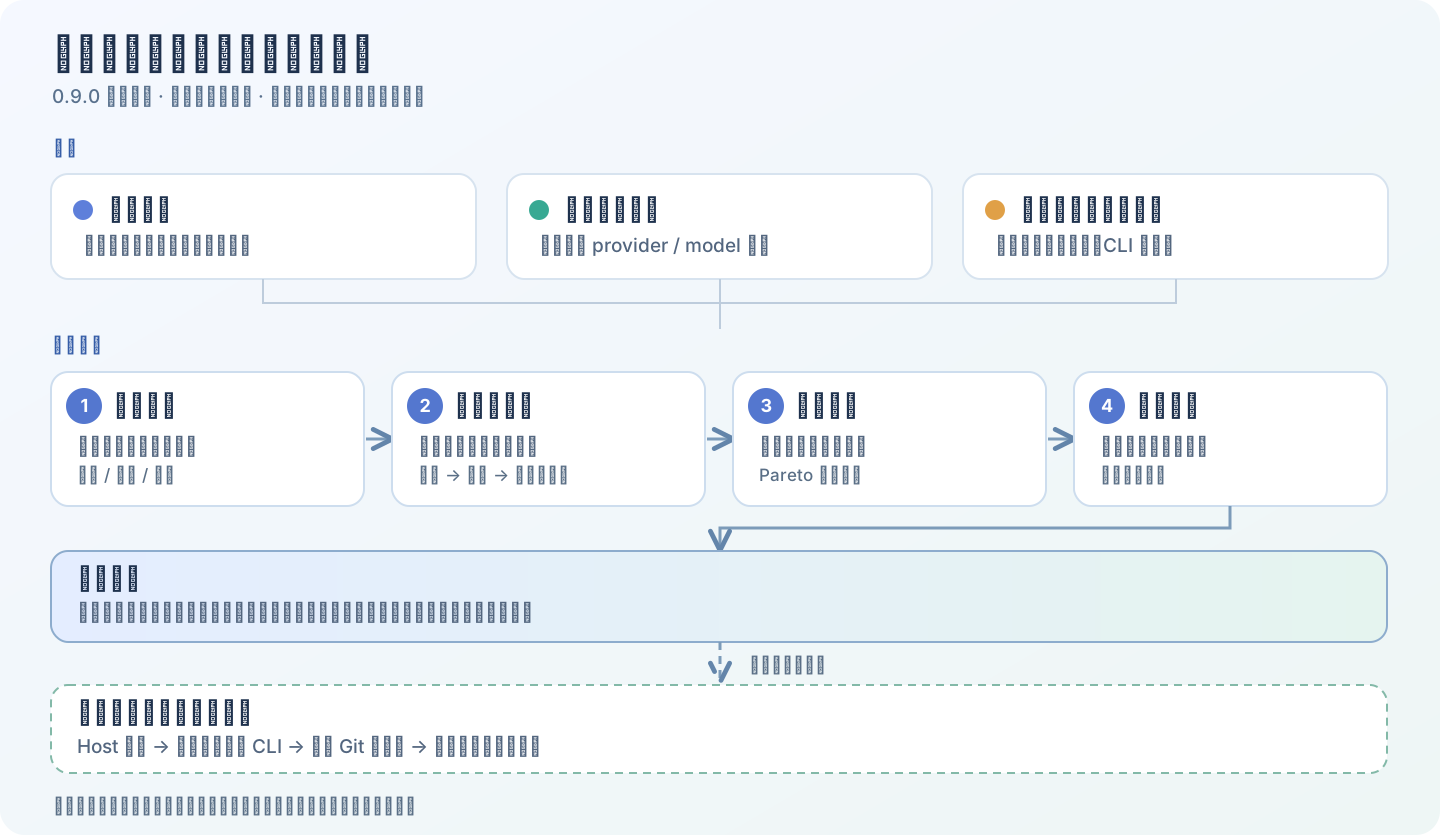
Screenshots and evidence: The workbench screenshot uses fixture models, prices, and health data; it is a simulated UI preview, not a live Harness or model run. See the routing workflow diagram for the execution flow. The real Windows validation report documents specific 0.20.0 executions and their limits; 0.22.2 has no verified end-to-end vendor run.
Permissions and risks: Planning is local and makes no model call. Execution sends the selected task/context to the chosen model API or vendor CLI and may incur charges. The default Harness-restricted environment separates read-only runs from approved workspace-write runs. An explicitly selected cli-native editable team runs with the current OS user's permissions, outside the Harness process sandbox; a Git worktree collects changes but does not restrict OS access. External providers and CLI services apply their own data handling and billing terms.
Compatibility: Declared host support is DeepSeek Harness Desktop 0.2.0-rc.1, 0.2.0-rc.2, and 0.2.1-rc.2. Node.js >=22.19 and pnpm 10.34.6 are source development/build requirements, not plugin runtime prerequisites. Compatibility beyond the declared host versions is not claimed.
Contents: Quick evaluation · Capabilities · Install · Workbench · Architecture · Session tools · Official tools · Team lifecycle · Costs · Routing algorithm · Data · Development · Troubleshooting
What is included
| Capability | Current behavior |
|---|---|
| Task planning | Local task classification and complexity analysis; single-route recommendation, dependent team work packages, or an explicit configured model. |
| Model configuration | Reads exact provider/model routes from Harness; optional user-supplied quality, USD prices, specialties, CLI model names, execution and billing preferences. |
| Routing presets | Economy, balanced and quality-first presets; quality floors, estimated token costs and bounded assignment search. Missing prices stay unknown. |
| Read-only execution | Preview and confirm a routed run from the workbench, or invoke it in an official Harness session. Supported headless CLIs and model-directory API calls return recorded results. |
| Editable CLI execution | A sequential CLI team from the workbench, or one supported CLI from a session, using approved isolated Git worktrees and conditional patch integration. |
| Official tools | Detect, install/update, check launch readiness and inspect login status for twelve registry tools; installation jobs have logs and cancellation. |
| Interactive terminal | PowerShell/system shell and all twelve registry CLI targets (ZCode TUI on verified Windows desktop installs), including fixed login commands, live output and multiple sessions. |
| Costs and subscriptions | Daily/monthly budget checks, economy downgrade or pause, subscription-first routing, quota cooldown and explicit handling of other subscription failures. |
| History and quality | Per-package results, dependency views, failure details, rerun/reassignment, ratings and optional stronger-model review. |
| Execution boundaries | Shows what each route can read/write and whether its process uses the Harness sandbox. |
Generating a route recommendation is local: it does not start a vendor CLI or make a paid model call. Actual execution can incur charges.
Install in DeepSeek Harness Desktop
Open Plugins → Add plugin and enter:
@ljwei-stak/dsh-model-router@0.22.2
Use the official HTTPS npm source https://registry.npmjs.org/ when a mirror lacks that exact version. Enable the plugin, then fully quit Harness (including its tray process) and restart it. Plugin details should show 0.22.2 and the sidebar should contain 模型路由 (Model Router). A global npm install -g alone does not register a Desktop plugin.
You can instead install a local .tgz archive or its extracted inner package directory through the plugin manager. Both must contain package.json and .dsh-plugin. See releases for archived builds, or build your own checkout below.
Upgrade from the old package name
The old name @ljwei-stak/model-router-galgame ended at 0.13.0. Remove that plugin entry while retaining your profile/application data, then add @ljwei-stak/dsh-model-router@0.22.2. Do not keep both entries installed: they share the internal plugin id model-router-galgame and tool names. The retained id lets existing router settings and history carry over.
For the combined 0.11.x package, back up the profile and export the GAL saves you want to preserve before upgrading. Story playback, artwork, music and saves now belong to the independent @ljwei-stak/dsh-galgame package. The detailed save limitations are in MIGRATION.md.
Use the workbench
The workbench groups the workflow into four navigation tabs. Its header summarizes registered routes, detected tools and today's recorded API spending.
| Tab | What you do there |
|---|---|
| 任务与执行 — Task and execution | Describe the task, generate advice, choose routed read-only execution or official CLI teamwork, preview and confirm, then inspect history. |
| 模型配置 — Model configuration | Refresh/search the model directory and edit exact-route profiles. |
| 官方工具 — Official tools | Complete onboarding checks, inspect/install tools and use the interactive terminal. |
| 预算与安全 — Budget and security | Set routing/cost/review policies and inspect subscription status and execution boundaries. |
Switching tabs keeps the panels mounted, preserving in-progress installation and terminal state.
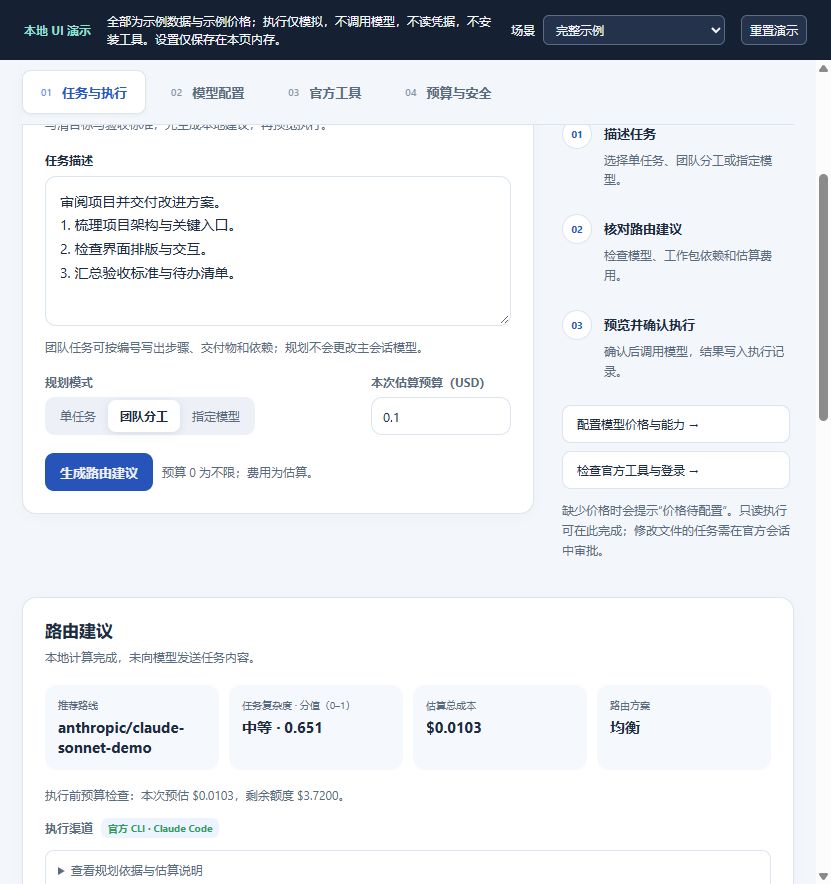
Screenshot from the local UI preview with fixture models, prices, and health data. No real model or Harness connection was used. Expand a work package to inspect its goal, dependencies, and acceptance checks.
- Configure providers, models and credentials on Harness's official Models page. In 模型配置, refresh the directory. A listed route does not prove that its credentials, network or model entitlement work.
- Optionally enter quality and prices for the routes you want compared. Prices are USD per million tokens; quality is a user-supplied 0–100 estimate. Leave unknown prices blank rather than entering zero.
- In 任务与执行, describe concrete deliverables, constraints and acceptance criteria. Select 单任务 (single recommendation), 团队分工 (dependent packages for sufficiently complex requests), or 指定模型 (one exact route, without comparing others). Team mode alone does not start any team.
- Set the per-run estimate target;
0removes that planning constraint. Click 生成路由建议. The result appears directly below planning. Check the route, complexity, cost, execution channel and each package's dependencies/checklist. - In 在工作台执行, choose 模型路由(只读) for the existing routed executor, or first select 团队分工 and choose 官方工具协作. For official teamwork, select 只读检查 (read-only) or 编辑文件 (edit files). Editable teams also choose Harness 受限环境 (Harness sandbox, the default) or 厂商 CLI 正常环境 (normal vendor environment, outside the Harness sandbox). Enter an existing absolute workspace path, or reuse the last run's path. Click 预览执行计划, review each package, its permissions and required confirmations, then explicitly confirm execution. The Host rechecks the plan before starting; changed conditions can require confirmation again.
- Inspect 执行记录与子任务 for the actual channel, response, failures, cost and ratings. Official teamwork replans using only installed CLIs ready for the selected permission mode. Edits require approval and a clean Git repository; successful worktree changes are conditionally integrated. An unavailable or failed CLI never silently becomes an API call in this mode.
Changing task text, planning mode, profiles, directory or relevant settings invalidates the prior recommendation. Changing execution inputs also discards the pending or completed preview, so execution requires a new preview of the current request. Previewing execution uses current Host state and can differ from a previous local plan.
Example task:
Review this project and prepare an implementation plan.
1. Map the entry points and identify the main UI workflows.
2. Review the interface at wide and narrow widths; list layout problems.
3. Check the execution and billing boundaries.
4. Combine the findings into a prioritized change list with verification steps.
The router plans and delegates text/code tasks. It does not itself render videos, generate artwork or control creative applications.
Architecture and execution contracts
The Host owns route discovery, settings, approvals, workspace validation, process launching and the persistent ledger. The React client requests previews and renders Host results. Planning, managed execution and installation requests accept fixed tool IDs and typed fields rather than arbitrary shell commands, executable paths, installer packages or download URLs. The same remote namespace separately exposes an explicitly confirmed interactive terminal, which accepts arbitrary user input under current-user permissions.
flowchart TD
  UI[Workbench or Harness session] --> PLAN[Local planner and route profiles]
  PLAN --> PRE[Host preflight and confirmation]
  PRE --> ROUTED[Routed read-only executor]
  PRE --> TEAM[Official CLI team executor]
  ROUTED --> CLI[Supported headless CLI]
  ROUTED --> API[Harness model API]
  TEAM --> MODE{Permission mode}
  MODE -->|read-only| SANDBOX[Harness sandbox]
  MODE -->|workspace-write| WT[Isolated worktree]
  WT --> ENV{Explicit execution environment}
  ENV --> SANDBOX[Harness sandbox]
  ENV --> NATIVE[Normal vendor CLI environment]
  SANDBOX --> PROCESS[Official CLI process]
  NATIVE --> PROCESS
  PROCESS -->|editable success| PATCH[Baseline checks and patch integration]
  PROCESS --> LEDGER
  CLI --> LEDGER[Results, identity, usage and cost ledger]
  API --> LEDGER
  PATCH --> LEDGER
| Path | Selection and permissions | Failure/fallback behavior |
|---|---|---|
| Routed execution | model_router_execute / workbench executor: "routed"; read-only; CLI or Harness model API according to execution/billing policy. | An eligible API fallback can follow the configured subscription policy. |
| Official CLI, Harness environment | Single-tool model_router_tool_run or team execution; only currently supported/ready CLI modes; Host sandbox required. | Missing confinement or readiness blocks launch. No automatic API fallback. |
| Official CLI, normal environment | Only editable official teams: official-team + workspace-write + cli-native; separate user confirmation. | Runs under current user permissions with sandboxEnforcement: "none". No automatic environment switch or API fallback. |
Discovery is not execution acceptance. Installed version, trusted launch entry, login status, supported permission mode, network connectivity and model entitlement are different checks. A CLI working in an interactive terminal can still be unavailable in a restricted task: the adapter, platform, sandbox and selected installation must all match.
Workbench RPC
The authenticated Host remote is ctx.remote.modelRouterOfficialTools, defined in official-tools-remote.mjs. It is an internal mounted-client interface, not a standalone public HTTP API. A preview request has th