dsh-task-board
提供双月日历、日常清单、时间轴及智能任务提取功能。 适合需要结合自然语言提取进行个人日程与任务管理的用户。
同名包的其他仓库
安装
$
npx -p @deepseek-ai/dsh dsh plugin --profile web add github:GinoXiang/dsh-task-board说明文档
阅读完整 README ↗dsh-task-board · 个人任务管理
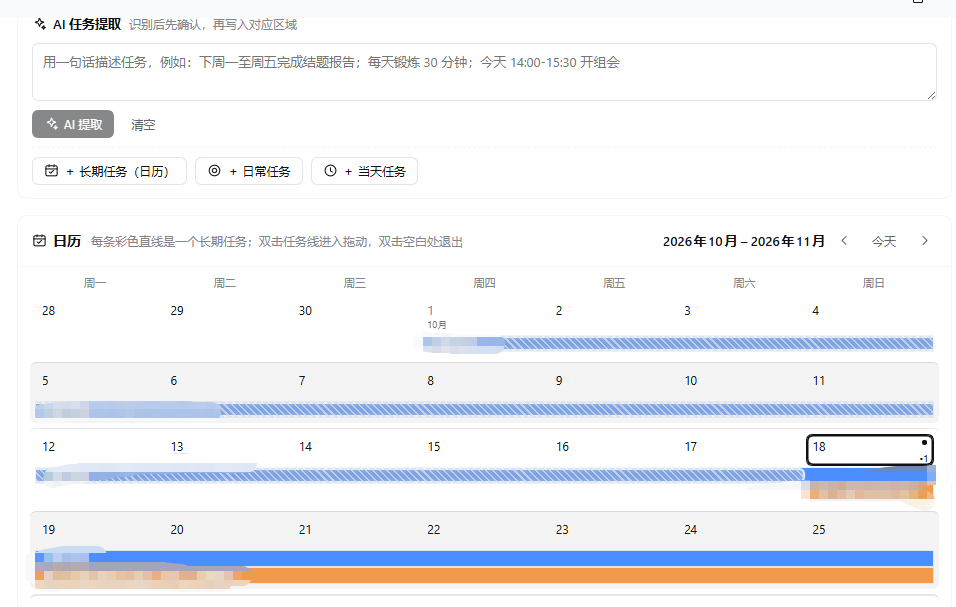
DSH Web GUI 的个人任务管理面板:双月日历、日常清单、每天工作视图与可拖拽的 24 小时时间轴,并支持用自然语言让 AI 提取任务。
功能
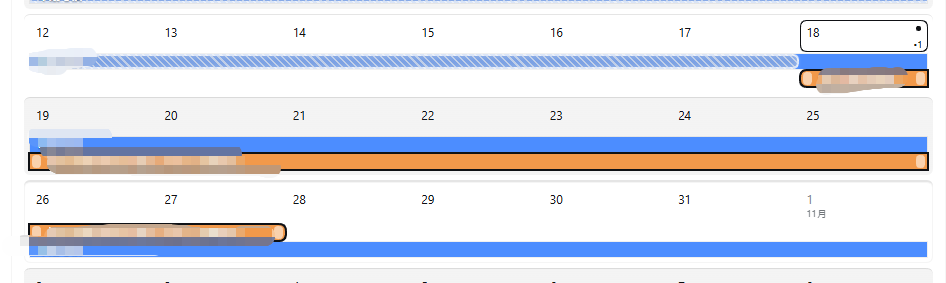
- 双月日历:连续两个月网格;每个长期任务按起止日期画成一条彩色时间条。跨周自动分段,每周行默认最多 5 条、超出可展开;双击线条进入拖动模式(拖线身移动日期、拖两端改长度);已度过的日期段用浅灰雾面 + 细斜纹 + 白色毛玻璃描边标出。
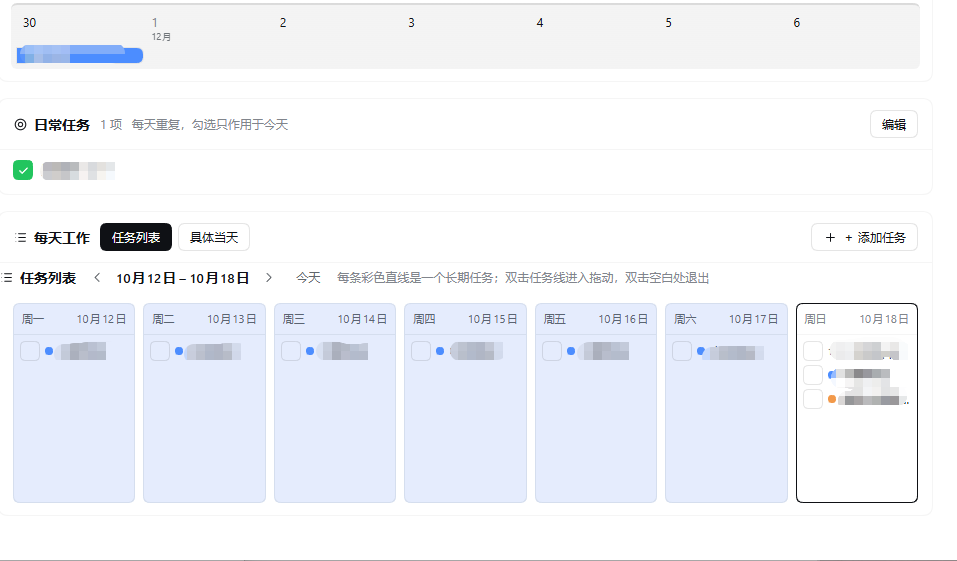
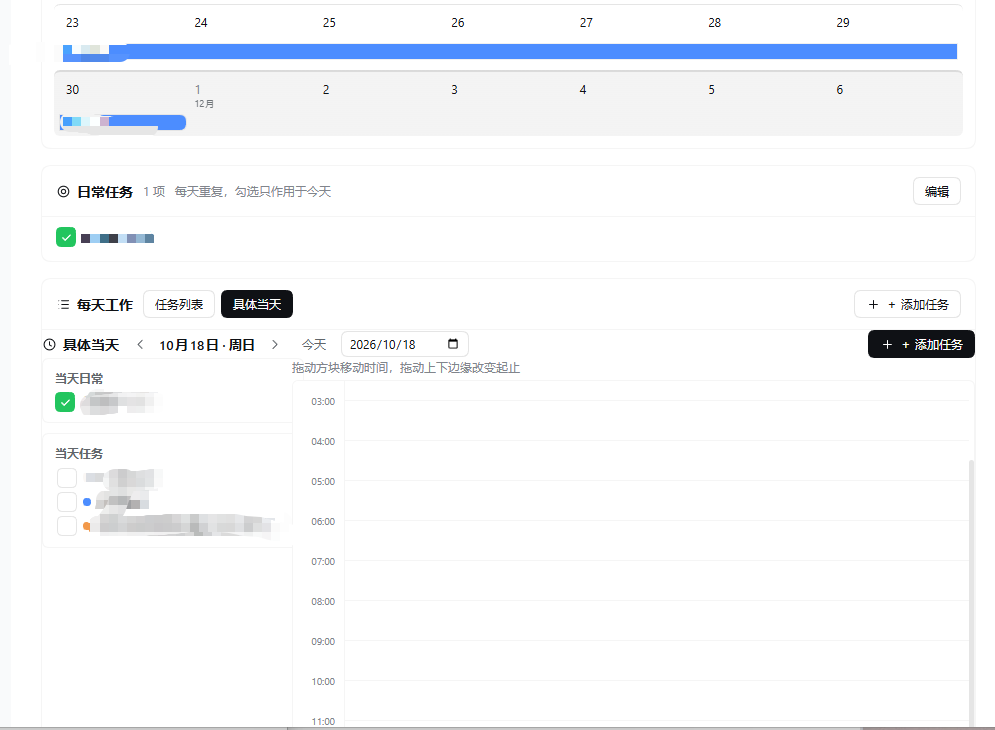
- 日常任务:每天重复的习惯清单,圆角方块勾选框(完成时绿色实心 + 白色对勾);可增删改。
- 每天工作:按钮切换两种视图。
- 任务列表:周一至周日 7 个竖列,左右翻页切换周;已过去日期背景为
#E5ECFD;只列非日常任务(定时任务与跨天长期任务),每行带完成勾选框。 - 具体当天:左侧「当天日常」与「当天任务」两个清单,右侧 24 小时纵向时间轴;方块可拖动移动、拖上下边缘改起止(15 分钟吸附),双击时间轴空白处快速新建;点方块可编辑。
- 任务列表:周一至周日 7 个竖列,左右翻页切换周;已过去日期背景为
- AI 提取:页面顶部输入一段中文安排(例如「下周一至周五完成季度报告;每天锻炼 30 分钟;今天 14:00-15:30 开例会」),点击提取后调用当前默认模型解析为可编辑的任务草案,确认后写入日历 / 日常清单 / 当天安排。模型不可用、超时或返回格式异常时自动降级为本地规则解析,并给出提示。
- 持久化:改动自动保存到
/task-board/data.json;写入前做字段校验与原子重命名,读取失败时暂停自动保存以免覆盖原文件。
安装
插件需要 DSH >= 0.2.1-rc.2。任选一种:
# 从 npm 安装(发布后可用)
dsh plugin --profile web add dsh-task-board

# 或直接从 GitHub 安装
dsh plugin --profile web add github:GinoXiang/dsh-task-board
安装后重启 DSH 或刷新 Web GUI,侧边栏会出现「任务」图标,点开即进入任务面板。
数据与权限
- 只读写
/task-board/data.json一个 JSON 文件(默认~/.dsh/task-board/data.json);卸载插件不会删除该文件。 - AI 提取只在点击「AI 提取」时调用一次当前配置的默认模型,不会后台自动请求;不发送文件内容,只发送输入框里的文本。
- Host 端提供三个本地 HTTP 接口(
/task-board/load、/task-board/save、/task-board/extract),仅接受回环地址与同源请求,只支持 POST,请求体上限 2 MB。 - 无第三方运行时依赖;客户端使用 DSH Web GUI 自带的 React 与主题 token。
开发
index.js           Host 半:三个本地接口、JSON 存储、LLM 提取 + 本地降级解析
client.js          Client 半:侧边栏图标与整页 UI(plain JS,无需构建)
cordis.patch.yml   插件插入补丁
locale/en.json     插件显示名与描述(英文)
locale/zh.json     插件显示名与描述(中文)
icon.svg           插件图标
修改 client.js 或 index.js 后,在插件管理中禁用再启用该 bundle 即可让客户端半重新加载。
License
MIT
dsh-task-board · English
A personal task board for the DSH Web GUI: a two-month calendar, a daily checklist, week and day work views with a draggable 24-hour timeline, and AI extraction of tasks from natural language.
Features
- Two-month calendar — every long-term task is drawn as a colored timeline bar across its date range; bars are split per week, each week row shows up to five lanes with an expand button, and double-clicking a bar enters drag mode (move the body, drag either end to resize). Days before today are rendered as a hazy gray band with fine diagonal hatching and a white glass-like outline.
- Daily tasks — recurring daily habits in a rounded-square checkbox list (green filled with a white check when done); add, rename and delete.
- Daily work, two views — a seven-column week list (Monday to Sunday, page between weeks, past days tinted
#E5ECFD, completion checkboxes for timed tasks and long-term projects) and a specific-day view with the day's daily tasks, the day's tasks, and a 24-hour timeline whose blocks move by dragging and resize by dragging their edges (15-minute snapping, double-click empty space to add). - AI extraction — paste a Chinese schedule into the top bar, click extract, review the editable task drafts, then confirm to write them into the calendar, the daily checklist or a day plan. When the default model is unavailable, times out, or returns malformed output, a local rule-based parser takes over with a notice.
- Persistence — autosave to
/task-board/data.jsonwith validation and atomic writes; autosave pauses if the file cannot be read, so a corrupt file is never overwritten.
Install
dsh plugin --profile web add dsh-task-board
# or
dsh plugin --profile web add github:GinoXiang/dsh-task-board
Requires DSH >= 0.2.1-rc.2. Restart DSH or refresh the Web GUI after installing; a "任务" (Tasks) icon appears in the sidebar.
Data and permissions
- Reads and writes only
/task-board/data.json(default~/.dsh/task-board/data.json). - The default model is called once per explicit AI-extract click; nothing is fetched in the background and no file content is sent.
- Three local HTTP endpoints (
/task-board/load,/task-board/save,/task-board/extract) accept loopback, same-origin POST requests only, with a 2 MB body cap. - No third-party runtime dependencies; the client uses the React instance and theme tokens provided by the DSH Web GUI.
License
MIT
感谢大肥鱼!MDGM!


感谢meme生产者们。