Han-1413141/dsh-cost-meter ↗★ 330
dsh-cost-meter
多模型费用统计、订阅额度与余额查询 适合需要跨厂商计费、峰谷提醒、Coding Plan额度及余额监控的重度用户。
同名包的其他仓库
安装
npx -p @deepseek-ai/dsh dsh plugin --profile web add github:Han-1413141/dsh-cost-meter说明文档
阅读完整 README ↗dsh-cost-meter
English | 简体中文
Session cost tracking plugin for the DeepSeek Harness web GUI (bilingual UI)
Per-conversation cost · daily totals · OpenCode Go subscription quota display · budget with usage percentage · official account balance · custom provider balance · balance progress bar · history · peak/off-peak pricing hours display (peak hours UTC 01:00–04:00, 06:00–10:00; from Aug 23, 2026 weekends are billed at off-peak prices all day, shown as “Weekend — all off-peak”) · pre-switch popup & system-notification alerts for peak/off-peak changes (position / lead time / alert type configurable) · one-click price sync from the official docs · Codex-style token usage heat grid · multi-vendor model pricing (built-in 90+ model price catalog with auto-matching) · mainstream Coding Plan quota queries & display (Anthropic / Z.ai / MiniMax / Kimi / OpenRouter / SiliconFlow / CommandCode / SCNet / Volcano Ark / Qwen / Xiaomi MiMo) plan/API dual-track billing (subscription quota vs pay-as-you-go money separated, per-1% & full-window token/equivalent-cost estimates with daily/weekly/monthly curves) · · quota strip above the input box (budget / Go / coding-plan usage in one row, toggleable)

v1.7.35 adds Bailian CLI quota support, full model names on hover, bounded decoding of bare gzip responses, and per-endpoint GLM quota diagnostics. See the release notes.





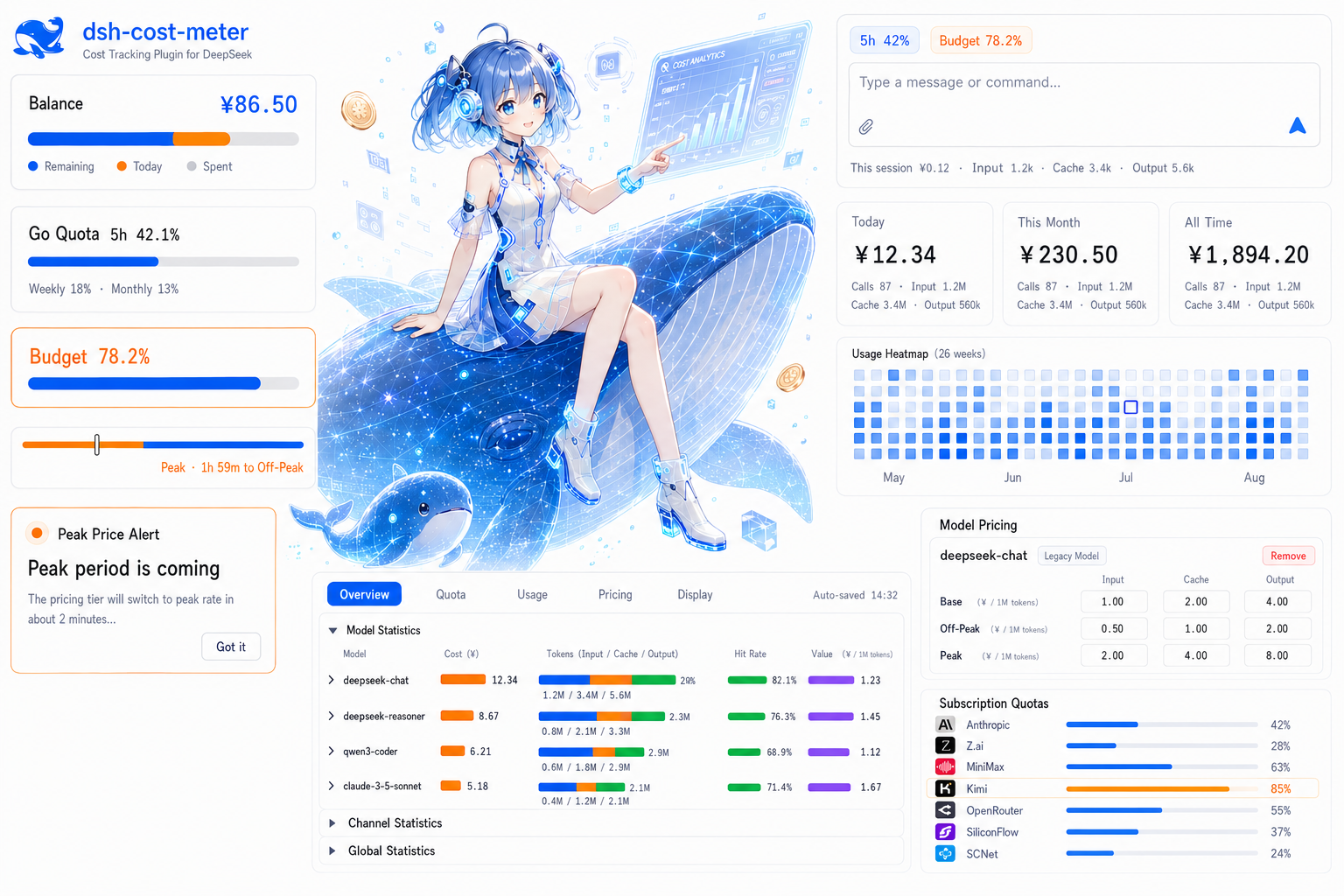
Feature overview
| Feature | Location | Description |
|---|---|---|
| Per-model cost card | Sidebar / composer dock (optional) | Disabled by default; inline Top-N, Other totals, shares and optional tokens, Today / Last 90 days, remembered expansion and a Top-1 chip. See the guide |
| Per-conversation cost | Below the composer / session title bar | Live accumulated cost + input/cache/output tokens; the composer footer shows cache hit rate before Input (cache reads / all input, including cache writes); position configurable |
| Official balance | Sidebar top / Settings page (configurable) | Total / granted / topped-up balance, auto-refresh + manual refresh; optional three-segment progress bar (blue/orange/gray), whose today segment only counts official-channel spend (coding plans / custom providers excluded) |
| Custom provider balance | Sidebar / Settings page (configurable) | Configurable HTTP balance lookup (e.g. LiteLLM); bilingual labels, currency, extract rules (dot path / number / add / subtract / divide — use divide for NewApi-style quota endpoints, see example); collapsible panel alongside Coding Plan quotas |
| OpenCode Go quota | Sidebar / Settings / bottom-right dock (configurable) | Rolling-5h / weekly / monthly usage percent and reset times, each window toggleable independently, budget used % can show alongside; key auto-discovered (dedicated ref / official Go route apiKeyEnv / env / opencode login) or entered manually |
| Coding plan quotas | Sidebar / Settings page (per vendor) | Multi-vendor coding-plan quota queries (Anthropic Claude Pro/Max, Z.ai / Zhipu GLM Coding Plan, MiniMax Token Plan, Kimi Code weekly + 5-hour quotas with PAYG balance fallback when no subscription key, OpenRouter credits, SiliconFlow balance, CommandCode 5h/weekly windows + monthly credits balance, Xiaomi MiMo Token Plan plan/compensation credit windows + period-end reset + balance via console cookie); per-vendor enable switch, key, display position and refresh interval (sidebar card in the same box style as the Go quota; the collapsed rail shows percentages), official endpoints by default, with a configurable trusted MiniMax origin; neutral hints when no credentials/subscription; SCNet Token Plan supports external console snapshots; without a valid snapshot, monthly usage is estimated from the local ledger via the official credits deduction table (no credentials needed) |
| Quota strip | Above the input box (toggle in Display settings) | One compact chip row for budget used % / the Go main window / each enabled coding-plan usage window (short label + mini progress bar, ≥80% warn, ≥100% over, hover for reset times); click any chip to refresh its data source (budget → state, Go → Go quota, vendor → all its windows); multiple windows of one vendor merge into a single segmented chip; a first-run guide card lets you decide whether to enable it; hides itself when there is no quota data |
| Click to refresh | Sidebar balance/quota boxes | Click the official balance / custom balance / coding-plan box (collapsed rail included) to fetch the latest data immediately; the box pulses while refreshing, failures keep the previous value and surface the reason in the hover tooltip; keyboard Enter/Space also triggers; a one-time guide card appears after the update |
| Simple sidebar display | Settings → Cost → Display | Optional, with a one-time choice after updating. Condenses cards and caps panel height at 38% of the viewport and 320 px, while preserving amounts, quotas, refresh actions and hover details. Turn off to restore your layout. Guide |
| Today's cost | Sidebar bottom (above the settings button) | “Today ¥x”, hover for call count and token details |
| Budget box | Sidebar bottom (between the balance row and the settings button) | Rounded-square frame: budget, used %, progress bar, today's cost & share of budget, used/limit; ≥80% warning, ≥100% over-budget |
| Summary cards | Settings page | Today / this month / cumulative cost and call counts |
| Token usage stats | Settings page (Cost section) | All-time token totals (input/cache/output/calls) + a Codex-style 26-week daily usage heat grid that fills the settings width; hover a cell for that day's detail |
| Token Plan usage stats | Settings page (Usage) | Per enabled coding plan (incl. Go): per-1% quota and full-window token / equivalent-cost estimates for the current windows (sample delta / live ratio), plus daily/weekly/monthly usage curves; plan-channel amounts are equivalent-only and never touch real money (issue #64) |
| Today's sessions | Settings page | Per-session call count, input/cache/output tokens and cost |
| History | Settings page | Per-day totals; retention days configurable (default 180) |
| Pre-install history import | Automatic on first launch | After install/upgrade, the first launch automatically replays all host session logs to import conversations from before the plugin was installed (missing dates are rebuilt whole; existing dates only gain previously unknown sessions; idempotent and never double-counts live metering; costs priced at per-event historical rates); a manual re-run entry remains in Settings |
| Budget settings | Settings page, top | Limit, period (today / month / cumulative / custom date range), used % |
| Price table | Settings page | Per-model off-peak / peak prices (input/output shorthand supported; cache prices derived automatically); fully editable |
| Peak/off-peak hours display | Settings / budget / today | Shows UTC peak hours 01:00–04:00 and 06:00–10:00 with the current tier; from Aug 23, 2026 weekends (Sat & Sun, Beijing time) are billed at off-peak prices all day and shown as “Weekend — all off-peak”; expanded view shows a peak/off-peak period strip (current period + countdown), collapsed (rail) view shows a vertical peak/off-peak progress bar; independently toggleable |
| Peak/off-peak switch popup alert | Global overlay | A full-width bracketed popup appears when the next tier switch is within the configured lead time (default 2 minutes, 1–30), with an alert-colored badge distinguishing entering peak vs off-peak; position selectable (bottom-right / screen center), alert type selectable (entering peak / entering off-peak / both), one alert per switch point; optionally sends a browser (system) notification (so you still get alerted when the page is backgrounded; requires granting notification permission); configured in the peak pricing panel in Settings, with a one-click popup preview (rendered by the real component — copy, position and notifications exactly as they will fire) |
| Official price sync | Settings page | Fetches and parses the official pricing page, applies with one click; the official price currency is selectable (USD · English page / CNY · Chinese page) — CNY prices are booked at the display exchange rate and match the official CNY bill when displayed in CNY |
| UI language | Settings → Display settings | Simplified Chinese / English / Follow browser (auto); switches instantly and auto-saves |
| Hide official balance / hide today's cost | Settings → Display settings | Two independent toggles: when on, the matching UI blocks (sidebar balance row & panels / today's cost row, budget details, overview today card) are not rendered at all; token and call-count stats stay visible — safe for screen sharing and screenshots |
| AI price sync | prompt | DeepSeek official sync; other providers use the verified official price catalog and manual configuration |
| Model & Plan adaptation guide | adaptation doc | Adaptation matrix for per-model billing and the Coding Plan vendors, the auto-matching mechanism and price sources (中文) |
| Peak/off-peak alert guide | alert doc | Fully illustrated guide to the pre-switch popup and system notification: effect screenshots (EN/中文), settings reference and usage tips (中文) |
| Token Plan usage stats guide | panel doc | Meaning of the four columns in the per-1% & full-window panel, the end-to-end delta estimation method and precision tags, the scope boundary (dsh-made calls only) and usage curves (中文) |
| OpenRouter passthrough pricing | pricing doc | Token reference prices: offline snapshot, scoped zero-cost backfill, public-catalog refresh, custom-price preservation and failure fallback (中文) |
| Multi-provider billing | Settings / ledger | OpenAI, Anthropic, Google Gemini, Mistral and other providers with input/output, cache and reasoning-token pricing isolated by provider + model |
| Model-name auto-matching | Settings / ledger | Unknown model ids are matched against the price table: case/spaces/hyphens/dots and bracket annotations (e.g. (go)) are ignored — a normalized-equal or containing name hits (e.g. gpt5.6 luna(go)); router providers (opencode/zen etc.) search across all vendors; can be restricted to exact match, and unmatched models can be pinned to a specific entry in Settings |
| Extended price catalog | Settings → Extended price catalog | Built-in reference catalog grouped by vendor and model family (expandable; vendors collapsed by default); mount entries into billing with one click — mounted third-party models live inside the catalog and stay editable; a per-model “Show directly in Cost settings” toggle chooses which models (DeepSeek included) appear directly in the price table |
Custom provider balance example (NewApi template)
POST with a JSON body: in Settings → Cost → Quota, expand a custom balance entry, select POST, then fill in Request body (JSON). For example, if the endpoint expects an account and returns {"data":{"balance":12.5}}:
{"account_id":"example-account","include_credit":true}
Set Extract rules (JSON) to {"remaining":"data.balance"}. Valid JSON is saved per entry and sent exactly as entered, including nested values and large integer IDs. Invalid JSON shows an error and keeps the last valid configuration; clearing the editor removes the body. GET/HEAD send no body while retaining it for a later switch back to POST. Content-Type: application/json is added automatically unless you supply a Content-Type header (any capitalization).
Existing request.body objects and raw strings remain supported. The body is ordinary saved configuration; {{VAR}} credential substitution applies only to request headers. For header authentication, use a reference such as {"Authorization":"Bearer {{MY_API_KEY}}"} and the credential input below it.
Display currency conversion: open Settings → Cost → Quota, expand a custom balance entry, and enable Convert USD balance to display currency. It defaults to off for each entry. Keep Source currency set to the endpoint's actual currency. With a USD balance of 54.3792, a CNY display rate of 7.2 and two decimal places, the balance displays as ¥391.53. Spend and API/manual limits convert together in the sidebar, settings and tooltips; progress percentages and stored balances do not change. Enter a manual limit in the source currency. The setting persists as convertToDisplayCurrency: true inside that customBalances[] entry (legacy customBalance is also supported).
The global exchange rate converts USD to the display currency. CNY/EUR source balances and Credits keep their original units; the switch is disabled for them. Alibaba Cloud balances use the currency returned by its API. No exchange-rate lookup or extra balance request is made when toggling this setting. Turning it off restores the original currency immediately.
DeepSeek CNY billing: USD prices × the display exchange rate and the official CNY table can give different amounts. Settings → Cost → Prices now explains this and provides a CNY selection button. See currency selection, sync and settlement timing.
For Qianwen / Alibaba Cloud fund accounts, use Add Qianwen / Alibaba Cloud balance to query available funds with a RAM AccessKey signature. The card uses the currency returned by the API. See the setup, permissions and balance definition.
Qwen Token Plan can use the official CLI subscription quota. Install the CLI on the DSH host and run qianwen auth login as the same OS user. Local estimates remain the default; CLI mode shows current account credits without changing the local ledger.
Local Qwen Token Plan credits include only the subscription providers qwen, qwen-tokenplan, qianwen-tokenplan, qwen-token-plan and qianwen-token-plan (case-insensitive, optional llm- prefix). Explicit API classifications are excluded. The qianwen pay-as-you-go provider does not consume estimated plan credits even when its model ID is identical. Use one of the supported subscription provider names; models outside the credits table need all three rates configured.
Xiaomi MiMo Token Plan quotas are queried with the MiMo console cookie, not an API key: log in at platform.xiaomimimo.com, press F12 → Network → find the balanceAlertConfig request and paste the full cookie request header into the MiMo card in Settings → Cost → Quotas (it must include serviceToken and userId; the DSH credential store keeps it as MIMO_COOKIE). The card shows the plan/compensation credit windows with the period-end reset (Beijing time) plus a balance row.