dsh-cad
在 Web UI 中嵌入 2D/3D CAD 可视化卡片 适合需要在 DSH 界面中查看 STL/STEP/DXF 等 CAD 文件的用户。
安装
npx -p @deepseek-ai/dsh dsh plugin --profile web add github:LAU-MARS/dsh-cad说明文档
阅读完整 README ↗dsh-cad — CAD Plugin for DeepSeek Harness



English | 简体中文
A CAD plugin for DeepSeek Harness (dsh): an embedded 3D/2D CAD viewer plus a native parametric modeling tool family (OCCT kernel) in the Web UI, letting the agent build and inspect CAD geometry step by step — "model while you watch".
Preview
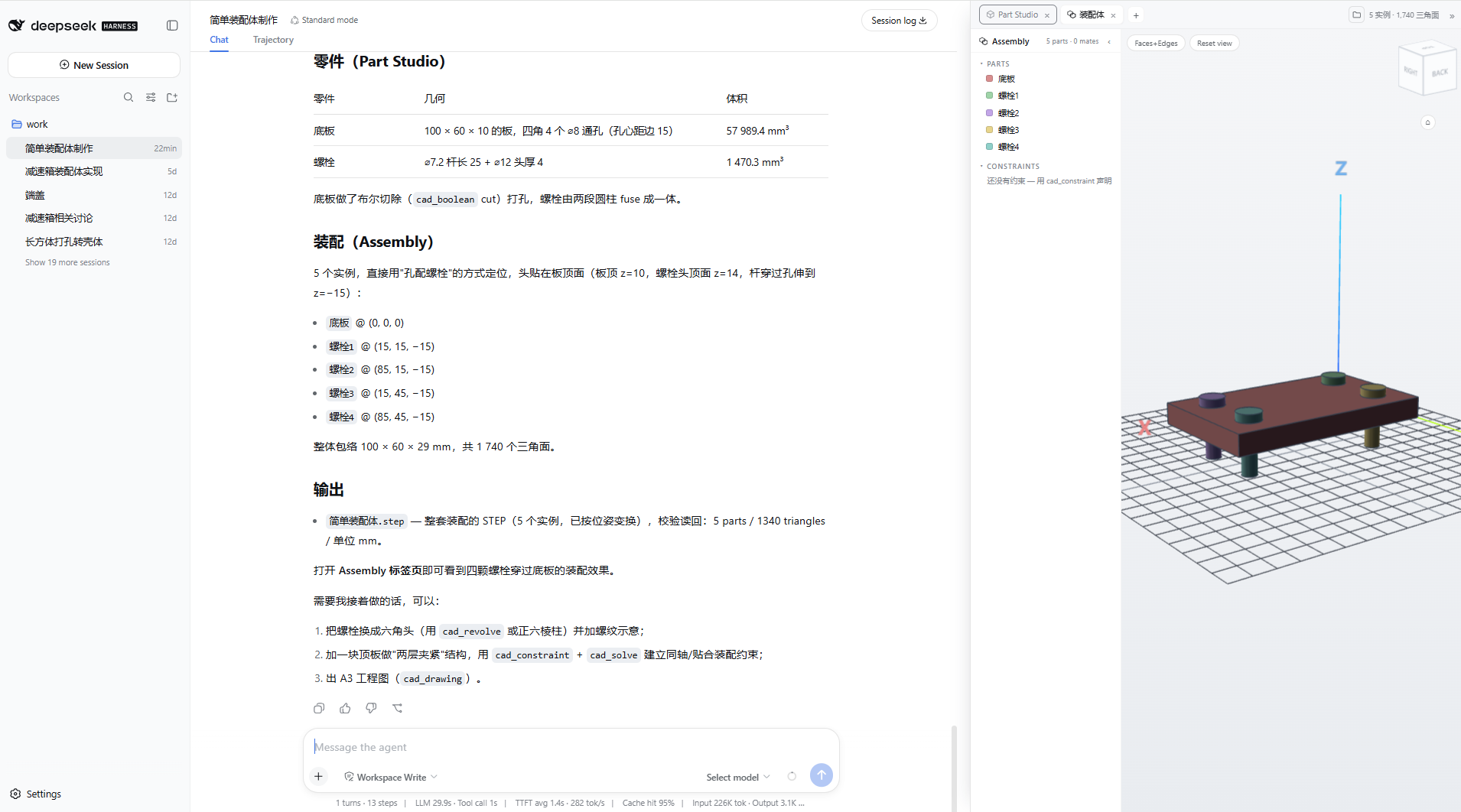
A full modeling session, end to end: the agent builds a parametric assembly from plain chat — a 120×80×8 base plate with R5 rounded corners, then four bolt instances placed at the corners — while the resident CAD panel tracks every step live (parts tree with per-instance colors, ViewCube, "装配体" assembly tab, 5 instances · 1,740 triangles). The finished assembly exports as a structured STEP document and the agent verifies it by reading the file back — 2 solids, 3 products, 2 assembly usages, 1,125.00 mm³:
Feature Overview
| Capability | Description |
|---|---|
| ⚙️ Single-kernel architecture | occt.ts as the primary modeling kernel (true B-splines, native shell/draft, centroid); opencascade.js stays only as the fallback backend; the v0.8 "no editing after shell" seam is gone — fillet/chamfer/boolean keep working after shelling |
| 🔍 CAD viewing | STL / OBJ / STEP / IGES / BREP / DCPRT (3D), DXF / SVG (2D); interactive in-chat card (orbit / zoom / wireframe / pan) |
| 🧭 CAD editor interactions | Onshape-style ViewCube (26-zone click-to-orient), hover/click face & edge picking with live measurement (area mm² / length mm), Faces+Edges / Faces / Wireframe render modes, switchable BRep demo parts (bracket / flange / shaft) |
| 🏗️ Parametric modeling | Primitives, profile extrusion, loft, sweep, revolve, booleans, all-edge fillet/chamfer, shell, draft, patterns (linear/circular), transforms; profiles take curve segments (arcs/circles exact BRep; B-splines sampled approximation) — exact OCCT BRep, not a mesh approximation |
| 🗂️ Codex-style document tabs | The resident display panel gets a tab strip with a "+" menu: Part (Part Studio, the default) / Assembly (instance insert/move/remove) / Drawing (true hidden-line sheets); tabs are closable and keep their state |
| 📁 Multi-document file space | Named documents per workspace (.dsh-cad/docs/), each session bound to its own active document — new sessions start empty instead of inheriting leftovers; a folder button in the panel lists every document (preview / delete), and cad_doc_new / cad_doc_open manage the modeling target from chat |
| 📐 Engineering drawings | GB first-angle layout: front / top / left views + isometric, true OCCT hidden-line removal via the occt.ts kernel (an npm dependency, dashed); sheet frame, title block, overall dimensions, standard scale series; exports SVG / DXF |
| 🔗 Constraint solving & motion | Ansatz geometric constraint solver (one command: npm install ansatz-wasm — a wasm dependency, no Rust toolchain, no native binary): entity/constraint modeling (assembly instances ↔ rigid3 poses mapped automatically), solve-with-writeback, full DOF/residual/redundancy/suggestion diagnostics (LLM-oriented), and parametric kinematic sweeps (cad_constraint / cad_solve / cad_motion) |
| 📐 Geometry measurement | Exact volume (mm³), bounding box, triangle counts, DXF layers |
| 📤 On-demand export | STEP (parametric) / STL (mesh); files are written only when the user asks |
| 🖥️ Resident CAD panel | A permanent panel right of the conversation: Codex-style tabs (Part / Assembly / Drawing), tracking the latest model in real time while modeling |
| ⚡ Zero-copy render pipeline | worker mesh → in-memory binary → three.js typed arrays; zero base64 / zero intermediate files / zero per-step disk writes |
| 💾 Modeling document persistence | Operation log (JSON) + debounced disk mirror; automatically replayed to restore state after a process restart |
| 🖼️ Image → profile | PNG sketch/screenshot → Otsu binarization → contour tracing → extrusion-ready polygon (cad_image_profile) |
| 🔌 FreeCAD executor | Run the same op family on an external FreeCAD console (STEP in/out); requires a local FreeCAD install |
| ☁️ Onshape executor | Run the same op family on Onshape over its signed REST API — zero local install; every op compiles to a standard Onshape feature pushed into the target Part Studio (no Feature Studio setup). Readback is three-tier: cheap per-part STL by default, readback: "step" for exact-BRep-derived named meshes via a server-side STEP translation, or readback: "none" — build only and return the document link (~3 calls, quota-friendliest). Exports .stl / .step / .x_t (Parasolid). Quota-aware errors distinguish credential problems from free-plan cooldowns; the Onshape document URL is always surfaced |
Installation
The plugin is published to npm — one line:
dsh plugin --profile web add dsh-cad
The installer applies the bundled cordis.patch.yml (declared in the dsh.bundle manifest) automatically, so there is nothing to configure by hand.
Version requirements
- Node.js ≥ 22
- dsh CLI (
@deepseek-ai/dsh): this plugin is developed against 0.1.0-rc.7 (minimum supported version, declared in theenginesfield ofpackage.json); recommended ≥ 0.1.1-rc.2 (verified 2026-08-31)
Install from source (dev mode)
git clone https://github.com/LAU-MARS/dsh-cad.git
cd dsh-cad
npm install && npm run build && npm test   # deps include occt.ts (true-HLR drawing kernel, ~20MB wasm)

npm install -g @deepseek-ai/dsh@^0.1.1-rc.2 pnpm   # requires Node ≥ 22
dsh web                                  # let the first launch init the profile, then Ctrl-C

dsh plugin --profile web add /path/to/dsh-cad

dsh web
The patch insert ships as cordis.patch.yml in the package root and is applied by the installer via the same dsh.bundle manifest.
Set DEEPSEEK_API_KEY and you are ready — for example:
- “open bracket.stl” →
cad_view - “model a 100×60×5 plate, punch a ⌀20 hole in the middle, R2 fillets on the four
corners, add a ⌀16 boss 20 tall, export plate.step”
→
cad_create_prim+cad_boolean+cad_fillet+cad_export, with the 3D tab updating live at every step - “build a snowman” → spheres + a cone nose + a cylinder hat (precise
at/axisplacement) - “add two more b1, one rotated 90 degrees” →
cad_assembly_insert+cad_assembly_move, the Assembly tab updates live - “make an A3 drawing of b1 and export dxf” →
cad_drawing(three views + iso + dashed hidden lines + dimensions) →cad_export.dxf
Modeling Tool Family
| Tool | Description |
|---|---|
cad_view | Open a CAD file and render an interactive viewer card |
cad_info | Read-only geometry metadata (format / counts / bounding box / units / layers) |
cad_create_prim | Primitives (mm, Z-up); at for placement, axis for orientation (exact axis-angle rotation) |
cad_extrude_profile | Extrude a closed XY-plane polygon along +Z into a solid |
cad_loft | Loft: skin a solid through successive closed sections (each a [x,y,z,…] loop in its own plane); sections may differ in shape and point count; ruled for straight sides |
cad_revolve | Solid of revolution: revolve a closed profile around an axis (profile coords = (radius, height); curve segments supported — rounded rims exact); optional angle |
cad_chamfer | Chamfer: bevel every sharp edge with one equal distance (mm) |
cad_pattern | Pattern: linear (delta spacing) or circular (principal axis + at point + sweep angle); creates copy bodies, fuse afterwards for one body |
cad_shell | Shell: hollow to a wall thickness (inward, outer skin preserved); open lists outward normals of the faces to open (empty = sealed). Runs on the occt.ts kernel; the result is a HOSTED body |
cad_draft | Draft: tilt the walls angle degrees about a neutral plane (mold release); direction is the pull direction, walls auto-selected by default. Runs on the occt.ts kernel; the result is a HOSTED body |
cad_sweep | Sweep: pipe a closed 2D profile along a 3D [x,y,z,…] path; the profile is auto-placed on the start plane, so no manual orientation |
cad_boolean | fuse / cut / common (classic hole punching: plate cut cylinder) |
cad_fillet | Constant-radius fillet on all sharp edges |
cad_transform | Translate / Euler rotate / mirror |
cad_volume | Exact BRep volume (mm³) |
cad_drawing | Engineering drawing: front/top/left + isometric views, dashed hidden lines, frame, title block, overall dimensions, standard scale, A4/A3 |
cad_assembly_insert | Insert a body into the assembly as a placed instance (at position, rotate orientation) |
cad_assembly_move | Set an instance's absolute placement |
cad_assembly_remove | Remove an instance from the assembly (the body stays) |
cad_constraint | Declare the constraint model: entities (assembly-instance bindings) + constraints (distance/angle/mate/coaxial…), persisted in the op log |
cad_solve | Solve with Ansatz and write poses back; returns DOF/residual/redundancy/suggestion diagnostics |
cad_motion | Kinematic sweep: drive one constraint value from from to to, solve frame by frame, apply the last pose, return the motion table |
cad_export | Export STEP / STL / DCPRT (the native replayable part document) to a workspace path; target: "assembly" writes the assembly STEP, target: "drawing" writes the sheet as SVG / DXF |
cad_delete | Delete a body |
cad_docs | List the workspace's modeling documents (id / name / bodies / updated, active marked) |
cad_doc_new | Create a named document and make it the session's modeling target (start multi-part projects here) |
cad_doc_open | Open an existing document (by id or name) as the session's modeling target — bodies replay exactly |
cad_doc_rename | Rename a document |
cad_doc_delete | Permanently delete a document (requires confirm: true) |
cad_freecad | Run an op program on an external FreeCAD executor (optional STEP input / export) |
cad_fusion | Run an op program on an external Fusion 360 executor (GUI bridge; optional export) |
cad_onshape | Run an op program on the Onshape cloud (signed REST API): creates or drives a document, returns its URL; readback: "step" for exact BRep meshes; exports .stl / .step / .x_t (Parasolid) |
cad_image_profile | PNG → contours → extrusion-ready polygon points |
After every modeling step: the same viewer card refreshes in place (stable viewId + versioned URL), and the "3D" tab tracks the latest model in real time.
Connectors (roadmap)
Modeling primarily runs on the occt.ts kernel (opencascade.js as the fallback backend) (OCCT in the browser — zero install). The connectors below refer to external CAD engines acting as executors for the same tool family, planned for future support:
| Connector | Suite | Platform | Status |
|---|---|---|---|
| Built-in kernel | CAD modeling kernel based on OCCT + WebGL, runs in the browser — zero install | All platforms (WebGL rendering) | ✅ Built-in |
| FreeCAD | open-source parametric suite — natural local executor via its Python API (console + GUI window modes) | Windows / macOS / Linux | ✅ Available (needs local install) |
| Fusion 360 | Autodesk CAD/CAM — resident add-in + spool bridge (no headless; the Fusion window doubles as a viewer) | Windows / macOS | 🧪 Experimental (cad_fusion) |
| SolidWorks | Dassault Systèmes industry-standard 3D CAD, COM/.NET automation | Windows only | 🚧 Windows demo scaffold (scripts/solidworks-bridge/) |
| Onshape | PTC cloud-native SaaS CAD, fully in the browser — signed REST API (cad.onshape.com or chamber hosts); every op compiles to a standard Onshape feature pushed into the Part Studio, results read back as per-part STL + mass properties, the cloud is the viewer | All platforms (browser) | ✅ Available (cad_onshape; set DSH_ONSHAPE_ACCESS_KEY / DSH_ONSHAPE_SECRET_KEY) |
| ZW3D(中望3D) | ZWSOFT all-in-one CAD/CAM | Windows / Linux | 🚧 Planned |
| GstarCAD 3D(浩辰3D) | Gstarsoft 3D CAD | Windows | 🚧 Planned |
All external engines implement the same GeometryExecutor contract (available() /
run(opProgram) → meshes), so the WebGL display layer never changes — swapping a
backend changes only the quality of the produced geometry.
Architecture
cad_view(path)                        modeling tools (cad_create_prim, …)
  → import worker (occt-import-js)      → modeling worker (opencascade.js WASM)
  → CadScene JSON (base64-f32)          → exact BRep geometry + meshing
  → GET /dsh-cad/scene/            → in-memory binary scene (f32/u32 packed)
                                        → GET /dsh-cad/bin/
            ↓ session presentationMeta (viewId + versioned URL) ↓
        browser card + persistent "3D" tab (three.js / SVG, Z-up, XYZ axes)
- Two workers: import (occt-import-js, read-only STEP/IGES/BREP) and modeling
(opencascade.js 1.1.1, full OCCT) are separate, both lazily started; the
_Nsuffix convention of embind overloaded constructors is wrapped insrc/modeling/occt-adapter.cjs(all verified at runtime) - Zero-copy pipeline: modeling scenes use zero base64 / zero large JSON arrays /
zero per-step disk writes (disk mirror debounced 1.5s, replayed only on service
restart);
cad_exportis the only explicit file export - Modeling document:
/.dsh-cad/model.jsonoperation log; all bodies are restored by replay after a restart - Drawing HLR kernel: hidden lines run on occt.ts (npm dependency,
npm i occt.ts) — true OCCT removal, no fallback engine, a missing kernel is a hard error. New APIs over opencascade.js:hiddenLines()true hidden-line removal, byte-level STEP/BRepreadStep/readBrep/writeStep/writeBrepwithout MEMFS, tessellation with built-in feature-edge extraction, and ahasError()/lastError()error contract. Geometry crosses kernels as STEP bytes and the projected segments are remapped into the sheet frame. Kernel dist resolution:DSH_OCCTJS_DISTenv var →node_modules/occt.ts/dist(npm, default) →/../opencascade-ts/dist(sibling checkout) →vendor/→node_modules/opencascade-ts - Constraint solving (Ansatz): the solver is the npm dependency
ansatz-wasm(a wasm-bindgen build, single package ~538KB, zero deps) — installing dsh-cad pulls it automatically, andnpm install ansatz-wasmalone upgrades it. No Rust toolchain, no native binary, platform independent. Resolution: the npm package (node_modules) → aDSH_ANSATZ_WASMdirectory → a sibling Ansatz checkout's pkg-node. The solver speaks one JSON envelope contract, with tool-layer errors (e.g.unsupported_constraint) surfaced verbatim for the LLM. Assembly placements (translate + XYZ Euler degrees) map bidirectionally to the solver's rigid3 poses (translate + exponential-map rotation, radians). Solver capability is staged (point-distance-to-origin today) — the plumbing contract is finished and needs no changes as it grows - Single-kernel architecture (v0.9): the primary modeling kernel is now occt.ts >= 0.5.0 — primitives, curve-segment profi