Wildchiken/dsh-doc-viewer ↗★ 0
dsh-doc-viewer
Edit your own spreadsheets in place, together with the agent. Also reads PDF, Word and text. Local only.
安装
$
npx -p @deepseek-ai/dsh dsh plugin --profile web add https://github.com/Wildchiken/dsh-doc-viewer/releases/download/v1.8.2/dsh-doc-viewer-1.8.2.tgz说明文档
阅读完整 README ↗dsh-doc-viewer
English · 简体中文
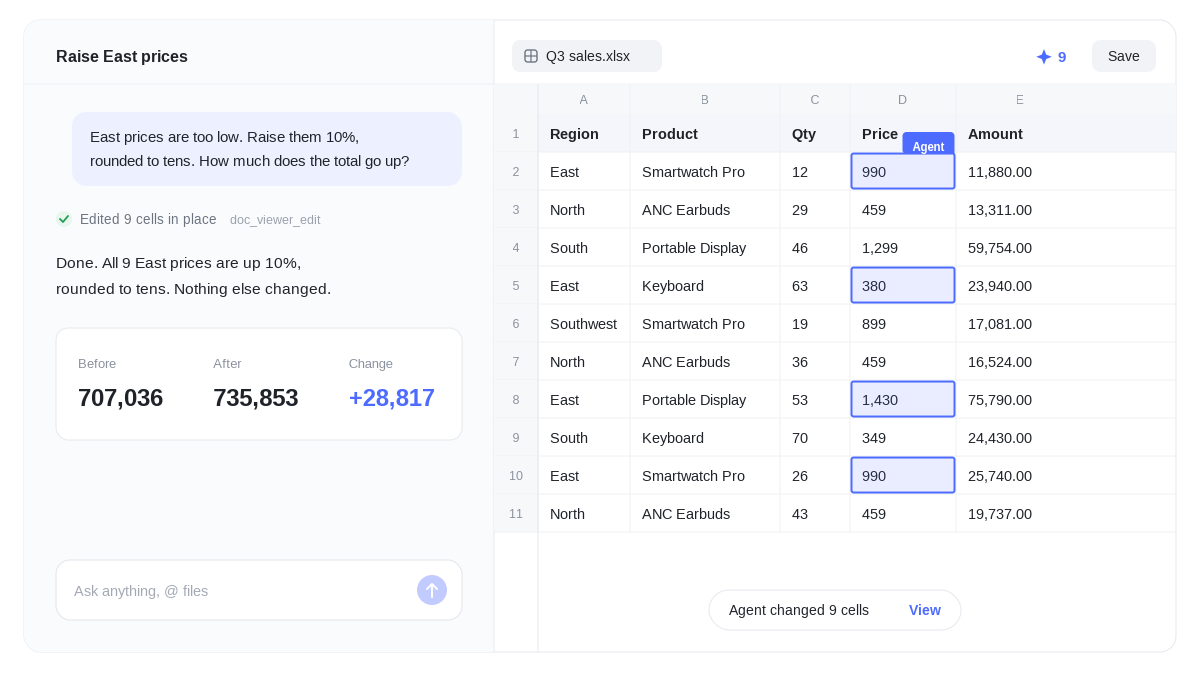
A DeepSeek Harness plugin for editing your own spreadsheets in place, together with the agent. The cells it changes light up in the table you have open, and everything stays on your machine.
The interface follows the Harness language (English or Chinese).
Features
- Edits the original file. Only changed cells are written back. A file holding something that can't be kept (charts, pivot tables, macros) is never overwritten.
- One document for you and the agent. Its edits land in the open table, alongside your unsaved ones.
- Shows what changed. Changed cells stay outlined until you click into the table, and each change can be jumped to or undone.
- No clutter. No cloud and no extra copies in your folders. Saving keeps the previous version, and can be undone.
It also opens PDF (read, merge, split, OCR), Word (preview), and text and Markdown (edit).
Install
Requires DeepSeek Harness 0.2.2 or later.
DSH="/Applications/DeepSeek Harness.app/Contents/Resources/runtime/cli/bin/dsh"
"$DSH" plugin --profile desktop add https://github.com/Wildchiken/dsh-doc-viewer/releases/download/v1.8.2/dsh-doc-viewer-1.8.2.tgz
Then restart Harness.
To update, run plugin --profile desktop remove dsh-doc-viewer, then add the file from the latest release.
Limits
- Tested only on macOS.
- Word and PDF can't be edited. Text files over 2 MB open read-only.
- 20,000 rows can take tens of seconds to open.
- OCR needs macOS 13 or later.
More in the guide.
License
MIT. See third-party licenses.