dsh-skill-eval
Skill execution telemetry & effectiveness scoring for DeepSeek Harness: records every skill load, folds the follow-up window into evidence, scores each skill and hands the agent concrete optimization advice.
同名包的其他仓库
安装
npx -p @deepseek-ai/dsh dsh plugin --profile web add github:carlslin/dsh-skill-eval说明文档
阅读完整 README ↗dsh-skill-eval



Records what happens after a skill is loaded, scores every skill 0–100, and
turns the evidence into fixes the agent can act on. It is a DeepSeek Harness
(DSH) plugin: telemetry, the scoring board and the agent-facing
skill_eval_report tool ship together.
Most skill-quality tooling checks the skill file. This plugin checks the execution: did the load succeed, did the tools that followed fail, did the user push back, was the skill ignored, did it collide with a sibling skill, what did it cost. Those signals only exist inside a running harness — which is why this is a DSH plugin rather than a CLI.
中文速览 · TL;DR for Chinese readers
- 在每次
skill加载后收集执行遥测:加载成败、后续工具报错、用户是否推翻、是否被忽略、碰撞与成本。 - 每个技能 0–100 分(A≥90 / B≥80 / C≥70 / D≥60 / F` — HTML board with grades, dimension bars and top fixes
- append-only JSONL telemetry in
$DSH_HOME/skill-eval/$DSH_PROFILE/events.jsonl(bounded to 8 MB: the oldest records are trimmed once it fills, with theeditaudit ledger kept, so a long-lived profile cannot grow without limit)
Screenshots
| Skills board | MCP tab | Scoring settings |
|---|---|---|
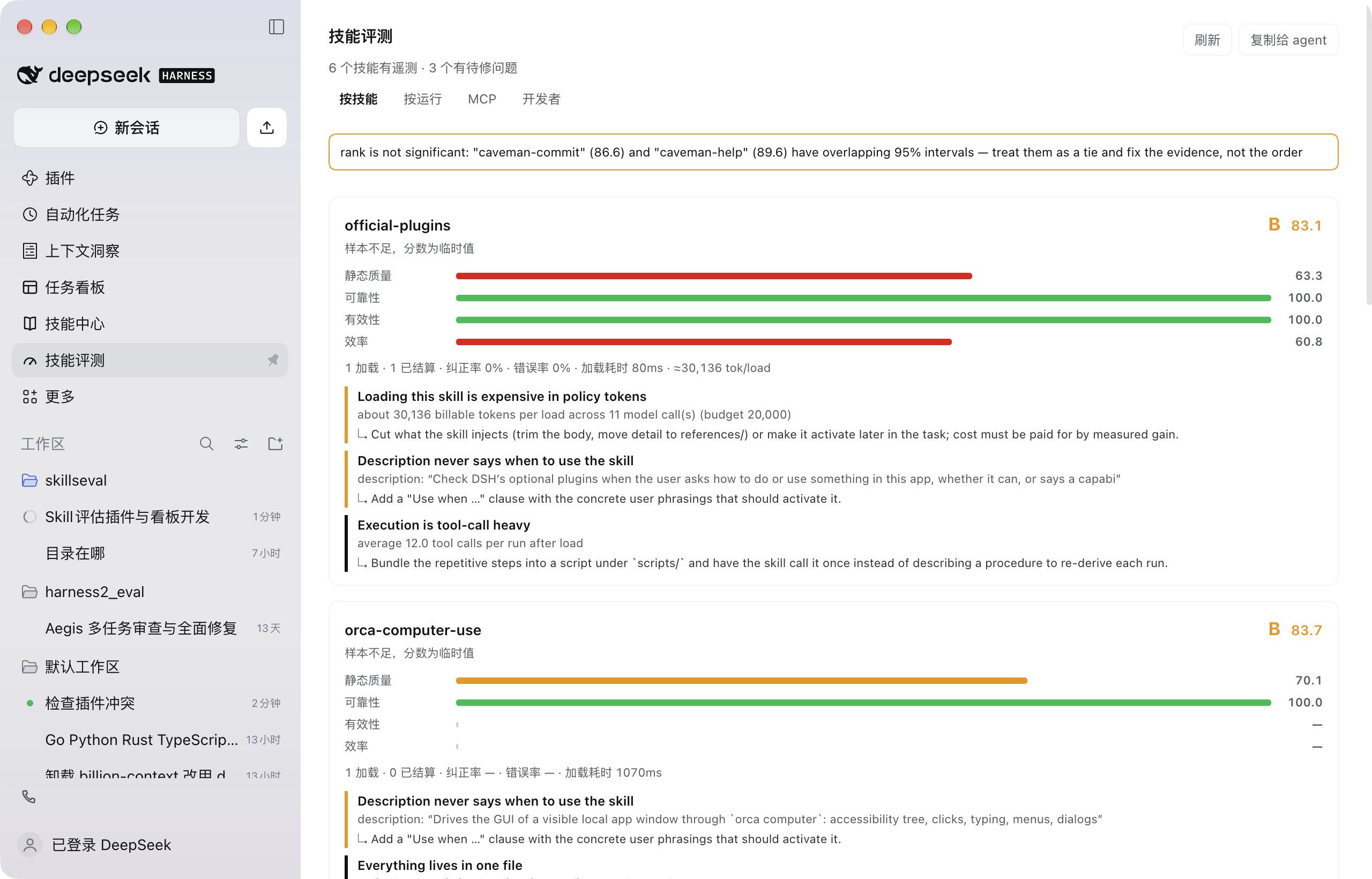 | 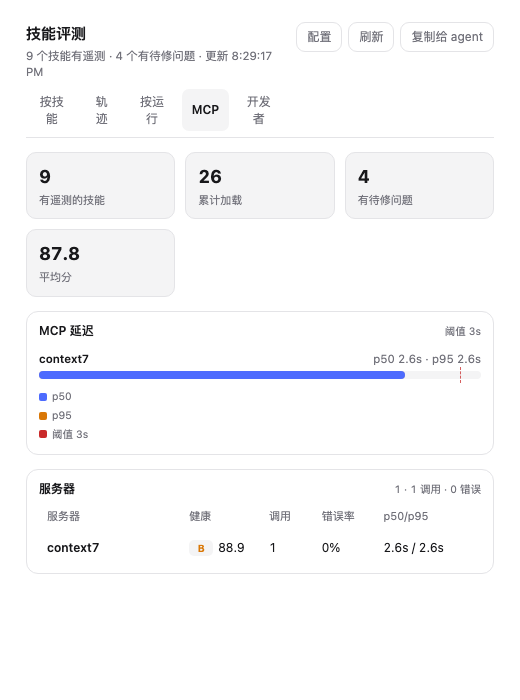 | 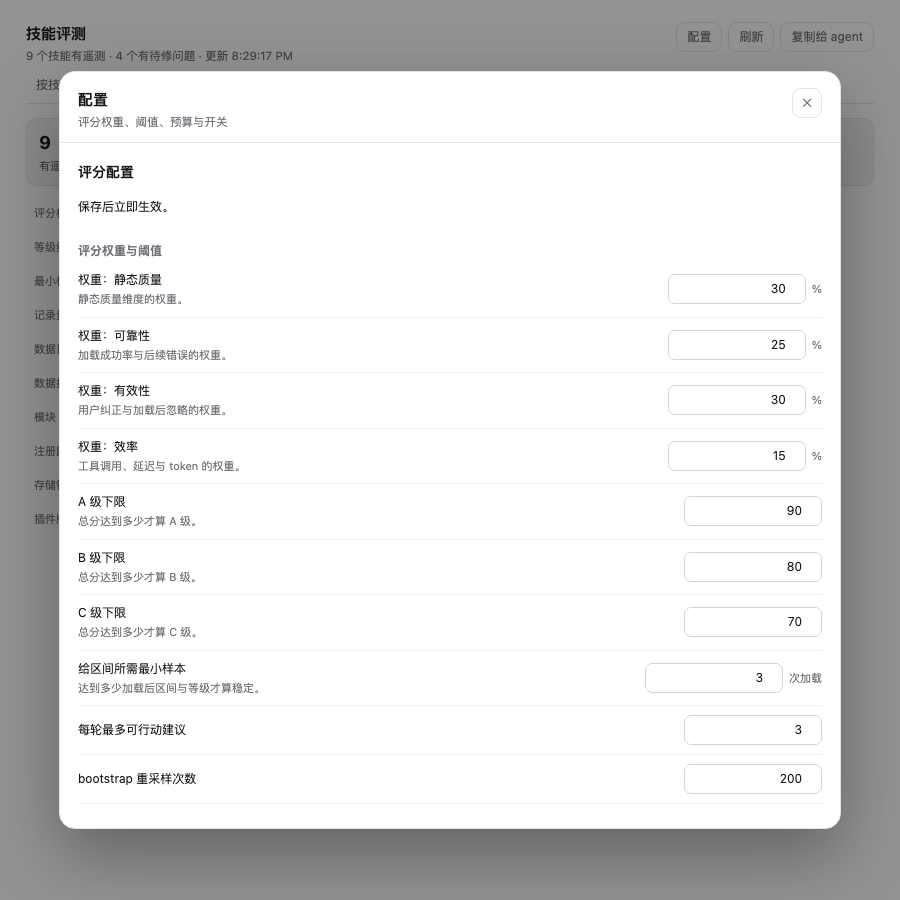 |
More real-window screenshots and the per-screen notes: docs/UI-REVIEW.md.
Scoring in one look
| dimension | weight | signal |
|---|---|---|
| static | 0.30 | description, trigger cues, progressive disclosure, size, examples |
| reliability | 0.25 | load success × post-load tool error rate |
| effectiveness | 0.30 | user corrections, ignored loads, sibling collisions |
| efficiency | 0.15 | tool calls per run, load latency |
Grades: A ≥ 90, B ≥ 80, C ≥ 70, D ≥ 60, F · web settings: …/config · JSON:
…/data/. Slash commands, agent tools, terminal checks and debug
switches: docs/ENTRYPOINTS.md.
dsh-skill-eval-doctor   # packaging pre-flight (release gate with --release)
dsh-skill-eval-accept   # generation & data contract (17 checks)
dsh-skill-eval-verify   # product surfaces (7 checks + 2 manual, after a reload)
Install
Requirements: DeepSeek Harness with plugin bundles (the package declares
dsh.engines.dsh >= 0.2.0) and Node.js ≥ 20 for the CLI helpers.
From npm:
dsh plugin --profile desktop add dsh-skill-eval
From GitHub source:
git clone https://github.com/carlslin/dsh-skill-eval.git
dsh plugin --profile desktop add "$PWD/dsh-skill-eval"
From a packed release tarball (what a published build ships):
dsh plugin --profile desktop add "$PWD/dist/dsh-skill-eval-.tgz"
Or straight from the source directory, or through the agent's
plugin_manager → install_bundle. The package ships the prebuilt browser
bundle, so installation needs no build step; editing client/*.js requires
npm run build:client (a zero-dependency concatenation script). After install,
refresh the GUI: the board is the Skill eval panel icon in the sidebar,
settings live under Settings → Plugins → dsh-skill-eval.
Use
- Result strip under every completed turn: score chip, calls/errors, next fix and edit history (zero tokens).
- Board: skills / steps / runs / MCP / dev tabs with next steps and evidence validity, plus SVG charts (score distribution, skill trend sparkline, evidence coverage, MCP p50/p95, session activity). The steps tab scores every loop step and compares recent turns.
- Agent: ask "how did
pdf-toolsperform?" — the agent callsskill_eval_report; before editing a skill it is told to callskill_eval_reviewfirst. - Slash commands:
/skill-eval(summary),/skill-eval,loop [all],validity,history,impact,mcp,runs,turns,dev,config,accept. - Read-only Inspect: provider
skill-eval, methodssummary|skill|mcp|runs|edits|standard. - To improve a skill: act only on
critical/warningitems, apply thefixlines, then re-read after a few more loads.
Config
The form lives in the bundle page; the same values can be seeded in config or
settings.json. The essentials:
enabled: true
windowToolCalls: 12 # tool calls that count as evidence for one load
minSamples: 3 # loads before a score stops being provisional
weights: { static: 30, reliability: 25, effectiveness: 30, efficiency: 15 }
thresholds: { excellent: 90, good: 80, pass: 70 }
tokenBudgetPerLoad: 20000 # billable tokens per load before efficiency/advice react
adviceNoiseFloor: true # advice must clear its 95% interval to stay critical
turnReports: true # one board per settled turn under reports/turns/
promptHint: true # the one-line system-prompt hint; false = zero fixed cost
registerReviewTool: true # skill_eval_review: leakage critic + audit ledger
Full key list (25 settings incl. pruning, edit budget, cache weight, dashboard
path, inspect provider and MCP thresholds): docs/DETAIL.md.
DSH_SKILL_EVAL_DIR overrides the data directory; $DSH_HOME/skill-eval/$DSH_PROFILE
is the default.
Release
See docs/RELEASE.md for the checklist, packing commands and
the clean-profile smoke test. npm run release:check runs the doctor gate, the
test suite and the live acceptance; node scripts/doctor.mjs --release verifies
the matching dist/ artifact.
Build
Editing client/*.js requires rebuilding the single-file browser bundle:
npm run build          # format check → lint → client build → doctor → 280 tests
npm run build:fast     # client build + doctor only
npm run build:pack     # full build + dist/dsh-skill-eval-.tgz
npm run build:install  # pack + install into the desktop profile
scripts/build.mjs runs the same commands as the release checklist; add
--fix to format before checking, --install= for another profile.
Tests
node --test test/
280 tests (npm test rebuilds the browser bundle first): scoring bands, static checks, correction detection,
window lifecycle (turn-end snapshot → correction → close), store round-trip with
a torn line, analyzer join, markdown/HTML rendering incl. escaping and bilingual
advice copy, host route registration under duplicate-route pressure, and the
client surfaces mounted in jsdom.
More docs
- docs/AUDIT.md — multi-layer audit: findings, fixes, residuals
- docs/CODE-REVIEW.md — code-hygiene review: dead code, duplication, cleanup
- docs/UI-REVIEW.md — real-window walkthrough with screenshots (
docs/ui/) - docs/ENTRYPOINTS.md — every entry point, including slash commands and debug switches
- docs/WORKFLOW.md — load → measure → score with intervals → advice → screen edits → re-measure
- docs/DETAIL.md — rubric, record schema, full configuration keys, why this exists
- docs/RRSI-NOTES.md — research notes and what we borrowed
- docs/COMPARISON.md — prior art and what each misses
- docs/DEV-RELOAD.md — hot-reload recipe and disposable-profile verification
- CHANGELOG.md — release history
Known limits
- Loads are recorded from
skilltool calls and user-typed/skill-nameinvocations; a skill the harness activates without either is invisible. - Effectiveness is inferred from the next user message, not from a task verdict.
- Advice evidence keeps measured ids/numbers in English even in the Chinese UI.
- Telemetry grows without pruning: each load writes a skill/window pair, each resolved skill also a
staticprofile, and every agent step onesteprow (the dominant growth in long sessions).