citydirector/dsh-remote-access-proxy ↗★ 0
dsh-remote-access-proxy
提供带密码和白名单的远程访问反向代理 适合需要从手机或其他设备安全访问局域网/VPN内DSH Web界面的用户。
安装
$
npx -p @deepseek-ai/dsh dsh plugin --profile web add github:citydirector/dsh-remote-access-proxy说明文档
阅读完整 README ↗The configuration page
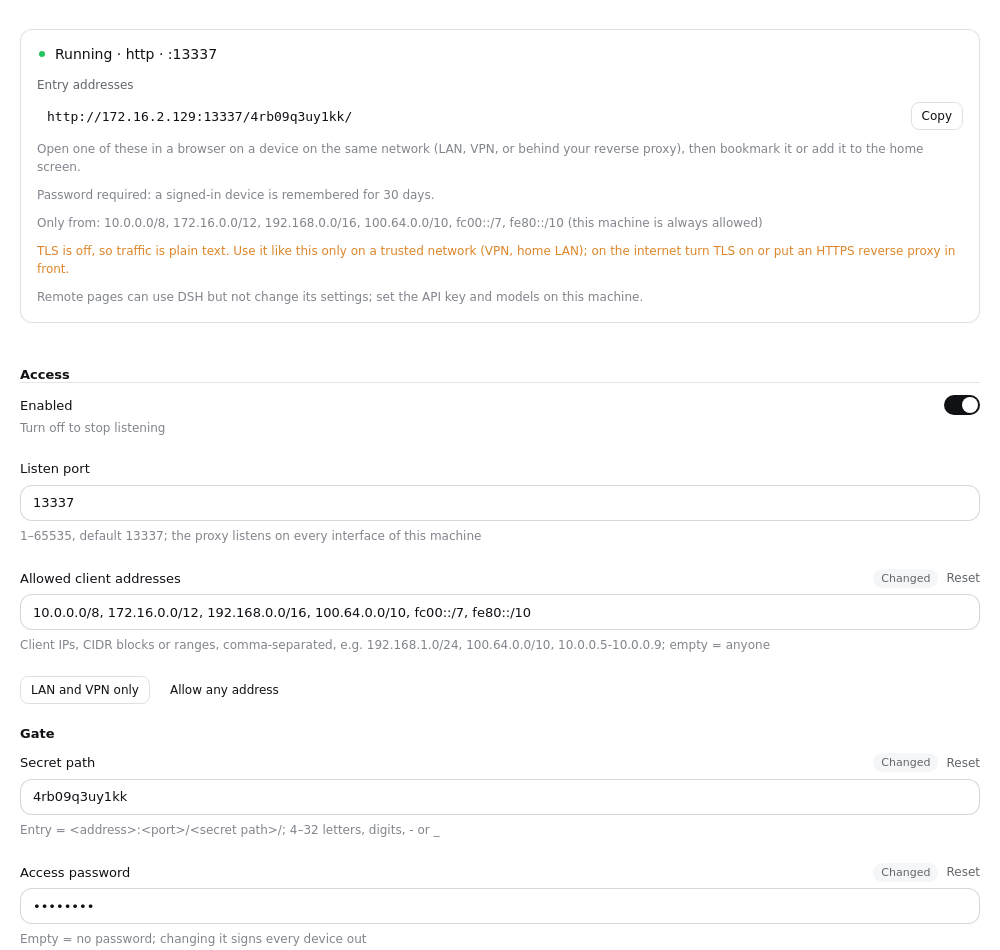
- Status: running, off, or not running — and when it failed, why and what to do ("Port 13337 is already in use", "The certificate could not be loaded"), instead of a line buried in a log.
- Entry addresses: one per network interface, each with a copy button.
- Allowed client addresses: which devices may connect — IPs, CIDR blocks or ranges, e.g.
192.168.1.0/24, 100.64.0.0/10. LAN and VPN only fills in every private range in one click; empty means anyone. Connections from elsewhere are dropped before a byte is exchanged, and the page tells you the last address it turned away, so you can add your own device if you locked it out. This machine itself is always allowed. - Access password (optional): the entry then shows a sign-in page. A signed-in device is remembered for 30 days; changing the password signs every device out. Five wrong tries lock that address for a few minutes.
/__rap/logoutsigns a device out. - Regenerate the entry path: after saving, the old address stops working — use it if the address may have leaked.
- On/off settings are switches. A save applies at once: the proxy restarts in place, DSH does not.
On DSH 0.2.0 the page appears on the host only; from 0.2.1 remote pages can open it too, but one-click updates are offered on the host only.
Configuration
Every field is a .volatile() field of the plugin's Cordis Config, stored in the active profile's cordis.patch.yml. Edit them in the page, or by hand from config/cordis.patch.example.yml.
| Field | Description |
|---|---|
enabled | Stop listening when off |
listenPort | Port (default 13337); the proxy listens on every interface, IPv4 and IPv6 |
allowFrom | Client addresses allowed to connect: IPs, CIDR blocks, a-b ranges, separated by commas or spaces. Empty = anyone; loopback always |
secretPath | Gate path (4–32 letters, digits, -, _; generated when empty) |
password | Optional access password (empty = none) |
cookieValue | Server secret that signs remembered devices (generated; not shown on the page) |
upstreamHost / upstreamPort | Upstream DSH. Empty / 0 follows the running instance: the bound port from its webServer service, then webStartup (3080 under dsh web; a desktop launch passes --port 0, so its real port exists only on webServer) |
tlsEnabled / tlsPfxPath / tlsPassphrase | TLS (pfx certificate) |
logMaxBytes / logKeep | access.log rotation: rotate past the cap (default 1 MiB), keep this many old files (default 3); 0 turns rotation / history off |
updateCheck | Check for updates (default on): read the release tags on GitHub a few seconds after start and every 12 hours; it only tells you, never installs |