elvisw/dsh-plugin-magic-context ↗★ 1
@elvisw/dsh-magic-context
Magic Context for DeepSeek Harness — elvisw fork: reversible context reclaim, an out-of-band historian, an m[0]/m[1] baseline, project memories in the plugin's own corpus, and the compaction seam.
安装
npx -p @deepseek-ai/dsh dsh plugin --profile web add github:elvisw/dsh-plugin-magic-context说明文档
阅读完整 README ↗Magic Context for DeepSeek Harness — elvisw fork


English | 简体中文
Two things keep happening in long sessions. What you worked out last session is gone this session, so you hit the same wall twice. Tool output piles up until the context window is full, and then compaction throws away the cache prefix and you pay for the expensive part again.
This plugin brings project memory and context management to DeepSeek Harness. Facts distilled in a session become project memories that survive across sessions. Tool output can be tagged and reclaimed, with the original text pullable later. History that has been digested becomes summaries instead of disappearing.
One command to install:
dsh plugin --profile web add @elvisw/dsh-magic-context
Install
You need Node ≥ 22.19 and a DSH host with a web client (desktop app or web profile). DSH is
DeepSeek Harness. The accepted host versions are
declared in engines.dsh: 0.2.1-rc.1, 0.2.2-rc.1 and 0.2.2-rc.5. The 0.2.2-rc.5 declaration
was verified on the Windows web profile only; other hosts and versions were not tested.
The command above targets the web profile. The desktop app keeps its own profile, so use
--profile desktop there, or whatever your profile is named.
The package ships its build output, so restart the profile and it works. Profiles with HMR hot-load it instead.
From 0.18.0 the same package also serves Android dsh-go 1.1.0 — see Android.
Package name. The unscoped
dsh-magic-contexton npm is a different implementation by another maintainer. It is neither this fork nor its upstream. This fork publishes only as@elvisw/dsh-magic-context, so the@elvisw/scope is required in every install command.
If you installed an older package, remove it first with
dsh plugin --profile web remove @elvisw/dsh-plugin-magic-context, using the same --profile you
installed with. This fork's old name is
@elvisw/dsh-plugin-magic-context (0.12.x); the upstream one is dsh-plugin-magic-context. All
three share one loader row id (magic-context-dsh), so installing more than one loads a single row
and the settings page can disappear. Upgrading from 0.12.x also needs a one-time package-name
migration in the profile patch — the steps are in
package identity and release.
What you get
The words this README keeps using are defined here once. Details and the files behind them are in the glossary, which is written in Chinese.
| Term | What it means |
|---|---|
§N§ | The tag on a tool result; the model addresses items by it, and you never type it |
| overlay | The layer the host draws above the conversation; the telemetry badge lives there |
| composer | The input area at the bottom; the badge sits above it |
| surface | The exact message list the host sends to the model; rewriting it invalidates the cache prefix |
| reclaim band | The moment a rewrite of the surface is allowed; queued reclaims land here |
| historian | The role that summarises; it replays the real prefix and writes to the store only |
| compartment | One digest produced by the historian, covering a contiguous run of history |
| baseline | The frozen block injected into every request (project memories, profile, global domain) |
| FTS5 | SQLite's full-text extension; its behaviour on Chinese is under Known limits |
| embedding | Turning text into vectors for semantic search; local MiniLM, 384 dimensions, model files downloaded on first use |
| tick | The maintenance loop, every 30 minutes by default |
| parity / gate | The shared-vector-space consistency check; failing it falls back to full-text search |
| pre-step | The host hook that runs before each model request; most decisions happen here |
| execute band | The pressure band entered past the execution threshold (65% by default); historian digests land on the surface here |
| force band | The pressure line where the plugin drops on its own instead of waiting for ctx_reduce |
| protected window | What the force band leaves alone: the newest results, up to 5% of the window (clamped to 8k–64k tokens), and at least the newest eight by default |
| four summary layers | The p1–p4 detail tiers of one digest, degraded by importance as the digest ages |
| flat/headless | A host shape with no web or desktop UI |
| HMR | The host's module hot-reload; with it on, no restart is needed after installing |
H / Q | Badge abbreviations: H is the historian state, Q the number of queued reclaims |
| defer | The other decision: leave the surface alone this step because pressure is low |
| token pair | Context tokens used, and the window they are measured against |
| host side | The part of the adapter that runs in the DSH host process |
| three-state | The persisted reclaim state: none, pending, landed |
What changes once it is installed:
- Tool results carry
§N§tags, and the overlay gains a telemetry badge showing live context usage. Open it for the token breakdown and the activity log. - Settings gains a top-level Magic Context page. The old Plugins-page card is removed, so a host
without a
settings.sectionslot has no configuration entry. - Three tools are registered:
ctx_reduce,ctx_expand,ctx_memory. Project memory is on by default, and facts distilled by the historian settle on their own.
It also reclaims without being asked. Routine reclaim is agent-driven — nothing is dropped
because a result got old, and /ctx-flush only marks already-queued reclaims to land on the
next message. The exception is the force band. When a management pass has a current pressure
reading at or above policy.forceThreshold (85% by default), it drops tagged tool results
itself, outside the protected window: the newest results that fit in 5% of the context
window, clamped to 8k–64k tokens, plus at least the newest protectedToolResults (eight by
default). Without a known context window, only that count floor applies. The order is by
class, not by age: everything else goes first, then edit / write / apply_patch /
grep / glob, and read / todowrite / task last, oldest first within a class. A pass
triggered by /ctx-wrapup, a pass with no pressure reading, or one whose reading predates a
/ctx-flush landing, a published digest or a baseline refresh does not fire the band. Neither
does it fire when dropping every reclaimable result still could not make the request fit a
known window.
Reclaimed output is not lost either. The tag stays a pointer, and when the model needs the
original — because a result it already consumed turns out to matter — it calls ctx_expand and
gets the text back as a new tool result; the placeholder stays where it was. That is an agent
move, not a user task: nothing in the UI asks you to pick a tag.
If the provider rejects a request as too long, a second path first publishes any digest that is ready, then drops the same way — same window, same class order — and retries once, but only after the surface actually changed: with nothing published and nothing dropped, the retry would fail identically. Neither path has its own switch.
The system prompt also teaches the model the §N§ habit, and once the tagged tail reaches
60k tokens with at least 25k of it not yet dropped, reminders start. How hard they push
depends on how much of the tail is still undropped: gentle, firm, urgent, and at the top a
"make it your next step" reminder at 50k or more undropped and three quarters of the tail
undropped. A band that stays the same re-fires no sooner than five user turns later.
Reminders ask; they never drop anything.
Common tasks
You do not manage reclaim. It runs as described above: the model stamps what it has finished
with, and at 85% the force band drops tagged results outside the protected window. A queued
reclaim lands on the next reclaim band rather than immediately because rewriting the
conversation invalidates the cache prefix. If a stamped reclaim should land now rather than wait
for that band, /ctx-flush makes queued ones land on your next message. You don't need to name
a tag and you never pick which output goes.
Record a project fact. Memories are per project, and project identity comes from the git root. You can also use this directly from the model's tool call when it learns something worth keeping.
you:     remember that we never tag a release before main CI is green
model:   ctx_memory {"action": "write", "category": "CONSTRAINTS",
                     "content": "never tag a release before main CI is green"}
Compress old history now. Automatic summarising waits for pressure; /ctx-wrapup gives you a
manual entry point that keeps the newest N entries.
/ctx-wrapup 20
Commands and tools
The model calls these tools; you reach them by asking in words, not by typing ranges. The slash commands below are yours to type.
| Tool | Purpose |
|---|---|
ctx_reduce | Queues outputs for reclaim (a range or a list); landing waits for the reclaim band |
ctx_expand | Retrieves original text by tag, by message (a session log event seq) or by a start/end range |
ctx_memory | Memory read/write: list / search / get / write / update / archive / merge, plus review_global and promote |
| Command | Purpose |
|---|---|
/ctx-status | Pressure, decisions, the reclaim ledger, digests, baseline, policy |
/ctx-flush | Marks already-queued reclaims to land on the next message; starts no historian, makes no model call |
/ctx-recomp | Re-runs the historian and replaces stored summaries in place |
/ctx-wrapup | Queues one manual compaction for the next pre-step, keeping the newest N entries (default 20) |
/ctx-profile | Confirm, reject or retire user-profile candidates |
/ctx-global | Domain membership and candidate approval |
Two commands from the original Magic Context (cortexkit/magic-context) are not registered here:
/ctx-dream needs the full dreamer
task set, and /ctx-embed targets session history, memories and git commits, while this adapter's
vectors cover memories only. The command matrix is in
PARITY.md, and the exact
upstream versions each baseline was checked against are under Provenance.
Settings
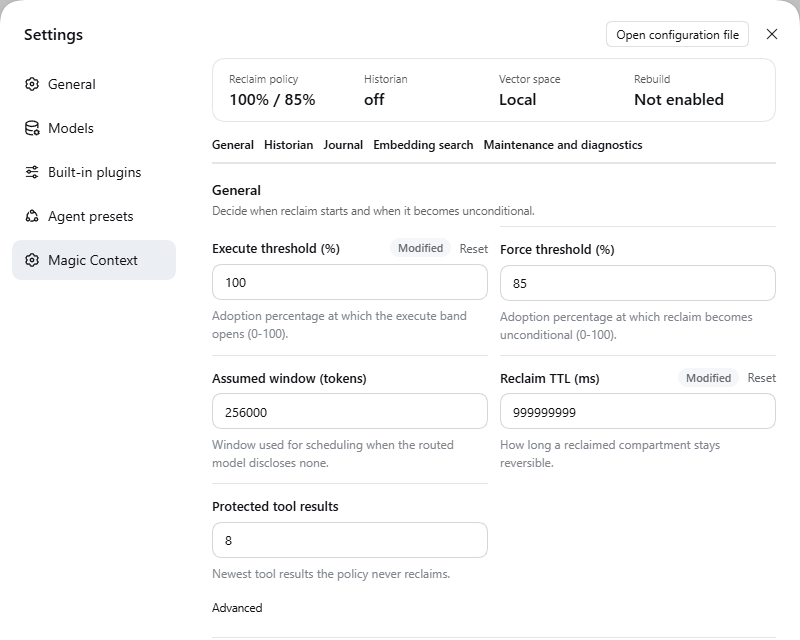
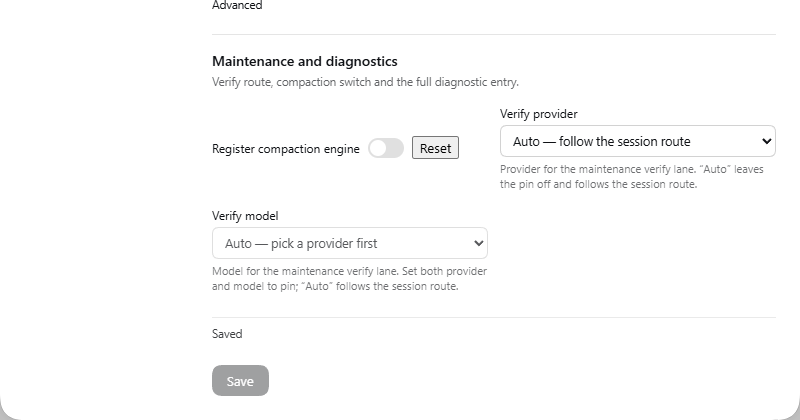
Under Settings → Magic Context: five sections and four summary rows, with jump links and an advanced disclosure, plus a plain-text status strip above the host footer. Interface text switches between Chinese and English live.
The entries people actually touch:
- Historian routing. Pin provider and model, or leave both empty to follow the session. Reasoning effort comes from the host model list.
- Vector search. Local MiniLM by default. To use an OpenAI-compatible embedding API (SiliconFlow, for example), pick the preset in this section, load the models and test the connection. The key is write-only, goes into the host credential store, and the card only reports configured or not.
- Compaction takeover. Can take over the host's compaction engine, but only in the shape described above with no web UI; it does nothing in Web or desktop, and is off by default.
- To turn project memory off, add
enabled: falseinside the existingmemoryblock of your profile patch. Do not write a bareconfig:block — it replaces the bundled config rather than merging, which silently drops keys such asregisterCompactionEngine.
The full key table with defaults is in the
configuration reference.
When writing profile overrides by hand, note that config replaces the bundled config rather
than merging into it.
Telemetry badge. A pill above the composer. Collapsed it shows live pressure, the token pair, the
historian state and the reclaim queue (H / Q); in a narrow window it shrinks to icons. Opened,
it shows the host token breakdown bar (system / tool definitions / messages), estimated message
composition (conversation / tool calls / compacted spans / memories / user profile / other), sections
for historian, memory, queue and maintenance, and at most 12 live activity rows. Values the host does
not report show —. Focus stays inside the panel while open; clicking outside, pressing Escape,
losing window focus or hitting close dismisses it and returns focus to the pill.
Android
The same package provides native panels for Android dsh-go 1.1.0 (source, releases). Choose the on-device engine. No Flutter build, and not a second package. Later dsh-go releases exist; the panels here were verified on 1.1.0.
Once the market entry is available, open Plugin market → DSH Go adapter and search for
@elvisw/dsh-magic-context. The market catalog is built by a separate repository whose watcher opens
an update pull request when npm has a newer version, so the entry can trail npm and may not list the
version you want yet; merge time is not something this package controls. If that version is missing,
install it from the app's local terminal and restart the engine:
dsh plugin --profile web add @elvisw/dsh-magic-context
That installs the current latest from npm. To pin a specific version, append it as
@, for example after reading the current one from
npm view @elvisw/dsh-magic-context dist-tags.latest.
The host side registers the status strip and panels only when the bridge is present; desktop and Web profiles load as usual without it.
Configure Magic Context in Web mode. If the plugin is installed on your phone's engine, open Settings → Interface → Open the web app in dsh-go, then Settings → Magic Context in DSH Web. You can pick the summary and verification models from that engine's list instead of typing IDs in the native form. Save your changes, then return to the native interface; you don't have to change your default interface. Native model selection is tracked in dsh-go #1648.
The phone's config form is generated by dsh-go from the plugin schema, and dsh-go only supports static hiding, so the twelve remote-only embedding fields stay on screen when Local MiniLM is selected. The Chinese labels say 「仅远程」; English cannot fit that marker in the 18-character row title, so it appears as the row's hint line instead. The Web settings page hides the twelve.
- Composer status strip. The same summary as the desktop pill, e.g.
context 62% · reclaim 3. It yields to the host while a reply streams. - Context panel. When opened from a conversation, it uses only that session's data; when opened from All fea