dsh-block-ptc
为代码运行标记黑板区域并自动总结 适合在 PTC 模式下需要对程序运行进行分块标记和自动总结的用户。
安装
npx -p @deepseek-ai/dsh dsh plugin --profile web add github:mengwEX/dsh-block-ptc说明文档
阅读完整 README ↗dsh-block-ptc
English | 中文


Blackboard blocks for PTC mode in DeepSeek Harness.
A block is a blackboard region. Every program the model runs is tagged with a block id, and when the block's work is finished the model hands in a summary it writes itself — which then replaces that block's messages in the model's own context. The original messages stay in the append-only session log, so the human transcript keeps everything and replay stays deterministic.
- DeepSeek Harness 0.2.0-rc.2 or newer; no upper version bound
- Community plugin maintained by mengwEX
- Zero runtime dependencies — the plugin imports nothing but
node:crypto - License: MIT
Table of contents
- Why
- Context and cache comparison
- How it works
- Install
- Quick start
- Reference
- Design notes
- Verification
- Troubleshooting
- Known limits
- Development
- License
Why
Automatic compaction condenses history when token pressure builds, and it decides what to condense by size. It has no idea that the last forty messages were one finished sub-task and the next ten are a new one.
This plugin lets the model draw that line itself: open a block, work inside it, and close it with a handover summary — so the context it keeps is the one it chose to keep. The summary costs no extra model request, because the model is already generating when it closes the block.
Context and cache comparison
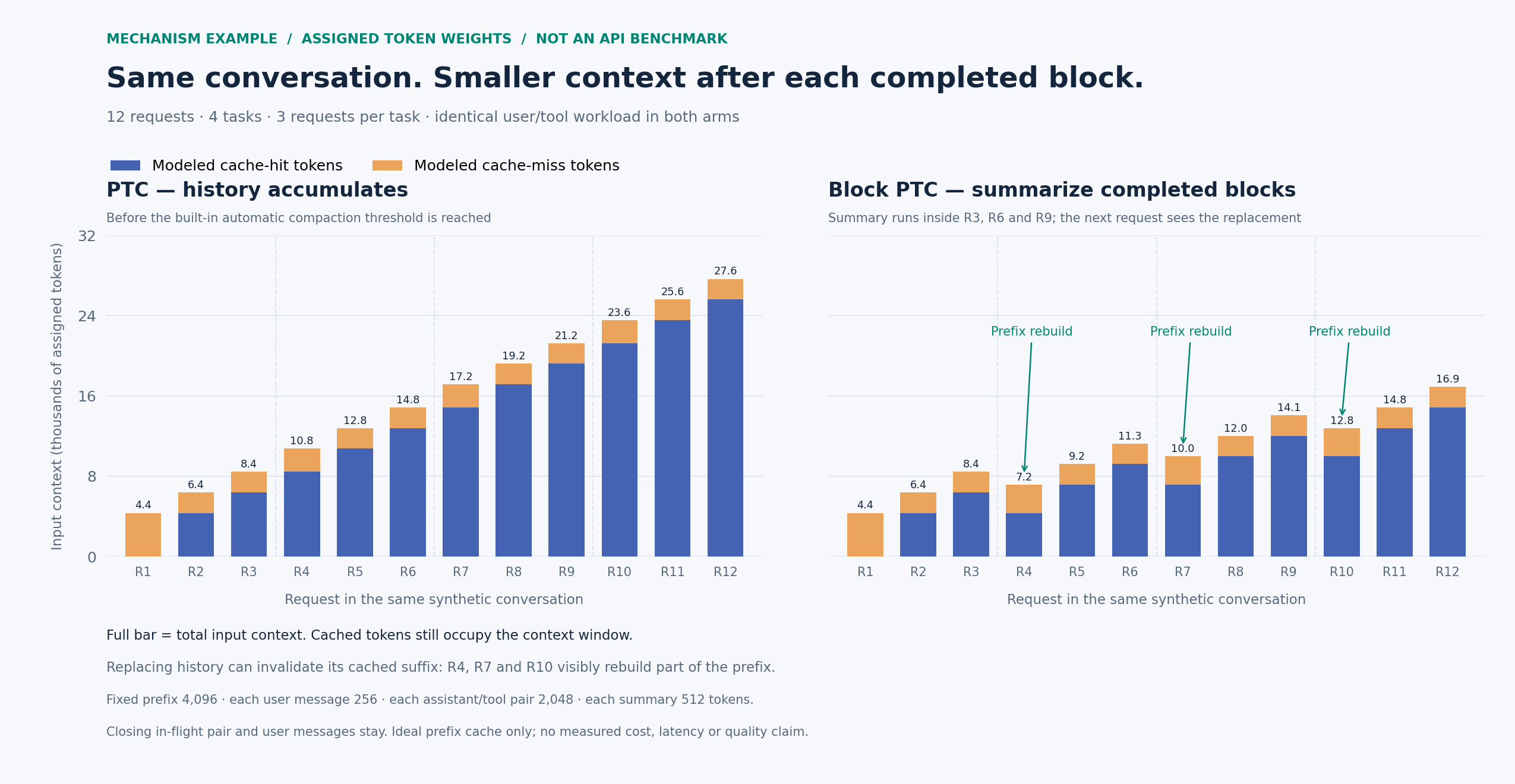
Mechanism illustration, not an API benchmark. Both panels replay the same synthetic four-task workload with assigned token weights. Full bar = input context; blue = modeled cache hits, orange = modeled cache misses. Cached tokens still occupy the context window.
After a block closes, the next request carries a summary in place of its completed work. Replacing history can also invalidate the cached suffix: smaller context does not guarantee a higher cache-hit rate or a lower bill. The closing in-flight assistant/tool pair and all user messages remain. The baseline here has not reached its built-in automatic compaction threshold.
See the data, assumptions and reproduction steps.
The real API fields needed for a measured version are documented there; the
plugin's tokensFreed is not a provider cache-hit measurement.
How it works
The model's whole surface is two callables:
block_run_code({ id, description, code })     the only tool it may call directly
await tools.block_summary({ id, summary })    callable from inside a program
block_run_coderuns the program through the built-in PTCrun_codetransport (nested dispatch), so program semantics, thetools.*SDK, sub-call logging, sandbox, timeouts and result rendering are the built-in ones. On top of that it records that this step belongs to blockid. The first call with a new id opens the block; later calls continue it.- While a block is open, every message the model produces belongs to it.
tools.block_summary({ id, summary })closes it. The plugin replaces the first eligible contiguous span of completed messages with one summary at the start of that span. System/user messages and in-flight tool pairs remain; messages outside the replaced span also remain.- A node that belongs to several blocks is only replaced once every one of those blocks has been summarized.
What the human sees afterwards: the transcript still shows every original turn (the log is append-only); the model's next request shows the summary instead. In the Web UI the summary renders as a compaction checkpoint node.
Install
Requirements: DeepSeek Harness >=0.2.0-rc.2 and its bundled runtime, with
Cordis >=4.0.4. Neither peer range has an upper version bound. The plugin
is a profile bundle: installing it adds one row to dsh.profile.bundles
and one new agent preset, block-ptc. It does not modify the shipped ptc
preset.
The version ranges allow newer hosts to load the plugin; they are not a record
of completed compatibility checks. Earlier live verification used DSH
0.2.0-rc.2; the current browser changes and newer hosts still await live
acceptance. DSH's plugin loader includes prereleases when evaluating its peer
ranges. The plugin checks the required tool/prompt methods before mounting and
the session methods before summarizing, and reports missing capabilities.
Method presence does not verify event semantics, preset configuration or browser
rendering; these still need validation when the host changes.
From npm (recommended)
Find dsh-block-ptc in the Harness Plugin Manager and install it, or ask an agent with the Plugin Manager tool enabled to install the bundle:
plugin_manager install_bundle dsh-block-ptc
The package is published on npm. Restart the application after installation and select the Block PTC preset.
From a local checkout
git clone https://github.com/mengwEX/dsh-block-ptc.git
Install the absolute checkout path through the Plugin Manager:
plugin_manager install_bundle /absolute/path/to/dsh-block-ptc
Both methods use pnpm in the target profile. The local form installs a link:
dependency for development. Versioned source archives are also available under
GitHub Releases.
Manual install (equivalent, if you prefer files)
In ~/.dsh/profiles/ /package.json:
{
  "dependencies": { "dsh-block-ptc": "link:/absolute/path/to/dsh-block-ptc" },
  "dsh": { "profile": { "bundles": ["@deepseek-ai/dsh-base", "@deepseek-ai/dsh-web-app", "dsh-block-ptc"] } }
}
then run pnpm in that directory.
After installing
- The preset appears in the session preset picker as Block PTC.
- Restart the application once. The loader keeps a plugin module per resolved URL, and installing a bundle changes the composition; a running host keeps the old module generation until it restarts.
- Start a session with the Block PTC preset.
Uninstall
plugin_manager remove_bundle dsh-block-ptc
then restart. plugin_manager set_bundle dsh-block-ptc enabled=false disables
it without removing the package.
Quick start
Say what you want done, then let it close the block when it finishes:
Read the parser module, explain how the tokenizer works, then close the block and continue with the lexer.
You should see:
- the model calling
block_run_codefor everything it runs; - a closing call to
block_summarywhose return value is{"replaced": 3, "tokensFreed": 346}— how many messages were replaced and the estimated token count of the replaced messages (before counting the new summary); - the summary node
[block:] …sitting where those messages were.
If a tool call is refused with "In block mode only block_run_code may be
called directly", that is the preset's guard working: in this mode every other
tool is reached from inside a program, exactly like PTC mode.
Reference
Tool block_run_code
| Parameter | Type | Required | Meaning |
|---|---|---|---|
id | string | yes | Block id, a short stable slug such as auth-refactor. Everything this program does belongs to this block. |
description | string | yes | One line stating the block's goal. Kept as the block's durable intent and used as the summary's header. |
code | string | yes | Program body; top-level await and return are available and return becomes the result. |
timeoutMs | number | no | Elapsed execution budget for this program. |
Returns the run_code result verbatim: { logs, result?, sandbox? },
rendered exactly as PTC mode renders it. The browser half registers the call
into DSH's keyed Tool view slot and draws the same code row the built-in gives
run_code — the Code title, [] as the summary, and the
program plus its output behind the row — with every bash/read/write card
the program dispatches nested inside it.
Callable tools.block_summary
| Parameter | Type | Required | Meaning |
|---|---|---|---|
id | string | yes | Block to close. |
summary | string | yes | Written by the model. Summarize all content for this block id and submit the summary to replace the original content. Retain necessary information, such as file paths, as needed. |
Returns { replaced, tokensFreed }, or { replaced: 0, tokensFreed: 0, note }
when there was nothing committed to replace yet; no summary is inserted in that
case. A successful summary is inserted at the start of the first eligible
contiguous span, not necessarily the block's first message if that message is
still protected. tokensFreed is the estimated
price of the replaced messages, not net context savings; the replacement summary
also consumes tokens.
Preset block-ptc
The shipped ptc preset plus:
tool-presentation.mode: both— underptcpresentation the reservedrun_codetransport is the only directly callable tool, a check that is hard-coded indsh-tools, so a plugin tool could never be reached.bothkeeps the generated tools SDK and the native schemas;- this plugin's row, which registers the two callables and a guard:
a model-direct call (no parent token) may only name
block_run_code, while nested calls from inside a program are unrestricted.
Design notes
Why delegate instead of reimplementing the transport. block_run_code
hands the program to the built-in run_code through
ctx.tools.execute({ …, parent: exec.token }). "Identical to PTC mode" is then
true by construction rather than by careful copying.
Why the nested transport keeps the outer call id. The PTC bridge parents
every program sub-call at the id of the call that is executing it
(parentCallId: exec.callId), and the conversation UI can only attach a
sub-call to a call node it can see in the transcript. Giving the nested
run_code a synthetic id such as :blk:1 therefore named a parent
that no node renders: the whole sub-call tree was projected away and the block
card showed a bare tool row. Reusing the outer id reproduces PTC mode's topology
exactly — rootCallId = parentCallId = , program sub-calls
:ptc: — so the bash/read/write cards a program dispatches
render inside the block row just as they do in PTC mode.
Why the package ships a browser half. DSH maps a wire tool name to its row
inside @deepseek-ai/dsh-client-ui-tool, which knows run_code and nothing
else; a Host-only tool therefore lands on the generic "Tool call" row. The
registered keyed view (tool.call.toolview, key block_run_code) is the only
supported way to give the call PTC's row. Its markup, CSS and icons are copies
of the host row renamed under a dbp- prefix, because the client-plugin rules
forbid importing Harness client packages as modules; --dsw-alias-* theme
tokens are the only shared styling dependency.
Why the bundle patch also mounts a host-level anchor row. DSH serves a
package's client module only for packages that appear as host Loader entries
(dsh-client-modules scans ctx.loader.entries()), and this plugin's
functional row lives inside the block-ptc preset, which is a separate tree.
The anchor row (config.anchor: true) exists so the package is a host entry; it
registers nothing, because a host-level guard would deny direct tool calls in
every other preset.
Why the compaction vocabulary. A message can only disappear from the model's context through DSH's own surface-replacement mechanism, and a replacement must carry the events DSH expects around it:
compaction/start        takes the durable compaction lock
compaction/summary      states the token price of the exact replaced range
user/message            the replacement itself (surfaceOp: replace, compact-checkpoint source)
compaction/end          releases the lock
These are DSH's own session event types (@deepseek-ai/dsh-compaction,
@deepseek-ai/dsh-session), not names invented here; a plugin cannot define new
event types without making the session log unreadable. The built-in
compaction engine is never invoked and no summarization call is made — the
summary is the model's own text, and these four events are only the bookkeeping
DSH requires for the replacement. Every failure makes exactly one close attempt,
so a failed summary can never leave the durable lock behind.
What is never replaced. The system prompt and every user-role message. A user message inside a block's span breaks the run instead of being swallowed by it, and the in-flight assistant message is excluded because its tool result has not landed yet.
Where the state lives. Blocks are derived from the session log on demand —
tool/call events for openings, tool/ptc-dispatch-start events for closings —
so nothing is stored outside the session and blocks survive resume and fork.
Why the plugin has no external imports. Profile bundles can be installed as
symlinks; a plugin that imports @deepseek-ai/dsh-* by bare specifier can fail
to resolve depending on how the host links it. This plugin imports only
node:crypto, so it loads wherever it is put.
Verification
npm run check          # syntax + both tests
node tests/logic.test.mjs
node tests/client.test.mjs
The logic test drives the real plugin entry with a fake context and fake
sessions: tool registration, the guard, the nested run_code dispatch, the
whole compaction transaction, the failure path that still releases the lock, and
the discovery anchor that must register nothing. The client test loads
client/client.js through a stubbed browser module table and renders the row
for every lifecycle shape — preparation, a dispatched program, a settled result,
a failure, an interruption, and a malformed argument payload — because a keyed
view that throws blanks its slot entry.
Live verification of the row (the browser half is not covered by the unit tests):
- Install this checkout as a bundle. The desktop profile is managed by the
desktop app, so use its Plugin Manager with the absolute directory —
plugin_manager install_bundle /absolute/path/to/dsh-block-ptc— or the plugin page's "package name or address" field, which accepts an absolute local path. - Restart the application: the Loader caches resolved modules and the client module scan runs at boot.
- Open a new Block PTC session and run any program. The
block_run_codecall should render as PTC's own code row, with the program's sub-calls nested inside it.
Known cosmetic difference from the built-in row: the running row has no shimmer sweep, and a DSH row redesign has to be copied here again.
The original development notes record the following live desktop-profile
validation on 0.2.0-rc.2 with the Block PTC preset. These are historical
observations, not an end-to-end test run by this repository's CI:
| Step | Observed |
|---|---|
| Direct catalog | block_run_code plus the SDK, which also exposes block_summary |
| Program run | block_run_code({ id, description, code }) returns the run_code result unchanged |
| Closing | `compaction/ |