prgrmrwy/ohmydsh--packages-dsh-pet ↗★ 1
dsh-pet
提供常驻桌面伴侣,在独立会话中运行日常管理任务。 适合不想打断当前开发上下文、需要AI在后台处理杂务的用户。不继承全局技能,需手动导入。
同名包的其他仓库
安装
npx -p @deepseek-ai/dsh dsh plugin --profile web add github:prgrmrwy/ohmydsh#4d0809d824b42ae9b548bda8aa0ce9bdf105adf2&path:packages/dsh-pet说明文档
阅读完整 README ↗dsh-pet
English · 简体中文
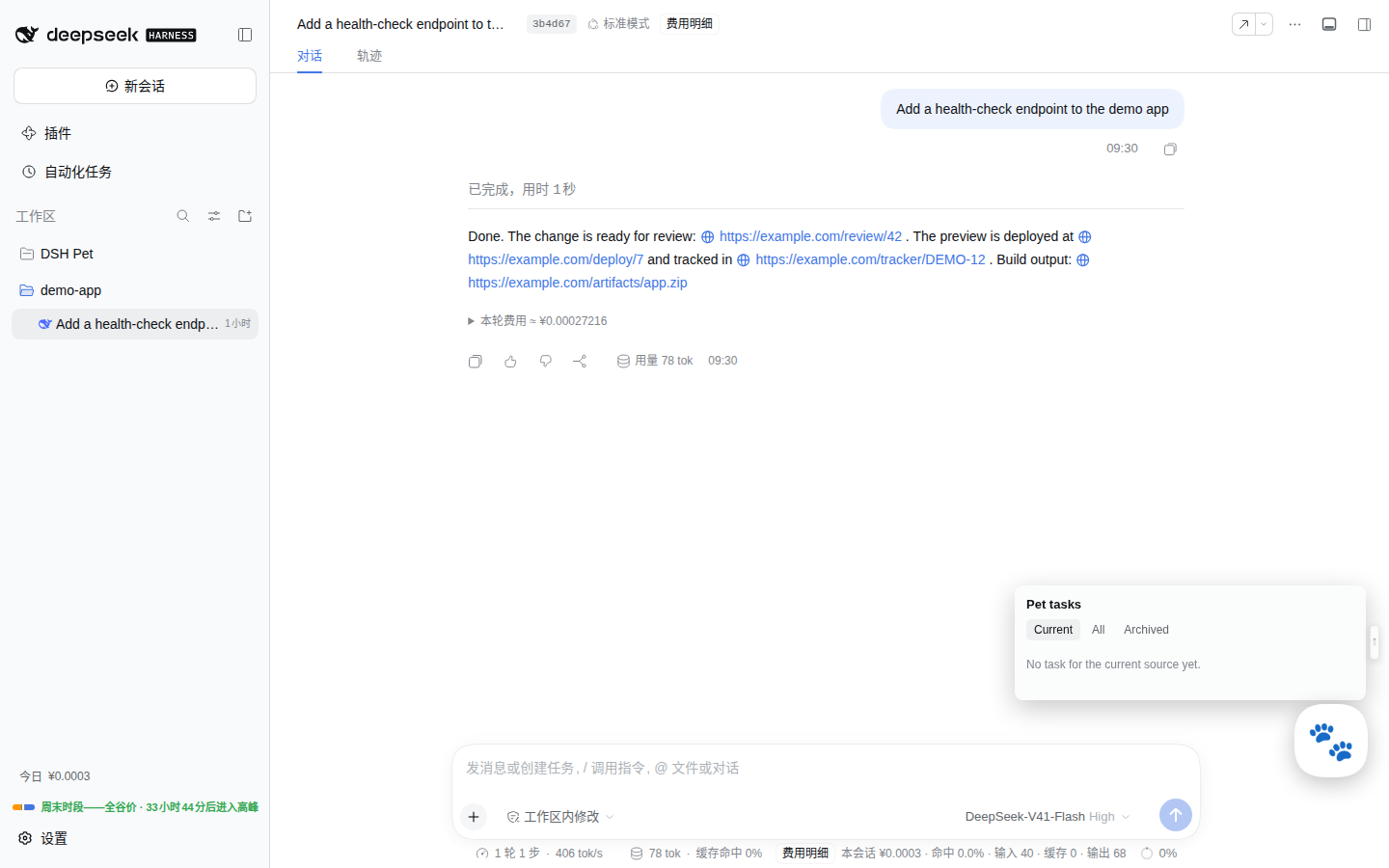
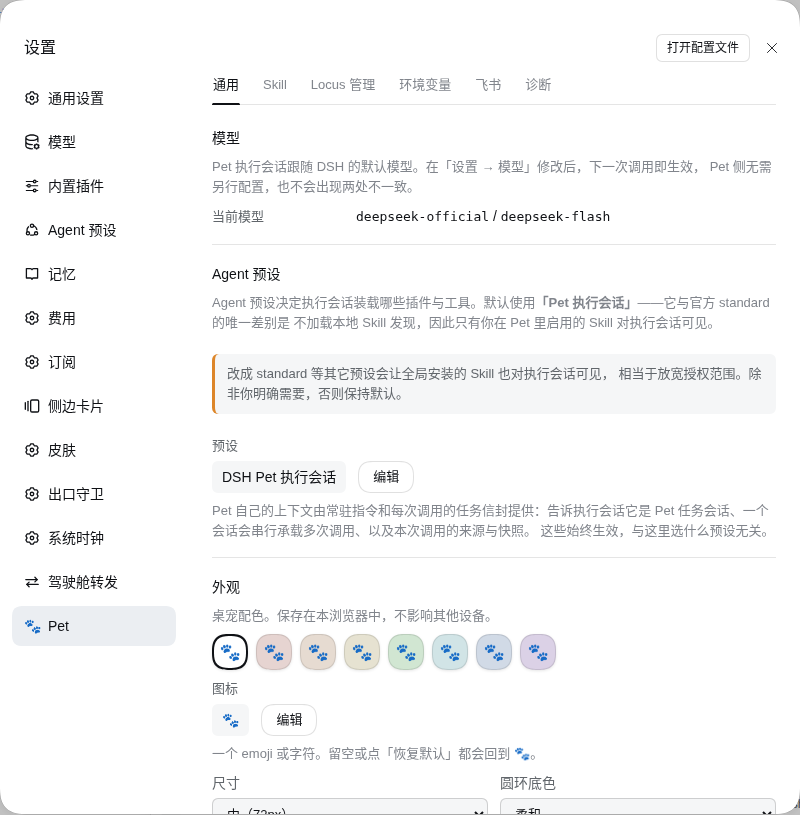
Routine chores such as cleaning up a worktree or answering a teammate's question from chat usually mean interrupting the session you are developing in, or pasting context into a new one by hand. Pet is a small floating companion in the DSH web UI that runs those chores for you in a separate session, working from a frozen copy of what you were looking at, so your development session stays clean and every action stays traceable.
What you get
- Quick actions without leaving your work. A draggable mascot with a wheel of shortcuts. Each one runs an ordinary DSH Skill that you import yourself, in its own executor session, against an immutable snapshot of the session or workspace you were in.
- A traceable record. Every request is a Task, Invocation and Run you can inspect in the task panel; nothing is written into your development session.
- Chat as an entry point (optional, off by default). Bind a Lark bot and an allowlisted teammate can mention it in a group or message it directly; a dedicated, read-only child session answers from the context of your work.
- A Q&A group for a session. One click on the wheel opens a Lark group tied to the session you have been working in, so others can ask questions without touching your session.
- Fail-closed by design. Pet never reads provider credentials, never accepts a model-invented destination, and degrades on its own when a dependency is missing instead of breaking DSH.
Install. In an ohmydsh setup this package is managed through dsh.yaml (entry dsh-pet, source: local): set enabled: true and run dsh build. The package does not depend on ohmydsh at runtime and can also be installed on its own; see Installation and compatibility. For the surrounding repository see the plugin index.
Jump to: Product concepts · Skills and environment values · Settings · Lark channel and Locus · Trust model and guards · Runtime state and lifecycle · Installation and compatibility · Development
Product concepts
Pet ships as one package with a Host half (persistence, task coordination, session creation, tools) and a Web half (a draggable mascot, a capability menu, a task panel and a settings section).
These four are deliberately distinct entities, not synonyms:
| Concept | What it is |
|---|---|
| Task | A long-lived work thread for one source scope. Owns exactly one executor session for its whole lifetime. |
| Invocation | One user request inside a Task. Each has its own immutable snapshot. |
| Snapshot | The source state frozen at the moment you invoked a capability. Never rewritten. |
| Run | One execution attempt of an Invocation. A transient retry adds a Run; it never re-targets. |
Source session vs executor session. The source is the session you were looking at when you invoked Pet. The executor is an ordinary DSH root session in the Pet-owned DSH Pet workspace that actually does the work. They are never the same session, and Pet never runs inside your development session.
At most one unarchived Task exists per source scope (session:, workspace:, or the independent scope). Invoking three capabilities from one session appends three Invocations to one Task and one executor session — it does not create three sessions. Archiving closes a Task permanently; the next invocation from that source starts a new epoch with a fresh executor.
Why snapshots are captured in the browser
The active session is browser UI state. The Host cannot observe it and cannot reconstruct it afterwards. So Pet freezes the source at the instant you confirm an Invocation. If you switch pages immediately after clicking, the running Invocation still targets the session you launched it from.
Skills and environment values
Skill installation and isolation
Pet does not inherit DSH's global Skill discovery, and it ships no Skills of its own. Every capability comes from an ordinary DSH Skill the user imports explicitly. Two facts are stored separately per Skill: whether it is registered, and whether it is enabled (plus whether it appears as a shortcut).
Crucially, Pet reads nothing Pet-specific from a SKILL.md. There is no petLabel, petIcon or petContext — a Skill cannot opt into better treatment inside Pet, so "Pet-adapted" and "ordinary" Skills are the same thing. The capability's label is the Skill name and its description is the Skill's own. This is why skills/ws from the ohmydsh repository works as a Pet capability with no changes whatsoever.
The single install source is local import from an absolute path on the Host machine running dsh web (not the browser's machine). Import is two steps: a read-only inspection showing name, description and file inventory, then a separately confirmed registration.
Every import is validated (SKILL.md present, kebab-case name, non-empty description, no symlinks, no special files, no path escapes, file-count/per-file/total-size limits). What is stored is a link to the user's own directory, not a copy:
skillName -> /absolute/path/the/user/gave
Editing that directory takes effect immediately, with no re-import. Deleting or moving it makes the Skill unresolvable, and the capability refuses to run rather than executing something stale.
The capability wheel also holds Host built-in actions next to Skills (today: the Q&A group action described below). A built-in action is not a Skill, never enters the Skill allowlist and produces no / envelope; its availability is computed from its own dependencies and shown disabled, with the reason, when something is missing. Built-in actions and Skills share the wheel's capacity (three rings of 6, 8 and 10, at most 24 entries).
Managed symlink projection
Registered, enabled Skills are projected into the Pet workspace as Pet-created directory symlinks:
$DSH_HOME/plugins/dsh-pet/workspace/.dsh/skills/
  -> /absolute/path/the/user/gave
DSH's filesystem Skill provider follows direct child symlinks, so one canonical directory serves every runtime. Pet does not also copy into .agents/skills or provider-specific directories: Skills belong to the DSH Agent runtime, not to the selected LLM provider, and duplicate roots create ambiguous precedence.
The projection is not the authorization boundary. The Pet allowlist provider is, and the executor runs on a dedicated preset that leaves out the filesystem Skill provider so global Skills cannot leak in (see ADR-0001). A projection entry that is missing, not a symlink, or broken is treated as drift: the affected Skill fails closed until you rebuild the projection explicitly from Settings → Diagnostics.
Pet applies no per-capability context gate. Any capability can be invoked from any source, including the independent scope — knowing what a given Skill requires would mean the Skill declaring it, which is exactly the coupling above removes. A Skill that needs a session, a repository or a configured value checks its own snapshot through pet_context and stops to ask when something is missing.
Environment values
A Skill often needs a value Pet cannot infer — which review group to post to, which URL shape identifies this organization's merge requests. Those are configured in Settings and reach the Skill as ordinary environment variables, so nothing organization-specific has to be written into a Skill that is otherwise shareable.
Two scopes, resolved per Invocation from the snapshot's source workspace:
| Scope | Applies to |
|---|---|
global | Every Pet Task, including independent ones |
| A workspace id | Only Tasks sourced from that workspace; overrides a same-named global entry |
Keys are upper snake case and are injected with a DSH_PET_ prefix, so CR_GROUP is read as $DSH_PET_CR_GROUP. When neither scope defines a key the variable is simply absent — Pet invents no default, and a Skill that needs it is expected to stop and ask rather than guess.
Injection goes through DSH's own ctx.shellEnv registry, so values travel on the dshEnv channel to the child process and never appear in the prompt, the envelope or any model-visible text. The registry is an optional dependency: where it is absent Pet logs the fact and injects nothing instead of degrading.
Values are stored in Pet's SQLite state, not in any repository, and they reach every command the executor runs. The panel says as much: this is not a credential store, and the masking in the list is display-only.
Settings
Six stable tabs:
- General — appearance/position reset, provider/model, default context policy
- Skills — local import, enable/disable, shortcut visibility, run arguments, removal, projection status. Pet ships no Skills of its own, so this list starts empty
- Locus — the Lark entries associated with DSH sessions: read-only display, navigation and lifecycle actions (see Lark channel and Locus). It offers no control that creates an external resource
- Environment — key/value pairs in a
globalscope and per source workspace, injected into executor shell calls asDSH_PET_* - Channel — Lark bot binding, the enable switch, permitted senders (including pairing) and the default workspace for automatically created main sessions
- Diagnostics — lifecycle, paths, allowlist, drift, explicit rebuild, channel connection state
The floating Pet and Task panel handle only quick execution, source confirmation and day-to-day Task operations. Installation, environment and diagnostics live in Settings. While no bot is bound, the floating Pet shows one dismissible hint that leads to the Channel tab; a Skill hint takes priority over it, and dismissing it never removes the Channel tab.
Lark channel and Locus
Pet can take work from Lark: mention the bound bot in a group, or message it directly. It is off by default and needs an explicit binding first. Unified Locus is the only production Lark execution path: a Locus is one durable association between a Lark entry (a group, or a topic inside it), a DSH main session and a dedicated child session that serves the entry. If the Host cannot compose everything Locus needs, the channel stays unavailable with a diagnostic and every inbound event fails closed; the rest of Pet keeps working.
Binding and admission
Binding uses a dedicated lark-cli profile named dsh-pet (create a new bot, or connect an existing one). Binding immediately verifies the profile and stores the bound app's own open_id; display names are presentation only and never an authorization key. The app secret lives in lark-cli; Pet only ever passes one through to that CLI on stdin when connecting an existing bot.
A message reaches the Locus controller only if it passes every gate: the sender is a real user, the bot is mentioned (a direct message is no exception), message-id deduplication, a start-up watermark against replays, and a supported message type. Anything refused is dropped with a low-cardinality diagnostic and nothing else — no reaction, no reply — so a bot sitting in an unrelated group never reveals that an agent stands behind it.
Who may ask depends on the entry:
- Allowlisted senders (an
open_idallowlist) can ask anywhere and are the only ones who can issue control commands or bootstrap a new entry. - Other members of a group whose Locus is already active can ask by mentioning the bot, because an allowlisted person set the group up. They cannot run control commands. A direct message is always allowlist-only.
- An entry whose tool tier is
shell(below) accepts only allowlisted senders.
Pairing instead of looking up an open_id. Settings mints a five-minute /pair xxxx-xxxx bearer command. The first user to send that exact command in a direct chat is atomically added to the allowlist. Do not forward it to somebody you do not intend to authorize. The code lives only in Host memory, is single-use, and a restart/cancel/replacement expires it. Pairing temporarily reuses the one supervised event consumer but never creates a Task, Invocation or Locus. Manual open_id entry remains an advanced fallback.
How a conversation is built and served
- Nothing is created when the bot joins a group. The whole tree is built on demand by the first qualifying mention: an automatic main session for that chat in the configured default workspace (different chats never share one; if the default workspace is missing, nothing is created and Settings says why), plus a dedicated child session. A topic first ensures its group's structure; group and topic children are siblings under the main session, and a topic keeps the main session it was created with.
- The child has its own context. It starts from its own identity and the entry it serves, not from a copy of the main session's history, and Pet refuses to create it when it cannot prove the provider does not inherit parent history. When it lacks facts such as the working root, it may ask its own main session through the host's native messaging; that answer is context, never authorization.
- One request at a time. Each Locus keeps a durable FIFO queue of Deliveries and hands the child exactly one current Delivery. A model turn ending does not complete a Delivery. The only way to answer is the caller-bound
pet_locus_finishtool (replywith a body, orno-replywith a reason);pet_locus_waitextends the deadline (initially one hour from acceptance, never beyond 24 hours). A timeout moves on to the next message on the same child session without rebuilding it. - Reactions are the Host's, replies are the Agent's. The Host maintains working → done/failed reactions on the triggering message. Business text is sent by the Agent through
pet_locus_finish, to the exact triggering message;@namereferences to chat members in a reply are rendered into real mentions when the name resolves to exactly one member. - Images. Images in the current message are fetched by the Host through the pinned official
lark-cliinto a private spool, handed to the child as typed image content and deleted before settlement; see media-download.md (written in Chinese). If the pinned binary or the private directory cannot be proven, only the image part is unavailable and text Deliveries continue. - Pet deliberately does not flatten chat history into the prompt. The Agent uses
lark-clias the bound bot to fetch richer context on demand, within the tool tier it was granted.
Control commands
Only allowlisted senders can issue these; anyone else's command is dropped silently rather than forwarded to the child as a question. Each also has a short flag form.
| Command | Effect |
|---|---|
| `/bind | |
(-b`) | Attach this chat to an existing main session. The prefix is the six-character short id on the session badge (at least six characters, unique, unarchived, and not a child). No match and several matches get the same reply, with no count and no hint that other sessions exist. An entry with no Locus yet is bound directly, w |