xiamubumu/dsh-composer-launcher ↗★ 0
dsh-composer-launcher
将输入框加号按钮转为支持添加参考源的菜单 适合需要快速将浏览器打开的标签页或常用插件作为参考源输入的用户。
安装
npx -p @deepseek-ai/dsh dsh plugin --profile web add github:xiamubumu/dsh-composer-launcher说明文档
阅读完整 README ↗dsh-composer-launcher
English · 简体中文




The composer's + button, turned into a real menu.
Table of contents
- What this is
- What it does
- Screenshots
- The browser extension
- Settings
- HTTP routes
- Interface language
- 🔗 Integration
- Known limitations (stated plainly)
- Installation
- Compatibility
- FAQ
- Repository layout
- Self-check
- License
What this is
By default the + button left of the composer opens a file picker. Everything else you may want to point the model at — a browser tab you are looking at, an earlier conversation, a skill, an MCP server, one of the plugins installed on this machine — has to be typed by hand, or referenced with @.
dsh-composer-launcher replaces that button with a three-group menu:
| Group | What is in it |
|---|---|
| Add | files and folders, earlier chats, plan mode, goal mode |
| Capabilities | slash commands, skills, MCP servers |
| Common plugins | one row per installed plugin, plus an "all plugins" row |
What you pick does not get pasted in as text. It becomes a reference chip on a rail above the input box — the same native chip kind the host already renders for @ references — and only turns into message text when you actually send.
There is also an optional browser extension (DSH Tab Bridge) which pushes your real browser's tabs to the plugin over a loopback HTTP bridge, so the Tabs row lists the pages you genuinely have open rather than a throwaway debug instance.
What it does
1. The + menu (three groups)
A 360px panel, opened from the button at the conversation.input.left slot.
- Add — Files and folders (the host's own picker, multi-select, drag-and-drop; falls back to
@references when the host exposes no folder picker), Chats (viaremote.sessionReferenceResolver; chats only, no files), Plan, Goal. - Capabilities — Commands (whatever the host's slash-command service offers), Skills (read live with
ctx.remote.skills.list({ sessionId })), MCP (needs the host'sremote.mcpManager). - Common plugins — one row per plugin returned by
ctx.remote.pluginInventory.list(). That list is read from the host on every load, so installing, removing or disabling a plugin is reflected immediately and there is no cache to keep in sync. Three modes decide which rows appear:pinned,frequent,mixed(see Settings).
Every row can be switched off individually from the settings card.
2. Reference chips
Picked items land on a rail above the input box (conversation.input.dock). A chip is { label, kind, icon } plus an optional url, where kind is one of web, plugin, skill, mcp. Clicking the × removes it.
Two properties are worth naming, because both were bugs before they were features:
- A web chip keeps its address. A page title with no URL is useless to whoever reads the message — the chip carries the URL and the payload includes it.
- A session reference stays a chip. Writing a reference back through the plain-text draft API silently downgrades it to body text; the plugin renders it as a chip instead and never round-trips it through the text editor.
Chips are per session, so two chat tabs never share a rail.
On send, each chip is serialised into the message with a short marker, so the model can tell a referenced page from an attached file:
| Chip kind | Marker |
|---|---|
| web page | 【参考网页】 — |
| plugin | 【使用插件】 |
| skill | 【技能】 |
| MCP server | 【MCP】 |
These markers are literal and stay in Chinese in both interface languages. They are part of the text the model reads, not interface copy — translating them would change what the model sees.
3. Settings card
Registered on the settings.plugin.item slot as a card titled Launcher — 「启动器」 in the Chinese interface. It is collapsed the first time you open it and remembers that choice. All twelve fields are listed under Settings.
4. Debug browser (fallback)
The Tabs row can also read tabs over a remote-debugging port from a Chromium process it starts itself. That is what Launch debug browser does — and when the extension is staged, the same call attaches it with --load-extension and then verifies through the debugging port that it really mounted, so this route needs no manual step at all (see The browser extension). It stays a fallback rather than the primary path because it only ever sees that one throwaway-profile instance, never the browser you already have open.
5. Loopback bridge
The host half owns a small HTTP bridge on 127.0.0.1:43130 (override: DSH_LAUNCHER_BRIDGE_PORT) so the extension can push tabs into it. It binds loopback only, yields politely if an older instance already holds the port, and is used for nothing else.
Screenshots
The + menu — Add / Capabilities / Common plugins — with the Tabs row fed by the extension
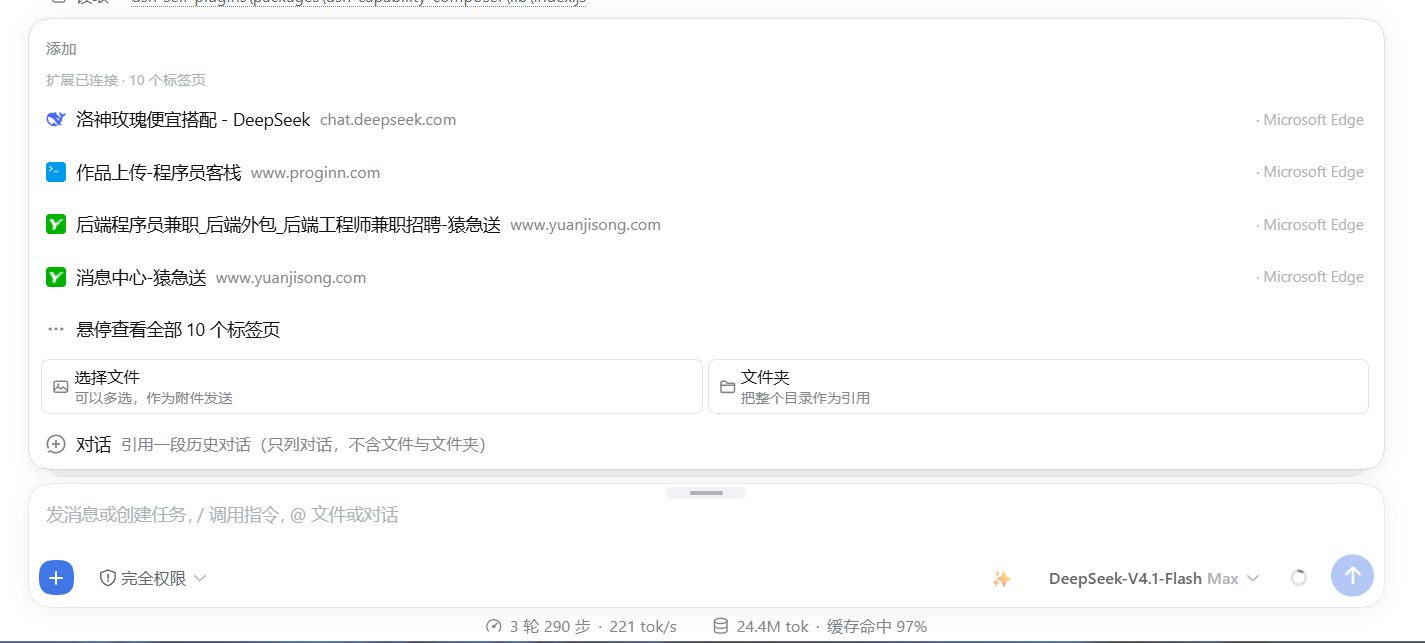
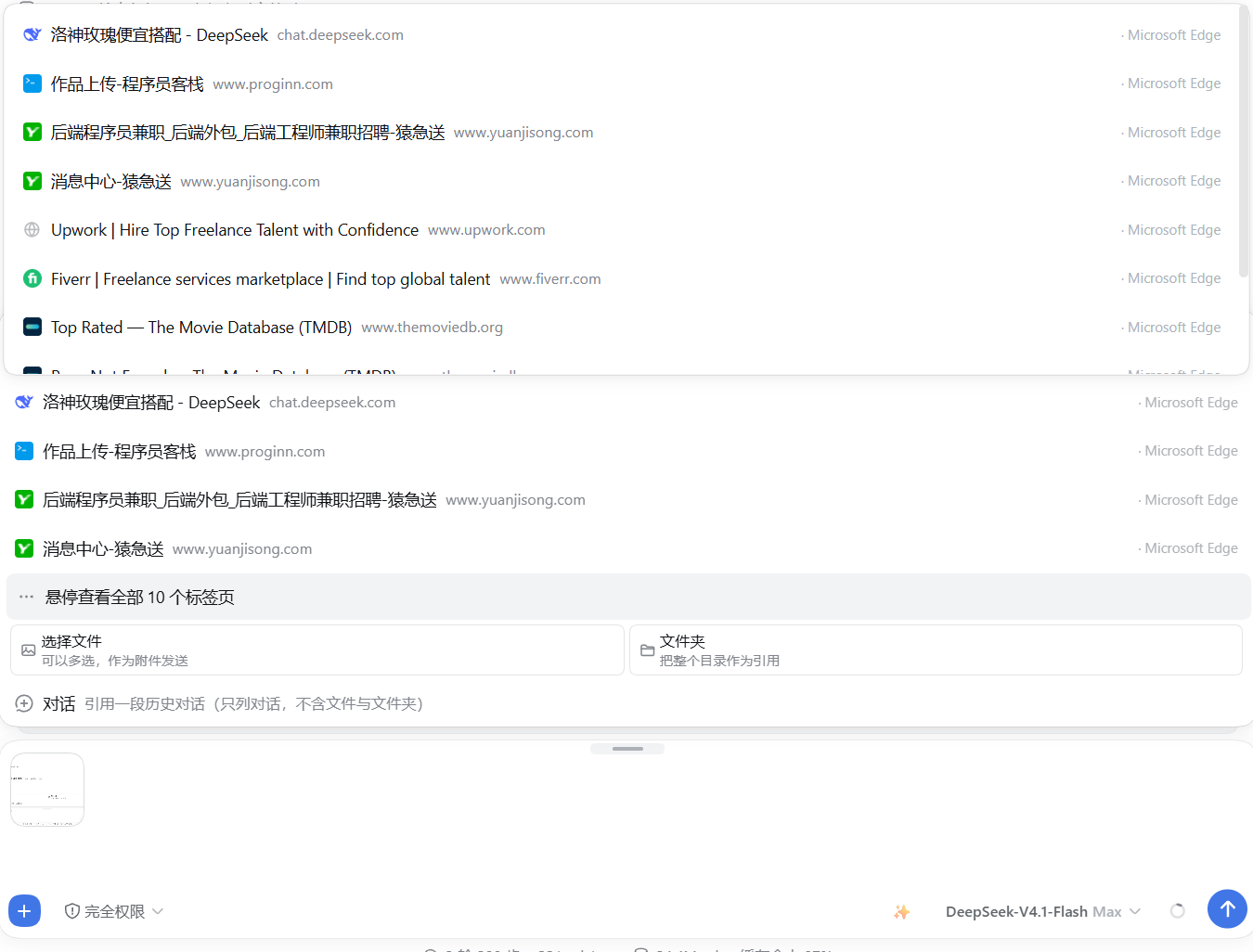
The Tabs row reading a real Microsoft Edge window over the bridge
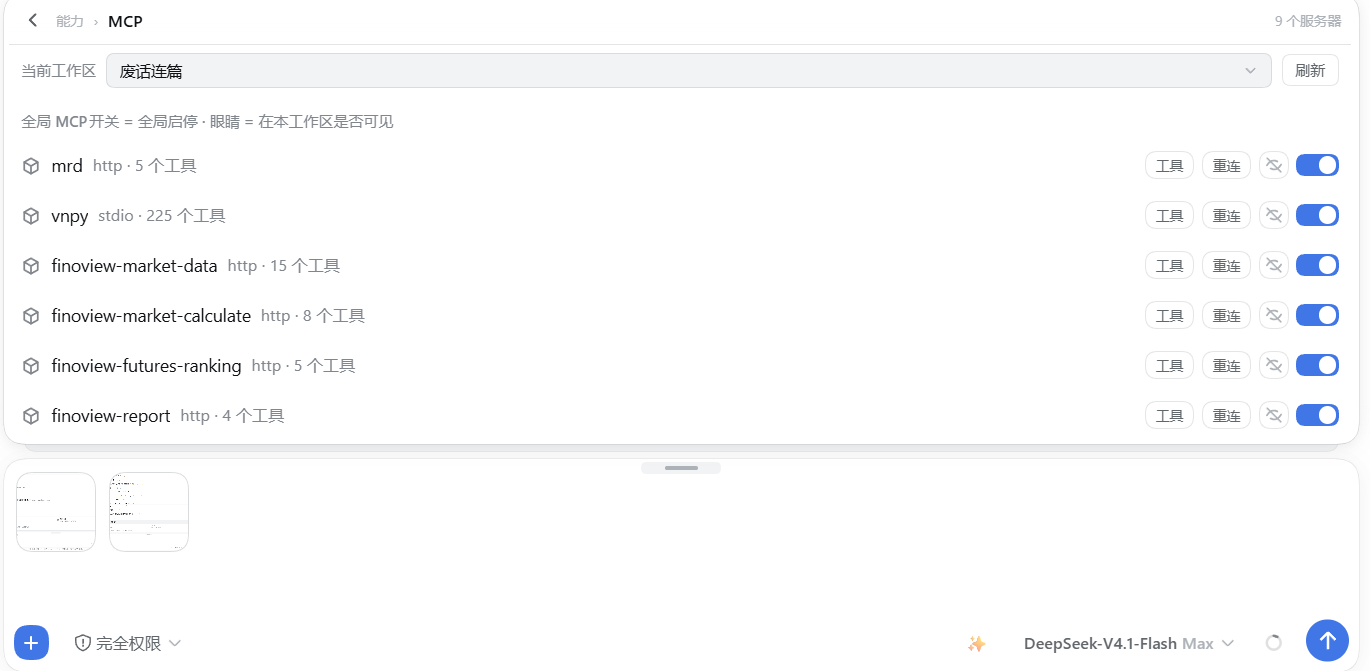
The MCP servers the Capabilities group can reference — the row is built from the host's remote.mcpManager
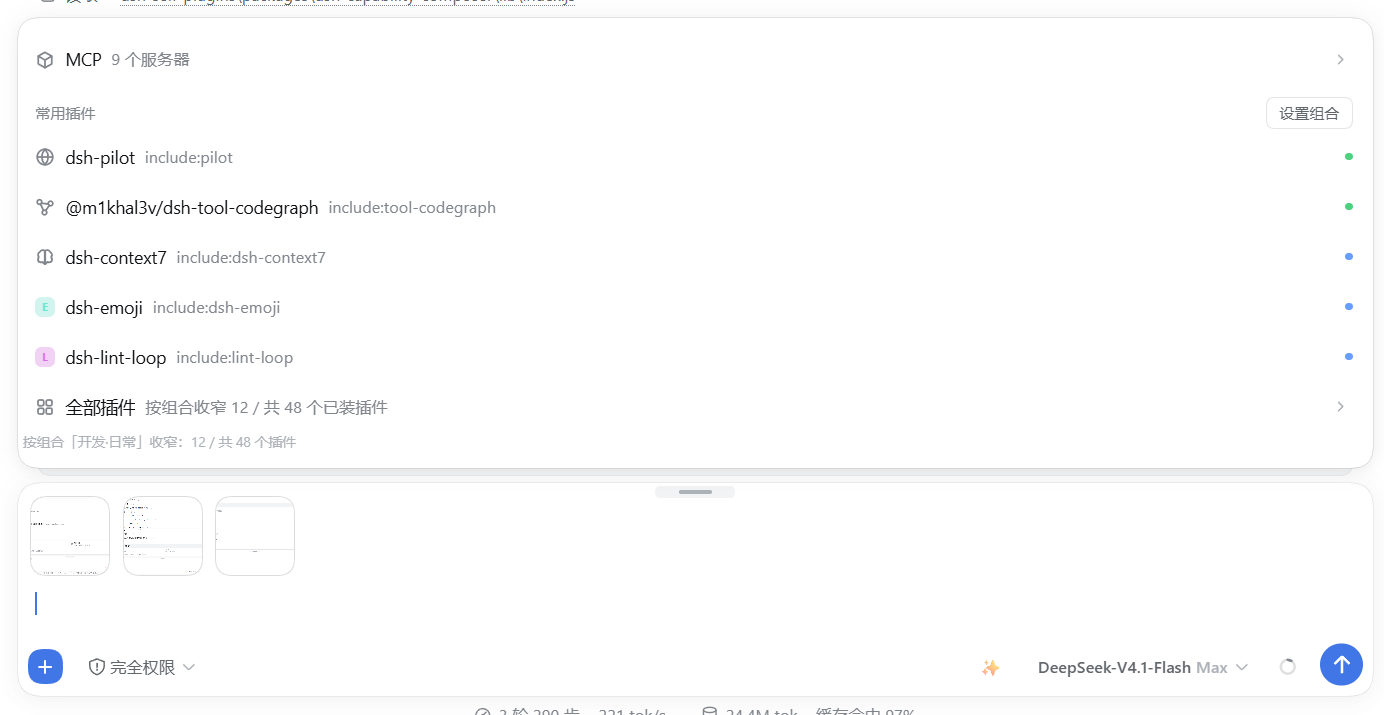
The plugin inventory the Common plugins group is built from, including its "N / M" narrowing counter
The browser extension
The plugin works without it — the Tabs row simply says the extension is not installed and points at the button. With it, the row lists the tabs of your everyday browser.
Three ways to get it loaded
Chromium will not let anything silently sideload an extension into the browser you use every day. That is a browser security rule with no plugin-side workaround, so the goal is a different one: make every remaining step either automatic or one click.
| Route | What happens | Manual steps |
|---|---|---|
| A — a browser this plugin starts | The plugin spawns a separate Chromium process with --load-extension pointing at the staged copy, then verifies through the debugging port that the extension really mounted | none |
| B — your everyday browser | The Tabs row offers Open the extensions page and Copy the extension path, so loading it once is a paste and a "Load unpacked" | one time, ~20 seconds |
| C — managed machines | Chromium enterprise policy (ExtensionSettings / ExtensionInstallForcelist) pointing at a self-hosted, signed CRX plus an HTTPS update manifest | admin rights; not shipped here |
Route A is verified, not assumed. After launching, the plugin asks the debugging port for its raw target list and looks for this extension's own worker (chrome-extension:///background.js) rather than "some extension" — every Chromium ships several of its own. Chromium reports no error when --load-extension is ignored, so a launch on its own proves nothing.
If our worker is missing, the plugin retries once on a clean profile ~/.dsh-edge-agent-ext and says so in the healed and note fields of its answer. That is not defensive padding: a profile that was ever opened without the command-line switches can stop honouring them, and the plugin's default profile ~/.dsh-edge-agent does exactly that on some machines. If both attempts fail, extensionLoaded comes back false and the Tabs row falls back to reading tabs over the debugging port — the plugin never claims a step it did not actually complete.
Firefox cannot be started this way: the launcher passes Chromium-only switches, which is why it is the one browser the plugin's table marks as manual-only.
Route B is what those two buttons and install-extension.ps1 are for (see Which browsers below) — nothing in either contains a drive letter or a user name.
Route C is a real answer for fleets, and out of scope here: it needs administrator rights, a CRX you signed yourself, and an HTTPS endpoint serving the update manifest. This repository ships none of that, and no README should pretend otherwise.
How it works
It does not poll. The extension pushes:
| Trigger | Action |
|---|---|
tabs.onCreated / onUpdated / onRemoved / onActivated / onMoved / onAttached / onDetached | push immediately |
a 1-minute alarms heartbeat | push |
| browser startup, install, update | push |
Each push is a POST to http://127.0.0.1:43130/composer-launcher/tabs with { tabs: [...] }. A failed push is swallowed, never thrown — the bridge is allowed to be down, and the extension must not spam console errors while it is.
The host keeps the last push for 65 seconds (PUSH_TTL_MS), deliberately longer than the 1-minute heartbeat, so one slow tick cannot make the row flicker to empty. An empty push is ignored rather than obeyed (ignored: 'empty-push-kept-previous'), because a browser that momentarily reports nothing must not wipe the list.
Pushed fields are { id, title, url, host, favIconUrl, browser }. Internal pages are filtered before sending: chrome:, edge:, brave:, opera:, vivaldi:, about:, devtools:, chrome-extension:, extension:, moz-extension:.
The popup shows the connection state, lets you edit the port, and has a Save and push now button for when you do not want to wait for the next heartbeat.
Which browsers
The extension is Manifest V3 and talks to globalThis.browser ?? globalThis.chrome, so it loads in every Chromium browser as well as Firefox.
| Browser | Extensions page | Loading |
|---|---|---|
| Microsoft Edge | edge://extensions | Load unpacked |
| Google Chrome | chrome://extensions | Load unpacked |
| Brave | brave://extensions | Load unpacked |
| Vivaldi | vivaldi://extensions | Load unpacked |
| Opera | opera://extensions | Load unpacked |
| Arc | arc://extensions | Load unpacked |
| 360 极速浏览器 | chrome://extensions | Load unpacked |
| QQ 浏览器 | chrome://extensions | Load unpacked |
| Firefox | about:debugging#/runtime/this-firefox | Load Temporary Add-on |
Chromium browsers do not allow silent sideloading — that is a browser security rule, not something a plugin can work around (routes A and C above are the two exceptions, and C needs an administrator). So for your everyday browser the plugin's job is to point precisely: the Tabs row has an Open the extensions page button (route POST /composer-launcher/open-extensions-page, which picks the first Chromium installed here) and a Copy the extension path button, and install-extension.ps1 does the same from a terminal — it enumerates the browsers actually installed on this machine (on Windows from the StartMenuInternet registry keys, on macOS and Linux from the platforms' own locations), prints them, and opens the right extensions page for the one you choose. -Browser picks one non-interactively. Nothing in that script contains a drive letter or a user name.
Firefox is offered but flagged differently in the plugin's own browser table: it is not offered to the debug-browser launcher, because that launcher passes Chromium-only flags.
Port
Default 43130, or whatever DSH_LAUNCHER_BRIDGE_PORT holds when it parses as an integer between 1024 and 65535. That override exists so two DSH instances on one machine can each keep their own bridge instead of one stealing the port from the other (this repository's own end-to-end tests use it for exactly that reason). The extension's port is editable in its popup: if you change one, change the other — a mismatch only means the Tabs row reports the extension as offline and falls back to the debug port.
43129 is recognised as the legacy port and migrated automatically on first read.
Settings
Namespace composer-launcher. Every field is a boolean or a number except the last, and all of them are optional.
| Field | Default | Meaning |
|---|---|---|
showWeb | true | Show the Tabs row |
webCount | 3 | How many tabs to show before the "N more tabs" row |
port | 9222 | Local CDP port (the debug-browser path, not the bridge) |
showFiles | true | Show the files-and-folders row |
showPlan | true | Show the plan row |
showGoal | true | Show the goal row |
showCmd | true | Show the slash-command row |
showSkill | true | Show the skills row |
showMcp | true | Show the MCP row |
pluginMode | "mixed" | pinned | frequent | mixed |
pluginCount | 5 | How many plugin rows to show before the "all plugins" row |
pinned | [] | Plugins that always appear, regardless of mode |
pinnedis empty on purpose, and the client half keeps the same empty default. It used to list two plugin names in the host schema only, which made the two halves disagree — a user who never opened the settings would see two pinned rows they had never chosen.
HTTP routes
Everything is served under /composer-launcher on the host's existing web server. The plugin does not open a second web port (the bridge on 43130 is a separate, tiny loopback socket for the extension).
| Method | Path | Purpose |
|---|---|---|
POST | /tabs | The extension pushes its tab list. Returns { ok, accepted } — or { accepted: 0, ignored: 'empty-push-kept-previous', kept: N } when an empty push was refused |
GET | /tabs?port= | Merged tab list (extension first, CDP second). Returns { source, stale, port, sources: { extension, cdp, mixed }, extensionHint, tabs, error } |
GET | /stage-extension | Copy the bundled extension to a stable path and return { extensionDir, dir, browsers, note } — browsers is the list of browsers actually installed here |
GET | /linked-plugins | Probe partner plugins. Returns { linked: [{ id, label, ok, detail }] } |
POST | /open-debug-browser | Start a Chromium instance with a debugging port and the staged extension attached; the answer carries extensionLoaded (verified over the debugging port, not assumed), plus healed/note when a clean profile was needed |
POST | /open-extensions-page | Open the extensions page of the first Chromium installed on this machine, for the one-time manual load. Returns { ok, browser, url } |
GET | /bundles | The profile's mounted-plugin manifest |
GET|HEAD | /favicon?u= | Same-origin favicon proxy: it sniffs the bytes, caches for 6 hours, and serves with default-src 'none'; sandbox |
GET|HEAD | /bridge | Bridge identity: { bridge: true, pid, port, holding, startedAt } |
POST | /bridge-yield | Ask an older instance to release the bridge port |
GET | /health | { plugin, extensionTabs, extensionAt } |
Anything else under the prefix returns 404 { ok: false, error: 'not found' }.
Writes are guarded: a non-GET/HEAD request is rejected with 403 cross-site request rejected unless it comes from no origin at all, from a chrome-extension:// or moz-extension:// origin, or from the same host. The favicon proxy is the one route that accepts an arbitrary URL, which is exactly why it is sand