AIMFllyYS/dsh-operating-context ↗★ 0
dsh-operating-context
DeepSeek Harness设置页面:将每个配置的模型服务限制在实际可容纳的工作上下文窗口内。
AI 分析
在设置中提供“工作窗口”页面,限制模型服务的工作上下文长度,防止超出承载极限。适合需要精细管理模型实际运行上下文窗口的DSH用户。
安裝
npx -p @deepseek-ai/dsh dsh plugin --profile web add github:AIMFllyYS/dsh-operating-context說明文件
閱讀完整 README ↗dsh-operating-context
English | 中文
Settings page 工作窗口 for DeepSeek Harness. It caps every configured model service to one working context window — the same contextWindow the adapter, the ContextMeter, and official compaction already read — and never asks a model to hold more than it can.
It does not mount a second compaction engine, wrap resolveModel, or patch adapter config through a bundle patch (a patch replaces the whole row and would wipe keys and endpoints). Everything goes through settings.mutate in the user layer.
GitHub topic: dsh-plugin.
Install
This is a DeepSeek Harness bundle. It does not run on its own, and there is no global dsh command unless you put one on PATH. Official Harness entry is npx @deepseek-ai/dsh.
A first-time user needs:
- Node.js
^22.19.0or>=24 - pnpm on PATH (
corepack enableis enough;dsh pluginforwards to pnpm) - Then the commands below. First
npx @deepseek-ai/dsh webalso creates thewebprofile.
npx @deepseek-ai/dsh plugin --profile web add github:AIMFllyYS/dsh-operating-context
A git install fetches sources, not lib/. This package ships a self-contained prepare script that builds the published entries. pnpm ≥10 blocks that script until the consumer allows it, so the first add fails; copy the exact key it printed into the profile's pnpm-workspace.yaml (usually ~/.dsh/profiles/web/pnpm-workspace.yaml):
allowBuilds:
  dsh-operating-context: true
Then re-run the same add. Pin a commit if you do not want a later push to change what runs:
npx @deepseek-ai/dsh plugin --profile web add github:AIMFllyYS/dsh-operating-context#
From a DeepSeek Harness source checkout, the same verbs go through pnpm dsh instead of npx:
pnpm dsh plugin --profile web add github:AIMFllyYS/dsh-operating-context
From this plugin's checkout (no allowBuilds needed):
pnpm install
pnpm build
npx @deepseek-ai/dsh plugin --profile web add .
Confirm the layer, then start the Web UI:
npx @deepseek-ai/dsh --profile web --dump-config   # look for a "# == dsh-operating-context" layer
npx @deepseek-ai/dsh web                           # still port 3080
After install, open Settings → 工作窗口 (between Models and Plugins). That page is this plugin:
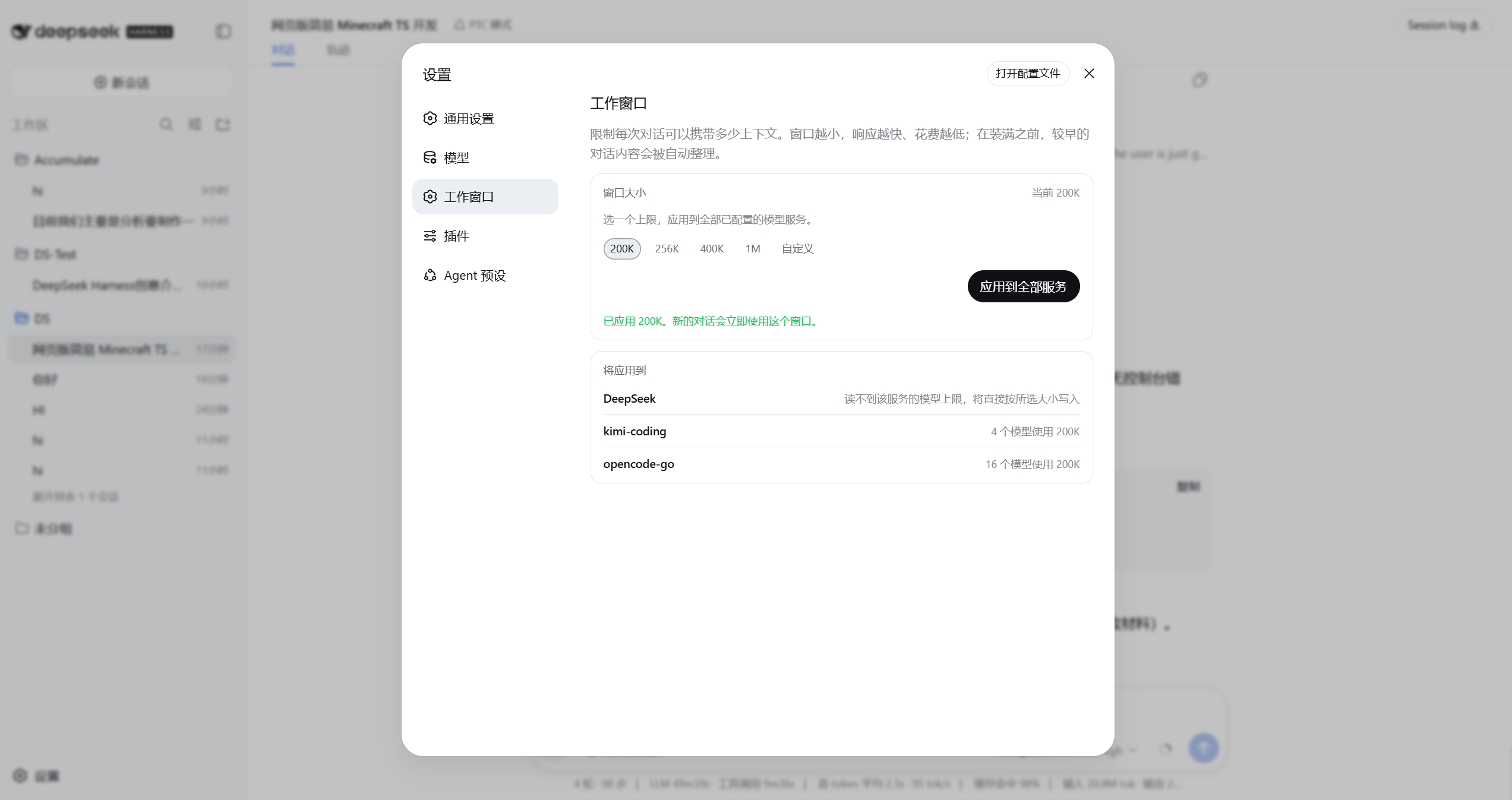
Pick a size and apply. Models, the usage ring, and official auto-compact follow through the settings event.
Unload:
npx @deepseek-ai/dsh plugin --profile web remove dsh-operating-context
Written values stay in ~/.dsh/settings.yaml; removing the plugin does not revert them. Choosing the largest preset does, because that clears the overrides rather than writing a new number.
What it writes
Capacity spelling matches the Models page: 256K = 256000, not 262144.
The write target follows the profile's shape, because the adapter resolves a capacity as entry.contextWindow ?? catalog.contextWindow ?? defaultContextWindow:
| Route shape | Written |
|---|---|
Catalog route with no models list | modelOverrides..contextWindow, plus defaultContextWindow |
Any route with a models list | every models[].contextWindow, plus defaultContextWindow |
| Hand-declared route | defaultContextWindow only |
This is why writing defaultContextWindow alone has no effect on a route whose models come from the installed catalog: the catalog's own value outranks it.
Ceilings
A model is never given a window larger than it can hold. The ceiling is read from the multi-provider adapter's installed catalog through llm.discoverModels, which for a catalog route answers from local data with no network request and no credential. For a hand-declared route, or for llm-deepseek (which registers no discovery), the ceiling is unknown and the page says so rather than guessing.
When the chosen window is at or below a model's ceiling, no override is written and any earlier one is removed — the catalog value is already correct. That is what makes applying idempotent, and what makes choosing a larger window restore native capacities.
Develop
pnpm install
pnpm typecheck
pnpm test
pnpm build
src/index.ts is a Host loader stub; all behavior is in the client bundle. api.ts, capacity.ts, ceiling.ts, and plan.ts are pure and carry the tests; store.ts and the components are the only files that touch platform modules.