GIN0076/dsh-install-review ↗★ 0
@local/dsh-install-review
在安装插件前进行安全审计、变更审查与计划批准 适合注重系统安全,需要在安装第三方插件前进行代码和权限审计的用户。
安裝
npx -p @deepseek-ai/dsh dsh plugin --profile web add github:GIN0076/dsh-install-review說明文件
閱讀完整 README ↗
Pre-install Review · 插件装前审查
Know what it is before you let it in.





Every plugin you install holds your keys. It can read every session, call every model, rewrite your profile. And "the author says it's harmless" — that is exactly what every plugin that ever went bad has said too.
Three uncomfortable facts
- Being on a list is not a safety endorsement. When the upstream list carries no capability scan, this panel says so — "upstream did not annotate capabilities" — instead of inventing a green checkmark for it.
- The ecosystem default is "install first, ask later." No backup, no plan approval, no post-install verification — when something breaks, your only rollback is the whole profile.
- All-green still does not mean harmless. But a red light always does: one block means the right move is to close the page.
This plugin does exactly one thing: before you hit Install, force the package to show its face — what it is, what it can touch, what it will change — and let you approve every change yourself.
Screenshots
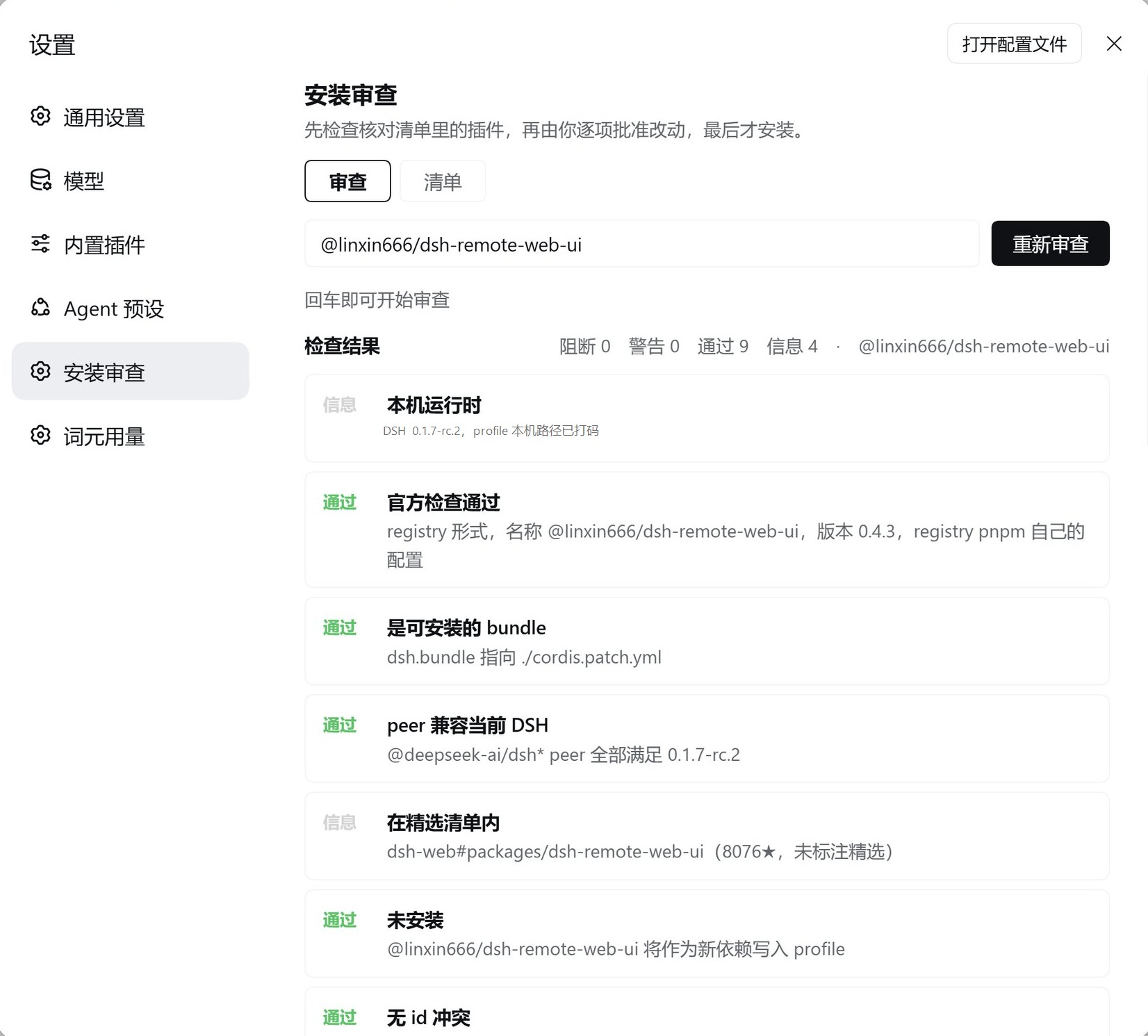
| 📋 Audit report (seconds, capabilities & red lines included) |
|---|
 |
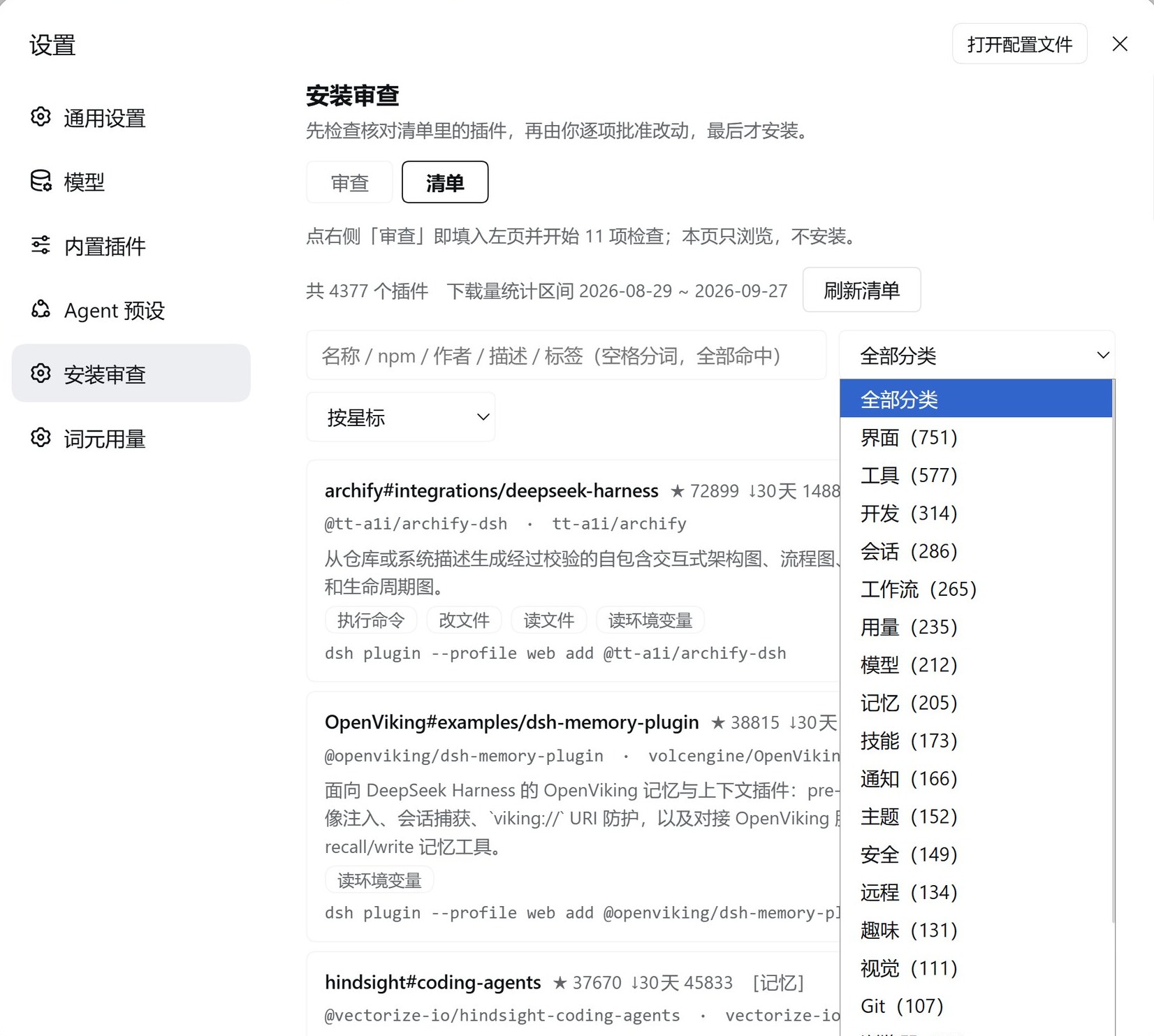
| 🗂 Browsable catalog (4,377-entry snapshot; server-side search / filter / sort) |
|---|
 |
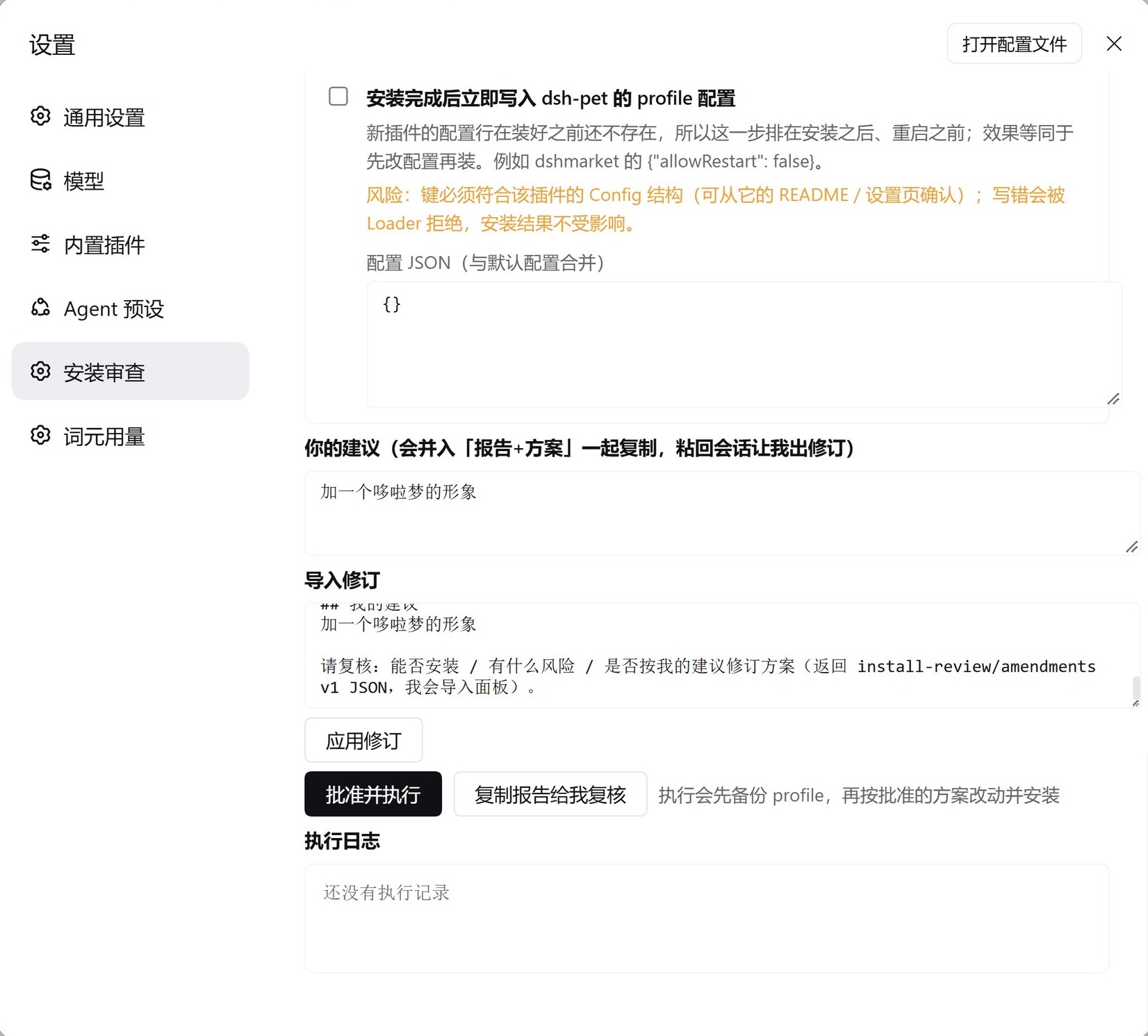
| ✅ Change plan · your note · import a revision |
|---|
 |
What it checks (13–14 checks, all read-only)
| Check | Detail |
|---|---|
| Local runtime | DSH version and profile (path auto-masked — screenshots are safe to share) |
| Official inspect | pluginManager.inspect: dsh.bundle / dsh.client / dsh.tool / dsh.page / dsh.configForm |
| Peer compatibility | Mirrors the host's own resolution (incl. includePrerelease) — 1,280 cases match host semver exactly |
| Catalog entry | Registry, repository, stars, 30-day downloads (no repo stars passed off as package stars) |
| Install state | Installed / not installed (recognises 4 loader-id shapes) |
| Loader-id collision | Intersects with every live loader row — a duplicate id crashes host startup; this check is bought with a real lesson |
| Patch override rows | The target patch's override rows: do their targets exist? double-written by another plugin? (self-review never flags itself) |
| Slot audit | Checked one by one against the local slot-catalog.ts — a slot check that cannot run is a warning: unknown ≠ pass |
| Install scripts | prepare / postinstall etc. → enters the "approve & retry" flow automatically |
| Terminal-shaped surface | CLI-flavoured description → warns it may do nothing in a web profile |
| engines | Both placements read: engines.dsh and dsh.engines.dsh (missing one misreports "undeclared") |
| Host-tampering language | Description talks about patching the DSH core → warning |
| Capabilities & red lines | The list's 10 capability tags plus red-line sentences, translated; unannotated stays unannotated |
The loop: audit → plan → approve → change → install → verify
- Audit: type
npm package/owner/repo/github:owner/repo/ a GitHub URL → report in seconds - Plan: only four executable change kinds — nothing runs unless you tick it
- Pin the version (defaults to latest; a wrong version fails and rolls back)
- Approve build scripts (when pnpm blocks one, it retries once with the exact package name pnpm reported — never a guessed wildcard)
- Write profile config after install (through the official
configEditorchannel: lock, validate, roll back; a bad key is rejected by the loader and cannot corrupt the install) - Switch source (git repository → pinned npm package)
- Your note: disagree with the plan? Write it under your note → press "Copy report for review" and paste it into your chat session → the agent returns a revision JSON → paste it into Import revision to flip tick boxes and values in one click (a mismatched target is rejected outright)
- Execute: backs up
package.json,cordis.patch.yml,pnpm-workspace.yamlandcordis.ymlfirst → applies the approved changes → installs → verifies (is it installed? any duplicate loader id?) - Build scripts blocked? The panel shows an inline "Approve `` build scripts &
retry" button — no deadlock, no overreach (a name that is no longer pending is refused by
the official
stale-approvalguard)
Boundaries (trust is built by saying what you will NOT do)
- Never edits third-party plugin code. It only touches four kinds of your own config: source, version, build approval, profile config.
- Never patches host source. Zero host patches; everything goes through public services and profile files.
- Unannotated capabilities ≠ safe. We show the facts; we do not vouch for upstream.
- This is a pre-flight check, not a code audit. It answers "can I install it, and what will it touch?" — not "is there a backdoor?"
Install
dsh plugin --profile web add github:GIN0076/dsh-install-review
- Requires DeepSeek Harness 0.1.7-rc.2 (the version this was tested against) and a web profile
- Zero runtime dependencies, no build step, no postinstall
- Hard-refresh (Ctrl+Shift+R) → Settings → 插件装前审查 / Pre-install Review
Prefer not to use git? Copy the repository locally and point the plugin manager's
install_bundleat the directory — identical result.
Uninstall
Settings → Plugins → remove, or remove_bundle in the plugin manager.
Uninstall does not delete your backups — every pre-execution backup is
written to /install-review-backup (the row's backupDir can move it).
Self-tests
node semver-selftest.mjs          # 1,280 cases, identical to host semver
node catalog-view-selftest.mjs    # categories / capabilities / red lines / projection
node patch-audit-selftest.mjs     # override-row parsing and verdicts
node audit-selftest.mjs           # parsing / peers / both engines placements / end-to-end
node runner-selftest.mjs          # backups / config edits / approvedBuilds / stale-approval
node host-selftest.mjs            # routes and same-origin fence
node client-selftest.mjs          # real react-dom SSR + revision-import loop
All seven green — zero test framework, zero dependencies.
The self-tests assume the harness checkout at
E:/DSH-OneClick(the constant sits at the top of each file — change it for another machine). The username in the fixtures is fake (localtester) precisely so the tests can prove that local paths in reports are always masked.
Disclaimer
This tool checks installability and blast radius before installation. No automated check replaces your own judgement of where a plugin comes from. Catalog data is an upstream snapshot (4,377 entries; downloads window shown in the UI) and reflects the moment it was fetched.
License
MIT © 2026 GIN0076