Jul11us/dsh-next-suggestion ↗★ 0
dsh-next-suggestion
根据上下文生成下一步指令草稿提示 适合希望在对话结束时获得连续行动建议以保持工作流连贯的用户。
安裝
npx -p @deepseek-ai/dsh dsh plugin --profile web add github:Jul11us/dsh-next-suggestion說明文件
閱讀完整 README ↗English · 简体中文
Download · Get started · Under the hood · MIT license
Next instruction suggestions
The next step, without breaking your flow.
A small, considered plugin for DeepSeek DSH. When an assistant finishes a turn, it offers up to three concrete next instructions above the composer. Choose one, refine it, and send it when you are ready.
Suggestions are optional. A click fills your draft; it never sends a message or runs an action.
Less friction. More intention.
| A little help | A clear boundary |
|---|---|
| Relevant next steps | Uses recent conversation text, open todos, tool outcomes, changed files, and the assistant's open question to propose short, concrete instructions. |
| Your words, your decision | One click fills the composer and returns focus. Edit before sending. |
| Quiet by design | Hides as you type, open the command menu, change sessions, or press Escape in the composer. Results arriving after 1.5 seconds are discarded. |
| A lighter model preference | Auto mode favors names such as flash, mini, and lite. This is a naming heuristic, not a live price comparison. |
| Small, explicit context | Sends limited text and tool names/targets—not tool outputs—to a provider configured in DSH, with common secret patterns and path usernames redacted. |
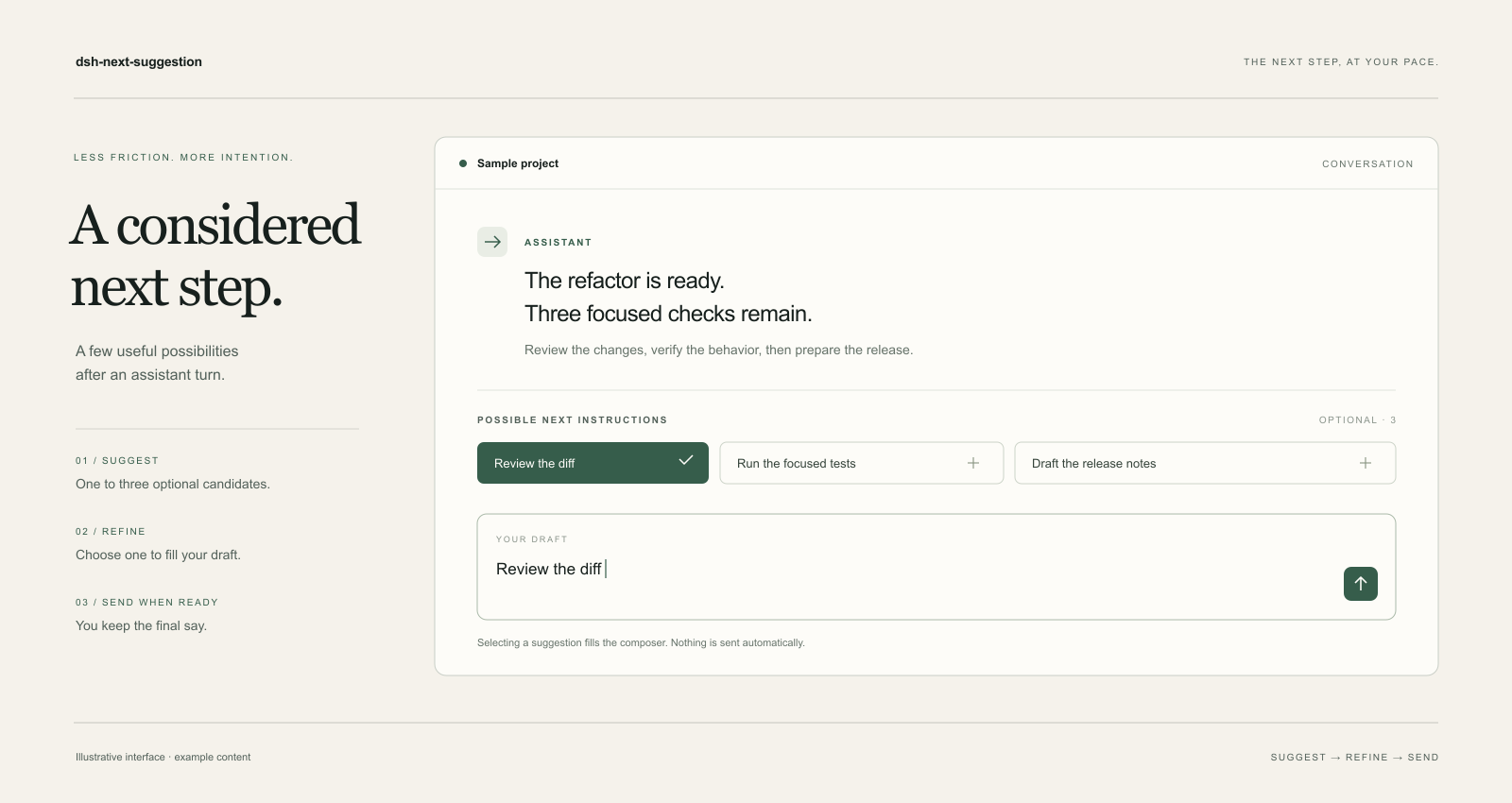
Illustrative interface with example content. Actual appearance follows your DSH theme.
A simple rhythm
- Finish a turn. Leave the composer empty after the assistant responds.
- Choose a direction. Pick a suggestion, or dismiss it with
×. - Make it yours. Review the draft, edit freely, and send it yourself.
The plugin waits for at least two user turns. Thin context or greetings may produce no suggestions. Dismissed suggestions are filtered in page memory, capped at 20 entries per session across 50 tracked browser sessions.
Why the next step is concrete
The host keeps a compact state packet for the completed turn: recent tool calls and results (name, target, success/failure), changed files, running or recent jobs, active goal/plan, open todos, and the assistant's open question. It does not separately load full tool outputs, attachment bodies, or file contents into the prompt.
The model is asked for up to five candidates. A local ranker then selects at most three by grounding (a file, test, command, or function named in the state), fit to the assistant's question, a state prior (for example, favor commit after a completed run with changes; favor fixes after a failed action), and intent diversity (change / verify / inspect / ship). This can make suggestions shorter and more specific than a generic "continue".
Getting started
Requirements: Node.js 22.19 or later, DeepSeek DSH >=0.2.1-rc.2 <0.3.0, a Web GUI or Desktop client, and a configured model provider. The original development baseline was DSH 0.2.1-rc.2; the full range has not been tested against every release.
Install the release package
- Open the latest release and copy the
.tgzasset URL. - In DSH, open Plugins → Add plugin / Install third-party plugin and enter the
.tgzdownload URL in the package field. - Enable Next instruction suggestions, restart DSH, then refresh the client.
If your installer does not accept an archive URL, extract the archive and install the inner package directory as a local plugin.
Install from source
git clone https://github.com/Jul11us/dsh-next-suggestion.git
cd dsh-next-suggestion
npm ci --ignore-scripts
Add the cloned directory through DSH's local plugin installer, enable the bundle, restart DSH, and refresh the client. A desktop-profile CLI alternative is:
dsh plugin --profile desktop add "file:C:\path\to\dsh-next-suggestion"
This version is distributed through GitHub Release. These installation methods do not require an npm registry publication.
Tune the experience
Open Plugins → Next instruction suggestions → Configure, or Settings → Next suggestions.
| Setting | Default | Purpose |
|---|---|---|
| Enable predictions | On | Turning this off stops new prediction calls. |
| Candidates | 3 | Show between one and three suggestions. |
| Provider / model | Empty | Auto-select a route, or specify your preferred provider and model. |
| Host timeout | 8000 ms | Bound the host request; the interface still has a 1.5-second display window. |
| Debug details | Off | Show token counts, latency, and call count. |
Automatic routing prefers models with lightweight names. When it falls back to a reasoning or expensive-looking model, it allows at most one prediction per tracked session. A provider-only setting stays within that provider; a model-only setting resolves that exact model. Choosing both overrides automatic routing. Prediction calls can consume provider credits.
Context, with limits
The plugin may send the session title, up to six open todos, up to six recent user/assistant turns, and a compact state packet (tool names and targets, success/failure, changed file paths, job labels, active goal/plan, and the assistant's open question) to your configured provider. It does not separately load tool output bodies, attachment bodies, or file contents into the prompt. Assistant prose is shortened and fenced code blocks are replaced with [code]. User messages, shell command text, goals, or todo labels can still contain pasted code or sensitive material.
Common API-key/token patterns, bearer strings, long base64 content, and usernames in common home-directory paths are redacted before the request. Redaction is best effort; it cannot recognize every secret or personal detail. Review the provider you select and the conversation you use it with.
The plugin does not separately read file contents, attachment bodies, or tool-output bodies into its prompt. It adds no analytics endpoint and does not write prediction context to disk. In-memory state is cleared on reload or host restart as appropriate; DSH and your provider have their own storage behavior.
Built to be understood
Two small JavaScript modules, public DSH extension points, and no build step. The host tracks turns and prepares model calls; the client renders suggestions and edits the draft. No core patches are required.
npm ci --ignore-scripts
npm test
npm pack --dry-run

# inspect the prompt of a replay case without spending tokens
node scripts/eval-replay.mjs --dry-run
The commands above run from a source checkout. Optional replay evaluation with your own provider (PowerShell):
# score top-1/top-3 against the message that actually followed a turn
node scripts/export-golden.mjs "C:\path\to\session.v4.jsonl.zstd" scripts/golden/session.json
$env:EVAL_BASE_URL="https://api.deepseek.com"
$env:EVAL_API_KEY="..."
$env:EVAL_MODEL="deepseek-chat"
node scripts/eval-replay.mjs --cases scripts/golden/session.json
npm test covers 28 host checks and 8 client checks, including the state packet, grounding/diversity ranking, open-question code filtering, job-failure ordering, timeout, cancellation, and the actual host response rendered by the client. The replay harness uses the shipped prompt, parser, and ranker; keep exported session cases out of git (they contain private conversation text). These checks do not certify every DSH version, live model response, or installer path. A slow provider, incomplete turn, insufficient context, or unavailable settings service can leave the dock empty.
An independent community plugin for DeepSeek DSH. MIT licensed.