JustGenius-s/DSH-Plugs--plugins-dsh-model-custom-ex ↗★ 8
@just-genius/dsh-model-custom-ex
替换官方模型设置页以支持视觉与思考强度选择 适合需要为自定义模型细粒度配置视觉输入声明和思考强度等级的用户。
安裝
npx -p @deepseek-ai/dsh dsh plugin --profile web add github:JustGenius-s/DSH-Plugs#e9fbcb429ec881cf068c94bab8e4e43409af1cd5&path:plugins/dsh-model-custom-ex說明文件
閱讀完整 README ↗@just-genius/dsh-model-custom-ex
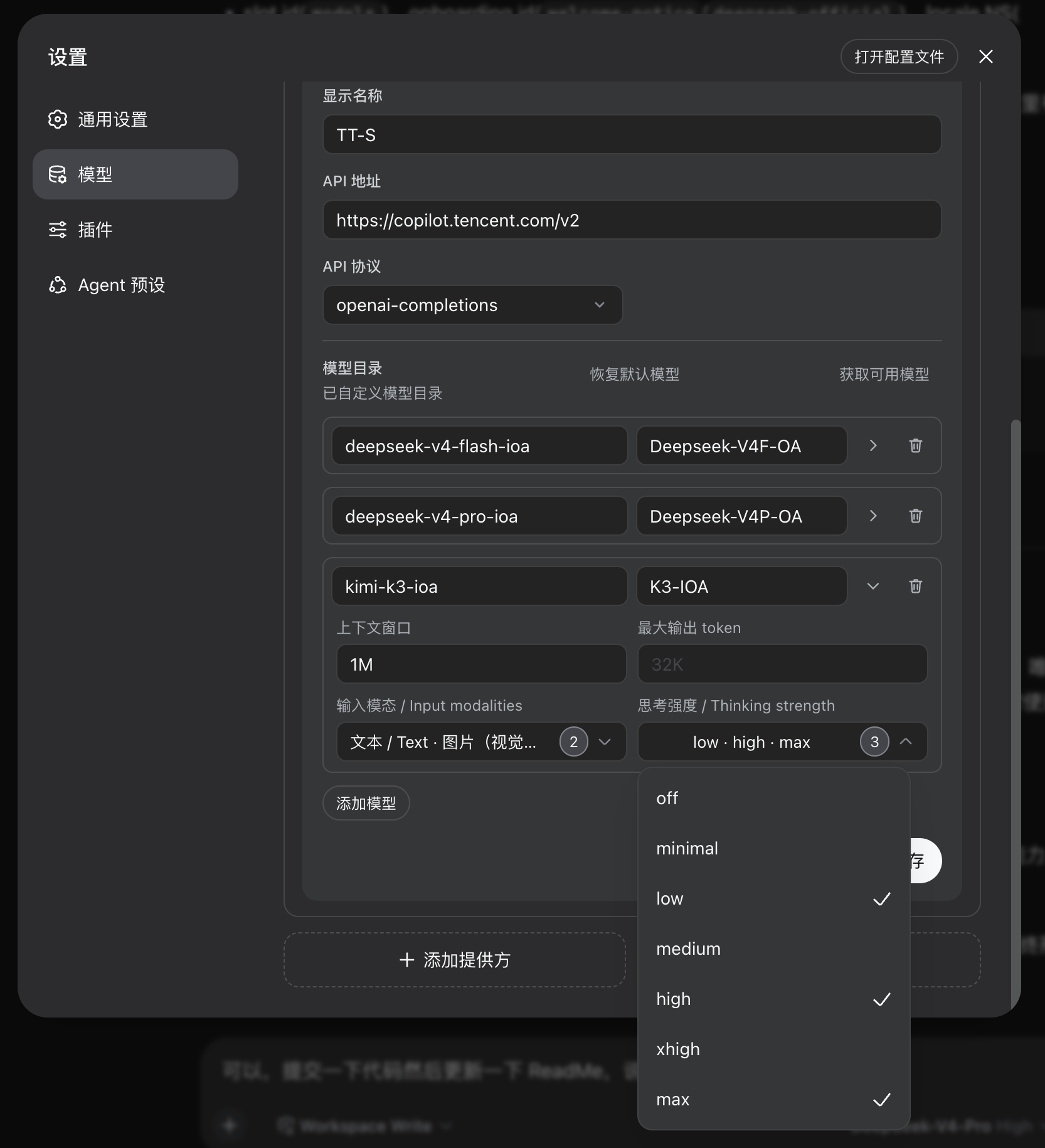
A fork of the official Models settings page (@deepseek-ai/dsh-client-ui-settings-models) that adds the two per-model controls the stock page punts to settings.yaml: vision (input) and thinking strength (reasoningEfforts).
Features
- Input modality (vision) — per-model dropdown multi-select; checking "image" declares
input: [text, image]so the model is treated as vision-capable. - Reasoning effort — per-model multi-select over off / minimal / low / medium / high / xhigh / max, written to
reasoningEfforts; the composer model picker then shows those levels. - Default thinking strength — per-model Menu on each catalog row (same chrome as the multi-selects). No empty / Default option: a stored override wins, else the model's own recommended level, else the first enabled level. Stored under
dsh-model-custom-ex.defaults, not in the pi-ai profile. - Capacity combos — context window and max output stay free-typed (
256K,1M, …) with a trailing DSH Menu of common sizes; a new row starts with max output32K. - Pixel-identical otherwise — provider rows, API keys, model fetching, delete confirmation, and onboarding match the official page; both write to the same
llm-pi-ainamespace, so the fork is 100% compatible with the official page, the composer, andsettings.yaml.
Design
| Source | Role |
|---|---|
src/index.ts | Host half: owns the defaults namespace and injects per-model defaultEffort into resolved catalog metadata |
src/shared.ts | Default-effort resolution shared by both halves |
src/client/index.ts | Registers the locale dictionary, the Models section, and the two onboarding steps — fully replacing the official plugin |
src/client/* | Forked official source; extras are the per-model selectors in ModelListEditor.tsx |
src/client/MultiSelectMenu.tsx | Dropdown multi-select and single-select built on the shared Menu / Pill primitives |
src/client/CapacityCombo.tsx | Typeable capacity input with a trailing preset Menu |
tsdown.client.config.ts | Inlines .module.css via dshCssModules, matching the official client bundle |
The fork exists because the official model-row editor renders only id / name / context window / max output — input, reasoningEfforts, and a per-model switch-to default have no UI.
The host half wraps ctx.llm.resolveModelInfo so resolved catalog metadata carries a concrete defaultEffort; the composer therefore never lands on Default for a model that offers thinking levels. The override lives in its own namespace rather than the pi-ai profile, so it never changes what the official page reads or writes.
Develop
pnpm install
pnpm typecheck
pnpm build
Syncing from upstream
The forked source comes from the deepseek-harness repo's packages/client/ui-settings-models/src/client. After an official upgrade:
- Re-copy that directory into
src/client/. - Re-apply the multi-selects and the per-model default select in
ModelListEditor.tsx. - Keep
MultiSelectMenu.tsx,CapacityCombo.tsx, and theindex.tsregistration changes.
Install
dsh plugin --profile web add ./plugins/dsh-model-custom-ex
Then disable the official plugin in ~/.dsh/profiles/web/cordis.patch.yml to avoid two Models tabs:
- id: ui-settings-models
  disabled: true
Restart DSH web (bundle-stack + cordis patch change — a refresh is not enough).
Uninstall
Remove the plugin and the ui-settings-models disable from cordis.patch.yml, otherwise the official Models page stays hidden.