Scorp1o117/dsh-motion-ui ↗★ 12
dsh-motion-ui
提供可交互UI组件、HTML/SVG动画与本地计算 适合需要丰富可视化交互、图表和表单渲染的Web端用户。
安裝
npx -p @deepseek-ai/dsh dsh plugin --profile web add github:Scorp1o117/dsh-motion-ui說明文件
閱讀完整 README ↗DSH Motion UI
为 DeepSeek Harness Web 提供可交互组件、自由 HTML/SVG 图解与动画。引导模式会主动注入设计技能、协议和示例;自由模式让模型自主设计。设置位于首页 → 插件 → dsh-motion-ui。
Interactive, declarative tool views for DeepSeek Harness Web 0.2.0-rc.2.
The plugin adds render_text (quick native typography), render_ui (validated components), render_canvas (HTML/SVG), and ui_catalog (protocol + examples). It saves per-document input state on the Host and sends explicit follow-up requests with the current parameter snapshot.
扩展可视化(v0.6.0)
在原有轻量文字、原生控件和自由 HTML/SVG 画布之外,新增扩展原生组件语言。直接传入 render_ui({document:{title,items:[...]}}),或在回答中写 dsh-ui / motion-ui JSON 源码围栏;无需为普通测验、图表和表单编写 HTML。完整组件依次预览,整轮回复结束后保存并启用交互,正文与原生“智能 UI”侧栏共用同一份文档和参数。
| 场景 | 新增能力 |
|---|---|
| 日常表达 | 卡片、分栏、列表、时间线、标签、代码、JSON、复制、公式、选项卡 |
| 数据探索 | 本地表格排序、输入筛选、CSV 导出,轻量柱/线/环图,按需加载 ECharts(含词云等) |
| 学习解释 | 单题即时判分;多题单选统一提交、正确答案与解析、重新作答,全程本地完成 |
| 数学与结构 | 带参数的安全函数绘图、Mermaid、定位图解、SVG、可旋转缩放的基础 3D 场景 |
| 信息收集 | 表单收集参数,一次显式提交后续请求;控件变化不会逐次请求模型 |
| 保存分享 | 扩展可视化的 HTML / JSON 导出位于可选详情区;HTML 内嵌组件与所需图形引擎,媒体仍使用原地址 |
例如:
render_ui({document:{title:"Git 小测",items:[
  {type:"radio",group:"q1",label:"提交记录什么?",options:["暂存区快照","所有未暂存修改"],answer:0,explanation:"git commit 记录暂存区快照。"},
  {type:"submit",label:"检查答案",groups:["q1"]}
]}})
ui_catalog({topic:"visual"}) 提供完整字段和示例;validate_ui 可只检查而不创建界面。引导模式注入组件选择、协议与短案例;自由模式只提供必要接口说明。确定无歧义的数组适配包装与声明字段的数字/布尔字符串会先无损归一化,任意 JSON 数据和源码不会被随意改写。
这一扩展复用了 MIT 项目 dsh-genui 的组件渲染与校验核心,基于 0.11.4 / 7ff0cf5,保留其许可证和来源声明。Motion UI 自行管理工具、参数持久化、流式展示、侧栏与风格提示词,并增强测验答案持久化。图形和公式引擎从本地认证路由按需加载,普通文字回答无需加载这些资源。
我们吸收的是可验证的组件能力,并未复制上游宿主插件的所有交互:不提供其 /panel 命令或输入框常驻 dock,也未开放自定义渲染器注册 API。独立 HTML 保留本地交互,但无法发送宿主 Agent 请求或打开宿主文件;外部媒体仍需网络。函数图参数沿用组件内状态,跨文档精确共享计算请使用 Motion UI 的 state/derived 或画布。
连续修改、自动反馈与案例库
- 同一界面继续编辑:
inspect_ui获取版本,update_ui追加或替换内容;操作有版本检查和去重重放,不必再生成一张。只有一个扩展根节点时,追加扩展片段会自动合并进去。保留原组件的唯一id,可在重新排版后继续恢复兼容的参数和视图状态。 - 最终源码围栏若无效或缺少关键控件,插件在同一轮回复结束检查时反馈具体诊断。最多两次去重提醒;不限制思考时长,取消生成后不触发。设置里可关闭。
- 渲染工具失败后没有交付正文,或整轮只有思考、没有任何正文和工具调用时,也会反馈完成提醒。空交付提醒允许普通文字回答,不强制生成 UI;明确要求不用回复时跳过。
- 简短正文若只是“现在补上组件”“用流程图看最清楚”等 UI 交付声明,却没有实际界面,也会触发去重提醒。此检查仅匹配可见声明,不读取思考内容;已有界面、完整正文或 UI 概念问答不因这条检查重做。
- 非关键组件被修复省略时,工具明确返回部分交付及原因;关键题目/输入控件被丢弃时拒绝把结果当成成功。已知的标题、容器拼写与声明类型包装会安全归一化。
- 首页插件设置新增八类只读场景预览:重点说明、方案对比、简易流程、数据摘要、本地测验、需求表单、函数探索、结构图解。模型通过
ui_catalog({topic:"templates",scene:"plot"})按需取一个短案例,避免每轮塞入整个案例库;自由模式不注入该设计指导。 - “运行状态”检查前后端构建、客户端渲染通道、原生侧栏、同轮反馈接口和本地资源路由;不会展示 API Key 或本地配置路径。
- 扩展表单、测验、函数图参数/视窗、表格排序、选项卡、折叠项和开关状态可保存、同步并带入导出。自动播放不按动画帧写入宿主;恢复时保持暂停。删除/改变字段语义时,模型仍应明确告知用户;不承诺把旧答案解释成新的问题答案。
日常阅读样式
生成期间支持渐进预览:文字和原生组件按完整且校验通过的块出现,HTML/SVG 先提供不执行模型脚本的静态预览。独立展示容器保留最后有效内容,后续思考不会主动卸载它;整轮结束后恢复参数并启用交互。宿主未传输增量时仍显示正常的正式结果。
展示位置统一通过正文 dsh-ui 标记定位,不再提供回答尾部和侧栏模式切换。通过 DSH 原生侧栏“智能 UI”入口查看当前会话的界面,正文和侧栏共享参数。旧 displayMode 配置保留兼容读取,但不再影响展示和提示词。
首页 → 插件 → dsh-motion-ui 的「视觉风格(仅限引导模式)」提供五套可点击预览:清爽阅读、柔和彩色、技术图解、活力展示、明亮扁平。每套可切换文字说明、双列对比、分隔列表、数据摘要和流程图解,共 25 种预览组合。切换预览只用于比较,不保存排版限制;点击风格卡片才保存选择。从下一次请求开始,只注入该风格的设计指导和两份短案例。组件、工具、状态、权限和已有界面保持原样。自由设计模式保留选择但不注入风格模板;切回引导模式后恢复使用。已有会话可能保留旧指导,对比时建议新建会话。
未选择过风格时,默认使用「明亮扁平」。已保存的其他风格继续尊重用户选择;自由模式仍不注入视觉风格模板。
明亮扁平参考 PrismFrame v0.2 的 Occamy 案例:浅彩背景、白色大圆角卡片、细彩色边线与偏移阴影,配色随解释内容变化。适配聊天宽度与内容高度,不复制视频字幕、页码或满屏留白,不使用玻璃效果。风格是模型生成偏好,并非强制重绘所有原生组件;简单文字仍走轻量排版。新增风格集中注册在 lib/visual-styles.js,设置预览、提示词和案例使用同一个注册表。
render_text 直接接收文字或原生节点,自动补齐节点 ID。八种独立预设:自然阅读 reading、简洁面板 brief、并排对比 comparison、分隔列表 list、重点提示 callout、评分摘要 scorecard、纵向流程 flow、极简文字 minimal。排版由模型按每块内容自选,设置不再提供默认文字排版。旧配置中的 defaultPreset 保留兼容读取,但不再影响提示词和生成;工具省略 preset 时安全回退到自然正文。
文字支持 size(12–48 px 或 sm/md/lg/xl/hero)、weight、color(语义色或十六进制色)、align、lineHeight;spans 可强调同一段中的部分文字。布局支持 row.columns(1–4)、gap 和 divider。日常默认采用轻边框与少量强调色。
render_text({preset:"reading",blocks:[
  {type:"text",spans:[{text:"重点:"},{text:"先交付最小完整结果",weight:700,color:"success"}]},
  {type:"link",text:"查看项目",href:"https://github.com/Scorp1o117/dsh-motion-ui",variant:"primary"}
]})
同一回复可调用多次,每份文档独立选择预设、配色并保存参数。正文定位时,每份成功结果使用自己的文档 ID 标记一次;没有标记时回退至回答下方。生成期间先逐步预览完整内容,回复结束后恢复参数并启用交互。
link 或 button 支持三种按钮外观:primary、secondary、text。href 打开 HTTP(S) 网页,path 通过 DSH 原生文件打开接口打开本地文件(可相对当前工作区);仅在用户点击后触发。每个按钮只能指定一个目的地:网页、文件或 Agent action。不会向画布开放宿主文件或工具权限。
Reliable process guides (0.5.5)
Static steps accept a direct items array without invented task statuses. The native tool schema now describes every registered component field and the nested step item structure. Exact lossless items: {item: [...]} adapter wrappers and literal boolean strings on details.open are normalized before native checks; ambiguous or unsafe inputs remain errors. Invalid steps report the node, index and correction. Failed tool calls retain their error in a compact message.
Easier authoring and cleaner visuals (0.5.4)
The tool schema exposes the document structure and accepts common authoring forms: inline table/chart rows, Chinese identifiers, text metrics, table captions and structured canvas state (type:"json", array/object, max16KiB per value). Runtime arithmetic and chart series still require numbers; unknown fields and unsafe properties remain errors. Prefer passing a document object directly and use render_canvas for HTML/SVG source.
The default display hides bottom diagnostics/history/parameter disclosures. Canvas export/reset/stop live in a compact top-corner menu. Optional details can be enabled under Home → Plugins. Rounded surfaces and soft gradients follow the host theme; canvas height fits content after rendering and shrinks when content is removed.
Install
Install the published plugin (or paste dsh-motion-ui into Home → Plugins → Add plugin):
dsh plugin --profile web add dsh-motion-ui
dsh web --no-open
The release artifact includes the generated browser bundle; users installing the tarball do not need the build tool. Restart an existing Web process after installation, then reload its browser page. Source builds are also supported: npm ci --legacy-peer-deps (DSH peers are supplied by the host), npm run build, npm test, then npm pack and install the generated tarball.
Development installs of dsh-generative-ui must be uninstalled before installing dsh-motion-ui; do not enable both because they register the same tools. Existing UI documents remain readable: the internal dsh-generative-ui storage directory, result metadata and authenticated route namespace are retained for compatibility. Plugin settings must be selected again under the new plugin entry.
模型生成效果 / Model-generated UI
以下是模型在 DSH 中实际生成并运行的界面,展示原生组件与自由 HTML/SVG 画布的组合。截图保留模型的实际布局与内容;动画展示为静态帧。它们来自开发期测试,代表这些案例的结果。
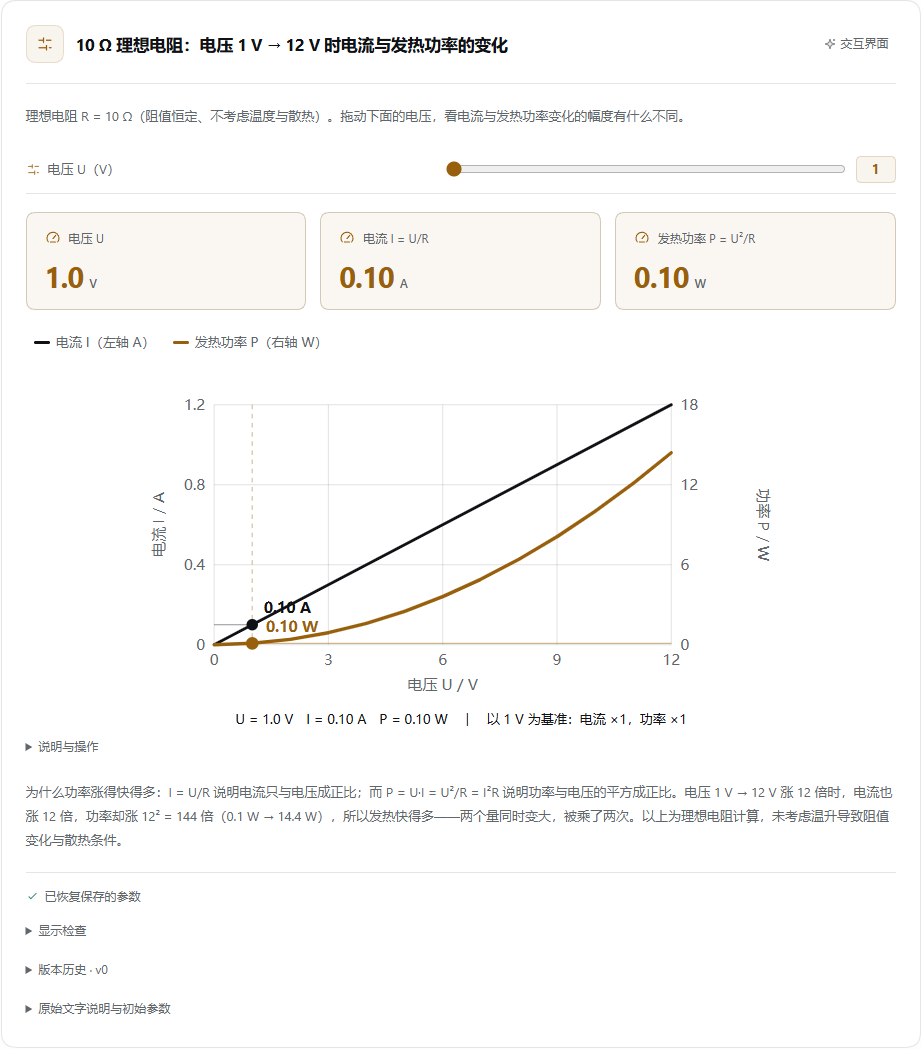
电压、电流与发热功率
DeepSeek V4.1 Flash Fast · 主动选择 UI。 用户只询问电压变化时电流和发热功率为什么不同,模型生成滑块、指标卡和联动曲线,用线性与平方关系解释差异。
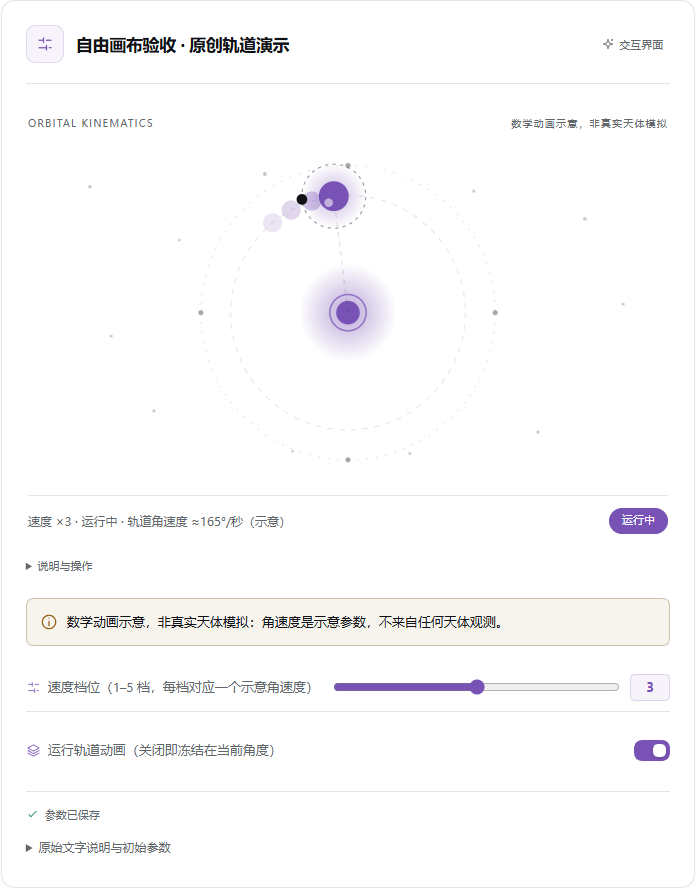
SVG 轨道动画
DeepSeek V4.1 Flash · 按文字需求生成。 模型自行编写 SVG、CSS 和动画逻辑,组合轨道图、速度滑块与运行开关;这是数学动画示意,并非真实天体模拟。
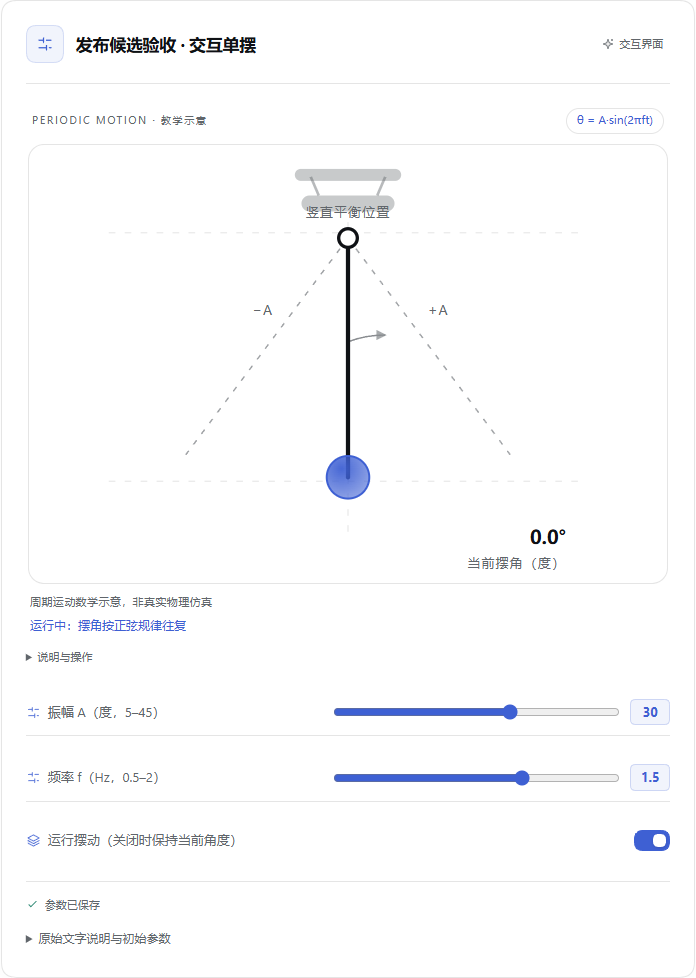
周期运动单摆
DeepSeek V4.1 Flash · 按文字需求生成。 振幅和频率控件驱动 SVG 摆动,支持暂停并保持当前角度;界面明确标注它是周期运动数学示意,而非真实物理仿真。
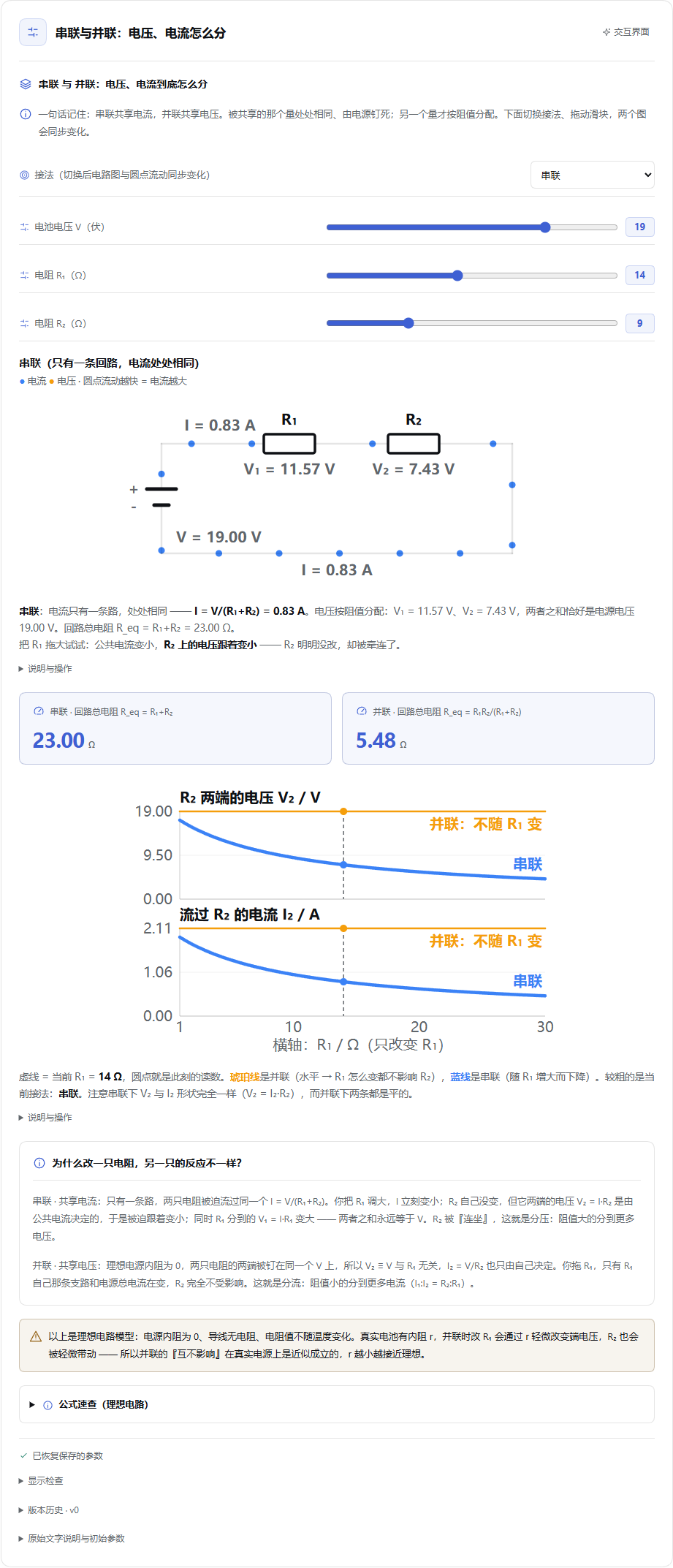
串联与并联电路
DeepSeek V4.1 Flash Fast · 主动选择 UI。 用户要求讲清两只电阻怎样分配电压和电流,模型生成接法切换、三个参数滑块、电路图、指标和对比曲线。下面展示完整界面。
Use
Lightweight by default (0.5.3)
静态图解、简短流程、方案对比和小看板都是完整的 UI,不要求添加控件或动画。引导模式优先注入静态流程与对比示例,计算器随后;复杂动画示例留在按需目录中。ui_catalog({topic:"quick"}) 提供四个轻量起点。画布可直接使用 .ui-flow、.ui-step、.ui-arrow 和 .ui-callout,无需重复编写样式或脚本。模型仍可按用户需求生成复杂界面;这些是默认表达指导,不是思考时间或输出截断。
每个文档在回答区域只保留一个展示实例。正文标记缺失时仅回退一次;标记后来出现或被删除时自动迁移。提交成功后退出同一调用的工具预览。手动打开的侧栏仍可作为独立视图与正文共享参数。
Canvas delivery improvements (0.5.2)
Free canvases now include optional theme-aware .ui-* primitives for typography, controls, result readouts, SVG nodes, connectors and annotations. Guided mode actively injects a construction handbook covering Chinese label widths, connector routing, actual rendered SVG font sizes, validated calculations and reset behavior. Free mode retains autonomous composition and only receives the interface/delivery contract.
Validated native blocks and inert HTML/SVG previews appear progressively during generation. Preview roots survive tool-card and tail-seat replacement; incomplete or failed input never activates scripts. The final UI takes over after the entire turn ends and parameter restoration enables controls. Failed calls, retries, cancellation and conversation navigation clean transient previews.
Each committed canvas offers 说明与操作 → 导出独立 HTML. The downloaded file includes the current parameter snapshot, the shared calculation interpreter and an isolated canvas. Declared state and derived results recompute locally without DSH or external libraries. It is a single-canvas export, not a complete mixed native layout; it does not send Agent requests or save back to DSH. Reloading the file restores the export-time parameters. External resources remain unavailable.
These improvements adapt the public design-system/skill, CSS-first streaming and standalone-export ideas from CopilotKit/OpenIntelligentUI. The implementation uses DSH's existing state/validation/sandbox contract, without adding its separate router service or CDN execution model.
Presentation, authoring and history (0.5.2)
Presentation uses same-conversation documentId markers in the answer. The model receives marker instructions for every successful UI tool result; missing markers retain a visible fallback. Tail/sidebar mode selectors have been removed. The native Intelligent UI sidebar tab lists current conversation documents; inline UI adds no sidebar button. successfully saved inputs synchronize between the inline view and sidebar, with explicit conflict/retry handling for concurrent drafts.
For simple formulas, write derived: {power: {expr: "state.V * state.V / state.R"}} and bind a metric with {ref:"derived.power"}. The authoring parser compiles to the existing bounded interpreter, including dependency/cycle validation. It supports arithmetic, comparisons, ternary conditions, parentheses, double-quoted strings, booleans and min/max/round/abs. It does not execute JavaScript or introduce a second calculation runtime. Existing op/args documents remain compatible; freeform animation continues to use the isolated canvas.
Each UI provides 版本历史 with read-only initial-state previews and restore. Preview never executes canvas scripts or writes input state. Restore appends a new head with the chosen document, retaining prior versions and current saved inputs; stale requests fail rather than overwrite another revision. The previous head is archived before replacement, and a failed head write cannot expose a fictitious future version. Preexisting documents start their available history at the first version observed after this update; overwritten older development revisions cannot be reconstructed. Archived input definitions must remain compatible. History uses the same authenticated Connection bridge and conversation ownership checks as document access.
Ask for the useful result naturally, for example: “Create an interactive theoretical weight-size calculator; distinguish estimated weights from real inference VRAM.” The plugin actively injects its design skill, complete protocol and minimal static and calculator worked examples through DSH's system-prompt service; the model does not need to discover a skill file or call a catalog to receive this guidance.
The packaged skill source is skills/intelligent-ui/SKILL.md. It teaches scene selection, composition, diagram grammar, theme/color/icon choices, responsive labels, local state, animation and error repair. lib/ui-skill.js injects it together with the shared protocol and concrete calculator/animation examples. It adapts public OpenUI, Diagram Design and Taste Skill ideas to DSH; it is not OpenAI's internal prompt. ui_catalog remains available for additional examples. This lowers the discovery/syntax burden for smaller models; it cannot guarantee complex program quality for every model.
Supported components: heading, text, card, row, column, metric, table, bar/line chart, numeric/text input, slider, select, toggle, follow-up button, badge, progress, ordered steps and collapsible details. Charts provide their full data as an accessible table. Controls compute locally without calling a model on each change.
The exact protocol and runnable examples are in lib/catalog.js and examples/. Component attribute definitions in lib/components.js drive both validation and capability discovery. ui_catalog() returns the protocol, component fields and two compact static examples; ui_catalog({topic:"canvas"}) adds the full design guide and four distinct visual examples. Other topics are quick (four lightweight static layouts), data, scenes, and all (fourteen examples). This avoids sending every example on each request.
The tool card retains a text result. A state-only conversation extension replays standard successful tool results into the official conversation.chat.turnTail list slot, so the interactive UI stays visible when DSH folds work details. It does not modify DSH core or add custom persisted event types.
Default visual design
Standard components receive the same theme-aware design, built-in line icons, clear metric hierarchy, section cards, switches, colored charts, and responsive controls. Existing documents need no changes. Fixed optional icon/tone tokens are documented in ui_catalog; freeform SVG/CSS belongs in an isolated sandbox node. Tones are static semantics and never infer safety from a number. On narrow screens, chart plots and tables scroll internally to preserve readable labels.
Heading/text/card titles are included in the default-state text projection. Conditional text uses a derived if expression returning strings; examples/conditional-budget.json demonstrates it. Comparison aliases gt, gte, neq supplement the existing operators.
Scene designs
Optional presentation: {layout, accent, density} chooses an authored scene design:
| Layout | Suitable content | Visual treatment |
|---|---|---|
| dashboard | Metrics, trends, analysis | Summary metrics with accent rules and chart hierarchy |
| workbench | Calculators, adjustable parameters | Grouped controls, input separators and result panels |
| comparison | Parallel alternatives | Equal choice cards, optional featured discussion focus |
| guide | Instructions, checklists | Ordered step rail and supporting details |
| status | Observed task snapshots | Header band, counts, progress and stages |
| report | Findings, methods and evidence | Reading hierarchy, inset sections and collapsible appendix |
Accent tokens: blue, teal, violet, amber, rose. Density: comfortable or compact. Cards may select surface: "outline" | "soft" | "featured". Omitted presentation retains the original design. All variants inherit DSH's light/dark theme and responsive behavior. Fourteen available examples include six scene documents and four canvases: bicycle disassembly, sine motion, Agent relationships and speed/memory scatter analysis.
Progress requires 0 <= value <= max with positive max. Steps use explicit pending, active, done, error statuses; these are declared snapshots, not automatic subscriptions to Host