Zhangw1998/dsh-usage-dashboard ↗★ 0
dsh-usage-dashboard
按项目和提供商统计 Token 用量、估算花费并显示余额 适合需要跨项目、跨模型统计 Token 消耗并估算 API 费用的用户。
同名套件的其他儲存庫
安裝
$
npx -p @deepseek-ai/dsh dsh plugin --profile web add github:Zhangw1998/dsh-usage-dashboard說明文件
閱讀完整 README ↗dsh-usage-dashboard
English · 简体中文
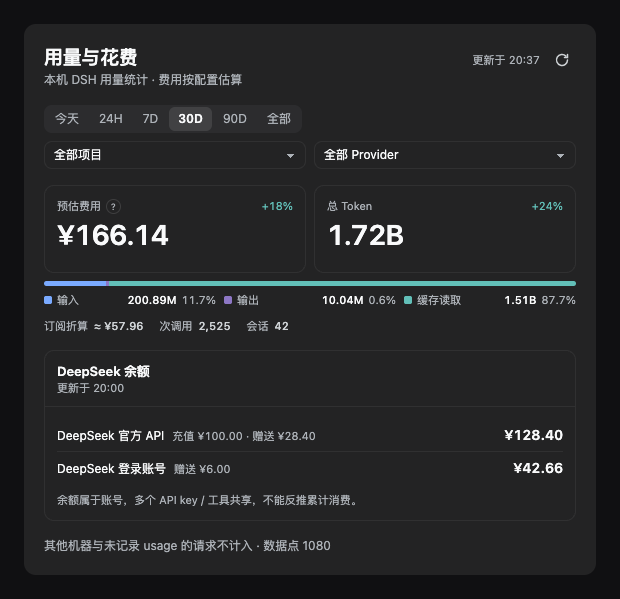
A usage and cost dashboard for DeepSeek Harness (DSH): token and call counts broken down by project, provider and model, cost estimated from your local price config, and your DeepSeek account balance — all on one screen inside Settings → Usage & Cost.
Screenshots use synthetic demo data — no real account information.
Features
- Two primary KPIs plus one composition bar — estimated cost, total tokens, and the input / output / cache-read split in a single glance.
- Ranges — Today, rolling 24H, 7D, 30D, 90D, All, custom.
24His a rolling window and is not the same as "today". - Three combinable filters — project, provider, model. Click a provider row or a project row to drill in.
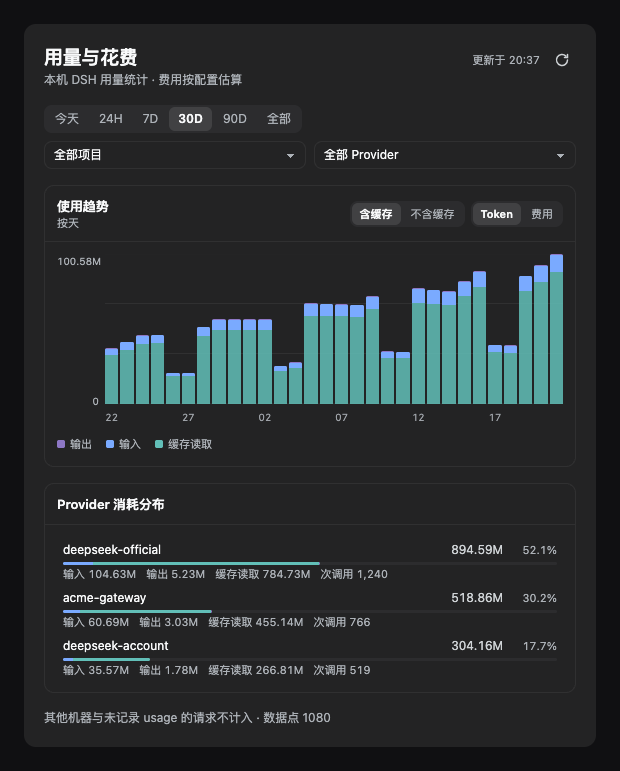
- Trend chart — toggle between tokens and cost; toggle cache in or out (cache is usually >95% of all tokens, so hiding it is the only way to see the input/output shape).
- Provider breakdown — input / output / cache / call count per provider, with the bar segmented by composition.
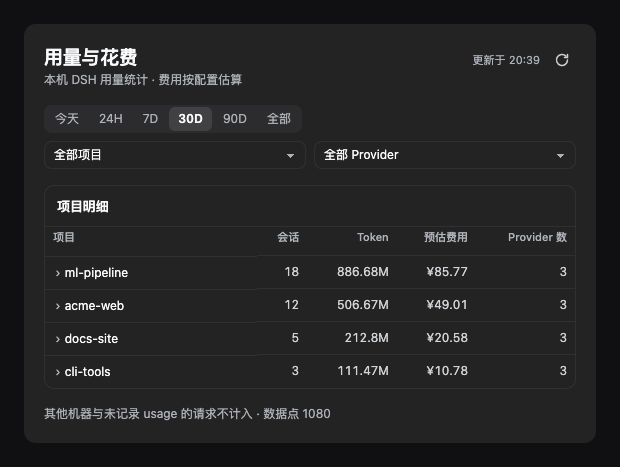
- Project table — expand a row to see which providers that project used, with tokens and cost each.
- Balance — DeepSeek API-key wallet and logged-in account wallet on separate rows, with top-up and bonus listed apart.
- Floating card — pinned bottom-right on the chat page, collapsed to a
Today ¥3.42 · 1.2Mpill; expand for today's breakdown and balance. Draggable, position remembered. - Refresh policy — refreshes only when you open the settings page, expand the card, or click refresh. No background polling: a full scan costs ~12s, so an idle page must not burn CPU. Data older than 10 minutes is dimmed as a staleness cue.
More screenshots
Install
Requires a DSH build that ships the dsh plugin subcommand (tested on 0.2.1-rc.2).