dsh-prompt-rail
在Web会话视图旁提供垂直的用户提示快速跳转导航条。 适合长会话中需快速定位历史提问的用户,悬停预览、点击跳转。
安裝
$
npx -p @deepseek-ai/dsh dsh plugin --profile web add github:Zzzzkd/dsh-prompt-rail說明文件
閱讀完整 README ↗DSH Prompt Rail
English | 中文
Prompt Rail is a compact vertical quick-jump rail for the DeepSeek Harness Web conversation view. One mark represents one loaded ordinary user prompt. Hover or keyboard focus shows its preview; clicking scrolls to that prompt.
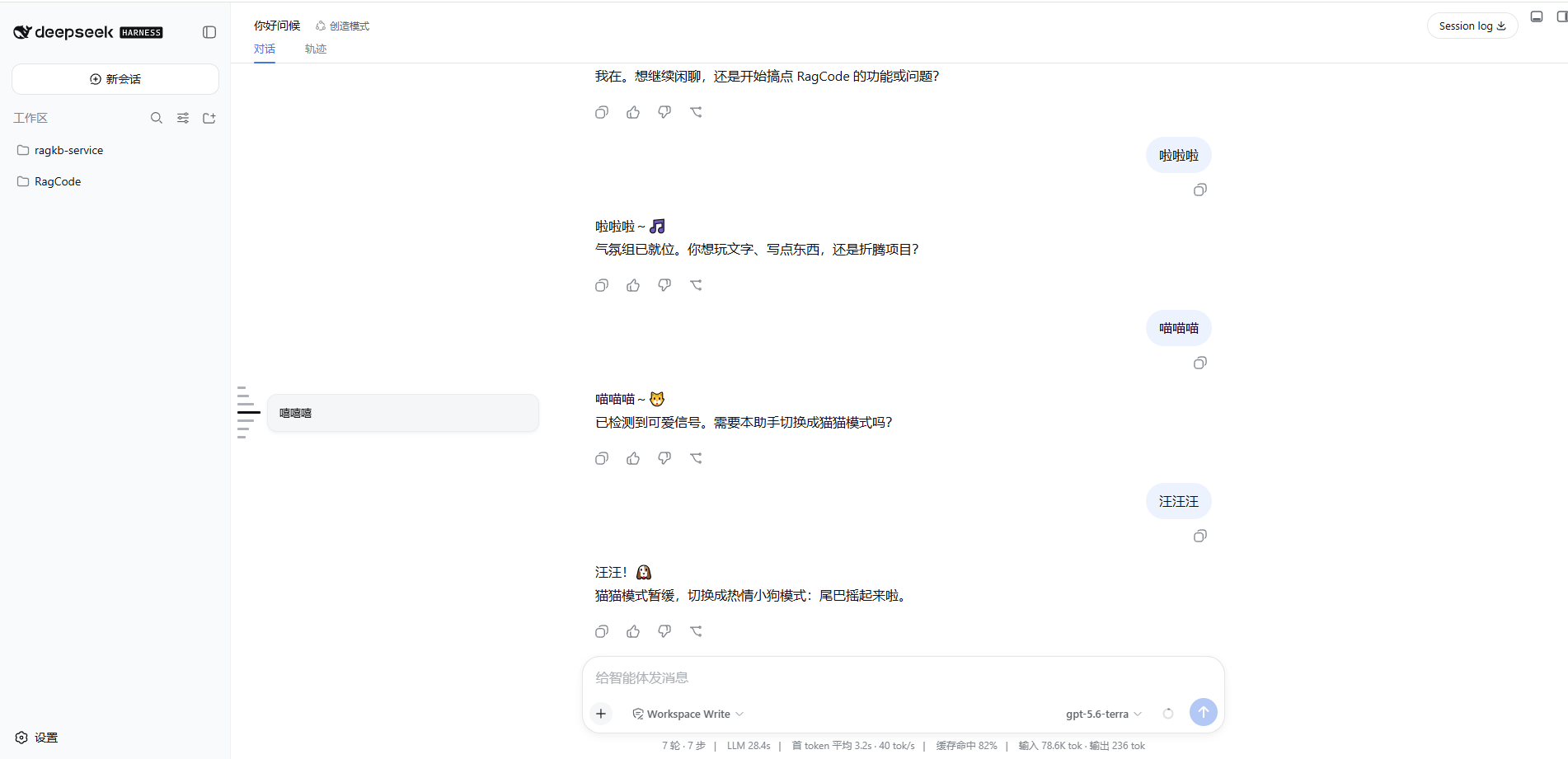
Behavior
- The rail stays vertically centered beside the session sidebar.
- Every mark has a 10px high hit slot, while its default visible mark is an 8px by 3px light line.
- Hover/focus makes the current mark 28px wide and dark; nearby marks taper to 20px, 14px, and 10px.
- Clicking records the selected prompt. When the pointer leaves, all marks return to their default length while the selected mark stays dark.
- Assistant, tool, command, steering, and injected-context rows are excluded. A one-prompt conversation still renders one mark.
Install
Clone or copy this repository into the Harness root plugins directory:
deepseek-harness/
└─ plugins/
   └─ dsh-prompt-rail/
Then open a terminal in the deepseek-harness root and run:
Windows
.\plugins\dsh-prompt-rail\install-and-restart.bat
macOS / Linux
node ./plugins/dsh-prompt-rail/compat/install.mjs
pnpm dsh web
Keep the plugins/dsh-prompt-rail directory after installation.
Development
The development layout expects sibling checkouts:
workspace/
├─ dsh/                       # DeepSeek Harness checkout
└─ dsh-prompt-rail/
Then run:
pnpm install
pnpm run check
lib/ is committed because profile installation loads the prebuilt Host and browser files without running package build scripts.
Release checklist
- Add an exact compatibility patch for every supported pre-slot Harness revision.
- Run
pnpm run checkand exercisenode compat/install.mjs --apply-onlyin a clean matching checkout. - Commit source,
lib/,compat/, README files, screenshot, and lockfile. - Push a
v0.1.0tag and create a GitHub Release from that tag. - State the compatible Harness versions and revision hashes in the release notes.
License
MIT