ai-tool-labs/dsh-plugin-square ↗★ 0
dsh-plugin-square
DSH侧边栏一体化管理插件、专家、技能与连接器 适合需要在一个地方统一管理和发现本地及社区插件与技能的DSH用户。
同名套件的其他儲存庫
安裝
npx -p @deepseek-ai/dsh dsh plugin --profile web add github:ai-tool-labs/dsh-plugin-square說明文件
閱讀完整 README ↗dsh-plugin-square
An all-in-one workspace plugin for DSH (DeepSeek Harness): it adds a global
「Square」panel to the Web GUI sidebar that manages Skills / Experts / Connectors (MCP) / Plugins
in a single place. Web (dsh web) and Desktop (DeepSeek Harness.app) share the same code and build output.
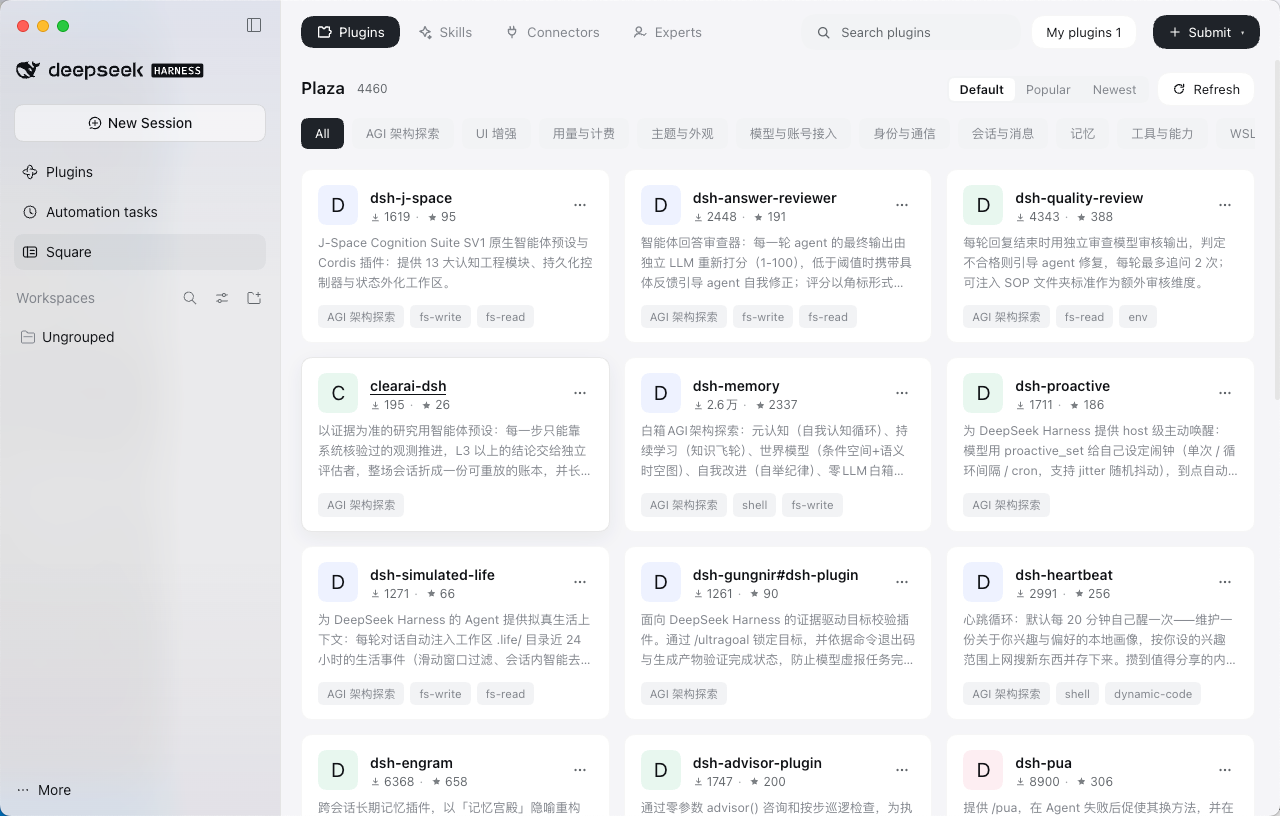
Sidebar → 「Square」panel: the four tabs show the Square (official/community catalog) by default; the 「My Experts / My Skills / My MCP / My Plugins」items in the top-right open sub-pages to manage local content, and 「Back to Square」at the top of the sub-page returns to the Square.
1. Installation
Published on npm and GitHub:
dsh plugin --profile web add dsh-plugin-square            # install from npm
dsh plugin --profile web add github:ai-tool-labs/dsh-plugin-square   # or from GitHub
# Desktop: open the "Plugins" panel in the sidebar → click "Add Plugin" → type "dsh-plugin-square" → Install
# Restart harness after installing to take effect (Desktop: restart the App; Web: restart dsh web)
A 「Square」entry then appears in the sidebar; click it to open the panel.
2. Screenshots
The Square panel as it appears in the Web GUI sidebar:
3. Development
pnpm --filter dsh-plugin-square typecheck    # host + client tsconfigs
pnpm --filter dsh-plugin-square build        # tsc(host) + tsc(client .d.ts) + esbuild bundle
pnpm --filter dsh-plugin-square smoke        # host smoke test (real Cordis lifecycle + filesystem + routes)
pnpm --filter dsh-plugin-square test:routes  # route integration (expert/connector write paths)
pnpm --filter dsh-plugin-square check:client # bundle shape / id / external-dependency allowlist + mock loader
Building and installing from source (developer)
pnpm --filter dsh-plugin-square build                                 # build (run pnpm install in the workspace first)
dsh plugin --profile web add /absolute/path/dsh-plugin-square    # 2A) Web profile
# 2B) Desktop: the profile is exclusively owned by Electron; use a relative path to write it into the manifest and link via pnpm
python3 - <<'PY'
import json, pathlib
p = pathlib.Path.home() / '.dsh/profiles/desktop/package.json'
d = json.loads(p.read_text())
d.setdefault('dependencies', {})['dsh-plugin-square'] = 'link:/absolute/path/packages/dsh-plugin-square'
bundles = d['dsh']['profile']['bundles']
if 'dsh-plugin-square' not in bundles:
    bundles.append('dsh-plugin-square')
p.write_text(json.dumps(d, indent=2) + '\n')
PY
cd ~/.dsh/profiles/desktop && CI=true pnpm install
# 3) Restart harness (Desktop: reopen the App; Web: restart dsh web)