chendefine/dsh-web-fetch-playwright ↗★ 8
dsh-web-fetch-playwright
使用Playwright渲染网页并转换为Markdown 适合需要对复杂网页进行真实浏览器渲染和去噪爬取的任务。
安裝
npx -p @deepseek-ai/dsh dsh plugin --profile web add github:chendefine/dsh-web-fetch-playwright說明文件
閱讀完整 README ↗Configuration
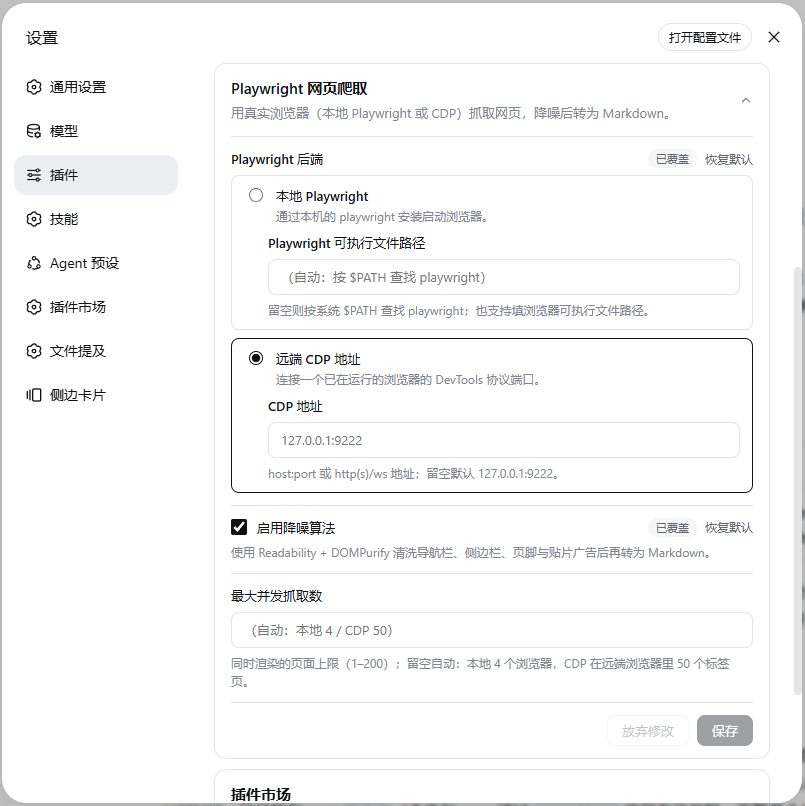
The Plugins page (侧边栏 → 插件) opens the form one click from the list: the dsh-web-fetch-playwright card lands on the package page with the full form between its description and its rows, and the row's own configure control opens the same form under the plugin's title. It edits the web-fetch-playwright settings section — derived from the plugin entry's Config schema — live:
| Field | Default | Description |
|---|---|---|
backend | local | Radio: Local Playwright or Remote CDP endpoint, each with its own nested input. |
playwrightPath | (blank) | Local backend: path to a playwright executable or a Chromium-family browser binary. Blank = discover on $PATH, then fall back to the bundled playwright-core. |
cdpEndpoint | 127.0.0.1:9222 | Remote backend: host:port, http(s)://… or ws(s)://…. |
shareBrowserContext | true | CDP backend only. Checked (profile mode): each fetch is a tab in the remote browser's default context — its real profile — so cookies/localStorage are shared and its persistent logins apply; only the tab closes when the fetch ends. Unchecked (isolated mode): a fresh incognito-like context per fetch, nothing shared. Local backend ignores this field. |
denoise | true | Run the denoise pipeline; off returns the full rendered HTML for the tool layer to convert. |
maxConcurrency | (auto) | How many fetches may render at once (1–200). Blank = backend default: 4 for local (each slot launches a browser) / 50 for CDP (each slot is just a tab in the already-running remote browser). Beyond the limit, fetches wait briefly; if no slot frees within 20s they fail with WEB_FETCH_TIMEOUT and a hint to retry or raise this setting, rather than hanging until the tool budget aborts. |
challengeWaitMs | 15000 | Bounded wait (ms, 0–60000) for a Cloudflare challenge to clear naturally in the same tab. 0 disables the whole challenge path — the first response is returned as-is (the pre-0.2.5 behavior). |
challengeRetries | 1 | Same-tab re-navigation attempts after a wait window runs out (0–3); any clearance cookies the browser earned stay in the context for the retry. Everything stays inside the 45s per-fetch deadline. |
Local backend resolution order:
- The configured path (auto-detected as Playwright CLI or browser binary).
- A
playwrightexecutable on$PATH(its package knows that installation's browser registry). - The bundled
playwright-core— requiresPLAYWRIGHT_BROWSERS_PATHor browsers in the default cache; otherwise the error suggestsplaywright install chromium.
Windows note —
$PATHis scanned with the platform delimiter (;), but npm/pnpm global installs exposeplaywrightas.cmd/.ps1shims whose location does not walk up to the package root, so discovery may still land on step 3 (the bundled core). To drive a specific installation's browser registry, pointplaywrightPathat theplaywrightpackage directory or a browser executable.
CDP mode needs no local browser: the provider holds one shared connection for its lifetime (reconnecting automatically if it drops, and reconnecting to the new endpoint when the setting changes), and every fetch leases a tab in the remote browser that closes when the fetch completes. Concurrency therefore counts tabs, which is why the CDP default is high (50). Unloading the plugin drops the shared connection (the remote browser itself is never closed).
The CDP context modes (share the browser's profile or not)
With Share the browser context checked (default, profile mode), each fetch is a tab in the remote browser's default context — the real profile. Cookies and localStorage come from and are written back to that profile, so sites the browser is logged into are fetched logged-in, exactly like a tab you open by hand. The shared context is never closed; resource filtering and popup guards attach to the fetch's tab only, so your other tabs are untouched. With it unchecked (isolated mode), every fetch gets a fresh incognito-like context — anonymous reads, nothing persists.
Profile-mode risk notes — it upgrades web_fetch from "anonymous read" to "acts as the browser's logged-in user":
- A fetched page that talks the agent into a GET-style state-changing URL (logout, settings change, API call) will send it with your session cookies.
- Concurrent fetches to the same site share one cookie jar; one fetch's logout or
Set-Cookieaffects the others. - Output starts depending on the browser's history (A/B buckets, language preferences). The remote profile also keeps accumulating site data; the plugin never cleans it.
Persistent logins require a persistent user-data-dir. Headful (recommended — log in by hand once):
google-chrome --remote-debugging-port=9222 --user-data-dir="$HOME/.config/chrome-dsh-profile"
Headless server (pre-seed logins in a headful environment first): chromium --headless=new --remote-debugging-port=9222 --user-data-dir=/data/chrome-dsh-profile. Do not add --incognito or a throwaway user-data-dir — either defeats profile mode. Design notes and verified playwright-core facts live in docs/context-mode-profile.md.
Cloudflare challenge handling (bounded natural wait)
Some strict sites serve a Cloudflare interstitial before the real page. A real browser often passes the check on its own within a few seconds — but a fetch that only looks at the first response hands you the interstitial as if it were the page (the pre-0.2.5 behavior; reproduce it any time with challengeWaitMs: 0, or — from a repo checkout, after pnpm build — run node scripts/challenge-demo.mjs for a local simulated before/after, and node scripts/challenge-online.mjs against a real site).
With the wait on (default):
- Detection — a response carrying
cf-mitigated: challenge(the documented signal for every challenge page type), or a 403/503 HTML document from aserver: cloudflareedge, or the localized interstitial itself (title family like "Just a moment…",请稍候…, "Минутку…", plus structural markers:/cdn-cgi/challenge-platform/scripts,#challenge-*elements,cf-chl-widget-frames,window._cf_chl_opt). The content-level markers are the fallback tier and only run on challenge-compatible responses — 403/429/503 or a Cloudflare edge (server: cloudflare/cf-ray) — because interstitials never ship as a plain 200, so an ordinary article that merely quotes challenge text can never be mistaken for one. Cloudflare Bot Management's passive JavaScript-Detections telemetry (/cdn-cgi/challenge-platform/scripts/jsd/, injected into every normal page of a protected zone — e.g. openrouter.ai) is neutralized before the prefix scan, so protected 200 pages with real content never misclassify. A hard block ("Sorry, you have been blocked") is classified separately and fails immediately. - Bounded wait, same tab and context — the fetch polls the live DOM (500ms interval) for the challenge to disappear while the browser runs its own verification; the last main-frame navigation response is tracked so the reloaded real document's status and headers are the ones reported. SPA-style clears (content swapped without any navigation) are caught by the same DOM probe.
- Bounded retry — when a window runs out, the same tab re-navigates once (default;
challengeRetries) with whatever clearance cookies the context already holds. - Clear failure —
WEB_FETCH_CHALLENGE(a provider-specific code the web seam's open-stringcodeallows) naming the site, the budget spent, and the last challenge status.
Security boundary (deliberate): no clicking through Turnstile, no CAPTCHA solving or token injection, no fingerprint/UA spoofing, no proxy rotation, and no cookie export — in isolated mode the clearance a fetch's browser earns dies with that fetch's context; in profile mode it stays in the remote browser's own profile, which this plugin never copies or cleans. The wait is always bounded by challengeWaitMs and the 45s per-fetch deadline; nothing blocks forever.