dsh-overleaf
在会话页嵌入Overleaf工作台标签页 适合需要边聊天边在Overleaf中编辑、编译和预览LaTeX的用户。
同名套件的其他儲存庫
安裝
npx -p @deepseek-ai/dsh dsh plugin --profile web add github:gychen-NJU/dsh-overleaf說明文件
閱讀完整 README ↗dsh-overleaf
An embedded Overleaf workbench plugin for DeepSeek Harness (DSH) Web. It adds a fourth tab next to Chat / Trajectory / Context on the session page: the tab loads your Overleaf site (public cloud or self-hosted such as https://tex.nju.edu.cn) through a same-origin reverse proxy, so the page renders and stays fully operable — editing, compiling, PDF preview — while the native DSH composer stays below it, with selection quoting, caret insertion, and LaTeX assist panels wired between the two.
+--------------------------------------------------------------+
|  Session tabs:   Chat | Trajectory | Context | [Overleaf]     |
+--------------------------------------------------------------+
|  toolbar: reload / open window / login / cookie / panel       |
|  +----------------------------------------------------------+ |
|  |  https://.../overleaf-proxy/... (same-origin iframe)      | |
|  |  full Overleaf editor, compiler, and PDF preview          | |
|  +----------------------------------------------------------+ |
|  floating quote CTA - selection bridge                        |
|  status strip / assist panel (AI write, selection AI, outline)|
+--------------------------------------------------------------+
|  DSH composer (native, untouched)                             |
+--------------------------------------------------------------+
- License: MIT
- Version: 1.0.0 — milestone release: adapted to DSH 0.1.7's plugin configuration contract (volatile hot-editable fields + Plugins page configuration seats) and consolidating the TeXPage (
tex.nju.edu.cn) two-site support - Target runtime: DeepSeek Harness
0.1.7-rc.2, web profile (http://127.0.0.1:3080); the peer ranges still accept host services from 0.1.0-rc.5 on, where the legacy settings entry is used - Protocol: ships a static Community v0.15
dsh-plugin.jsonper the dsh-std interoperability spec; classic dual-face bundle loading remains the primary activation path.
Screenshots
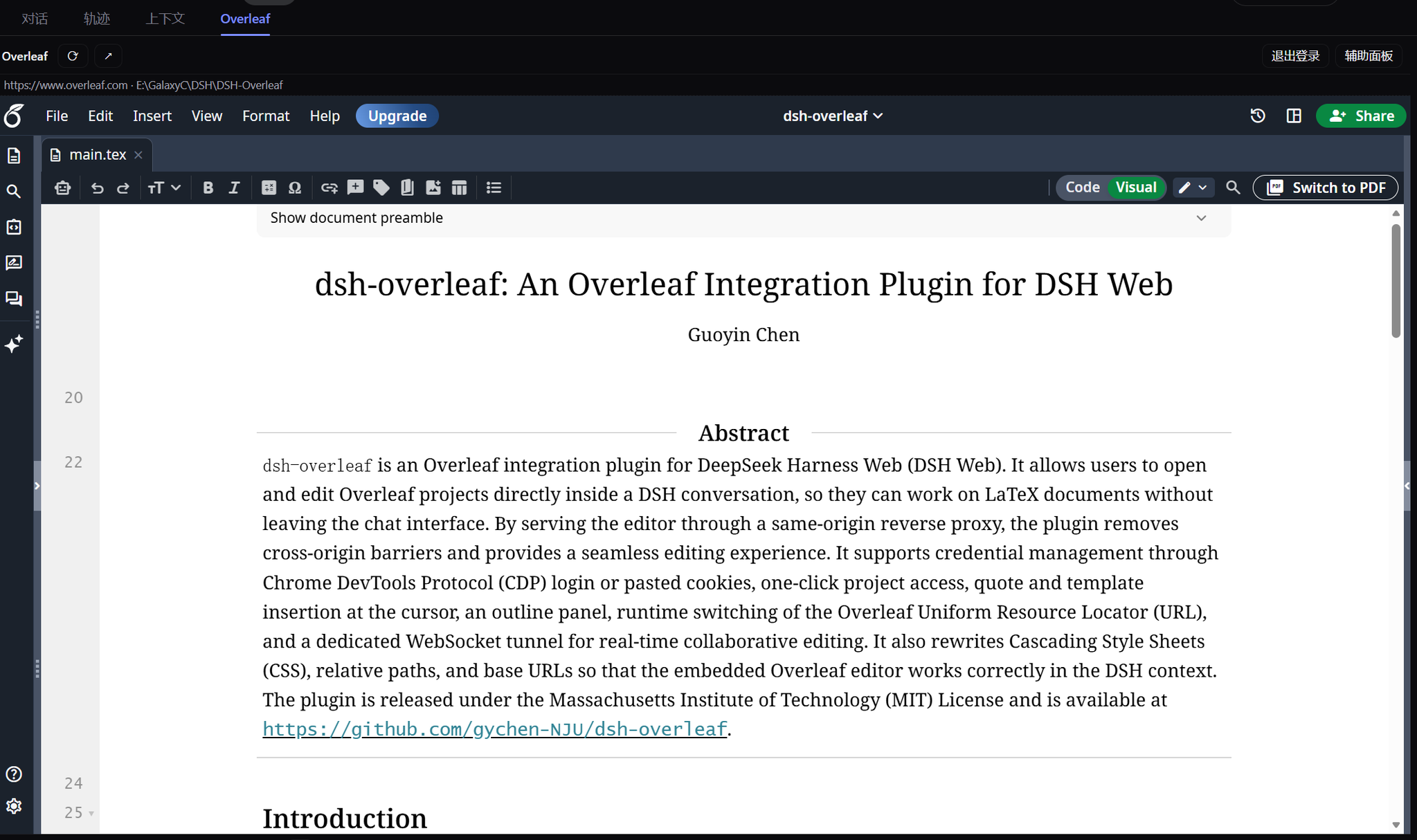
The Overleaf editor running inside a DSH conversation tab — full editor with project file tree, and the DSH composer stays below:
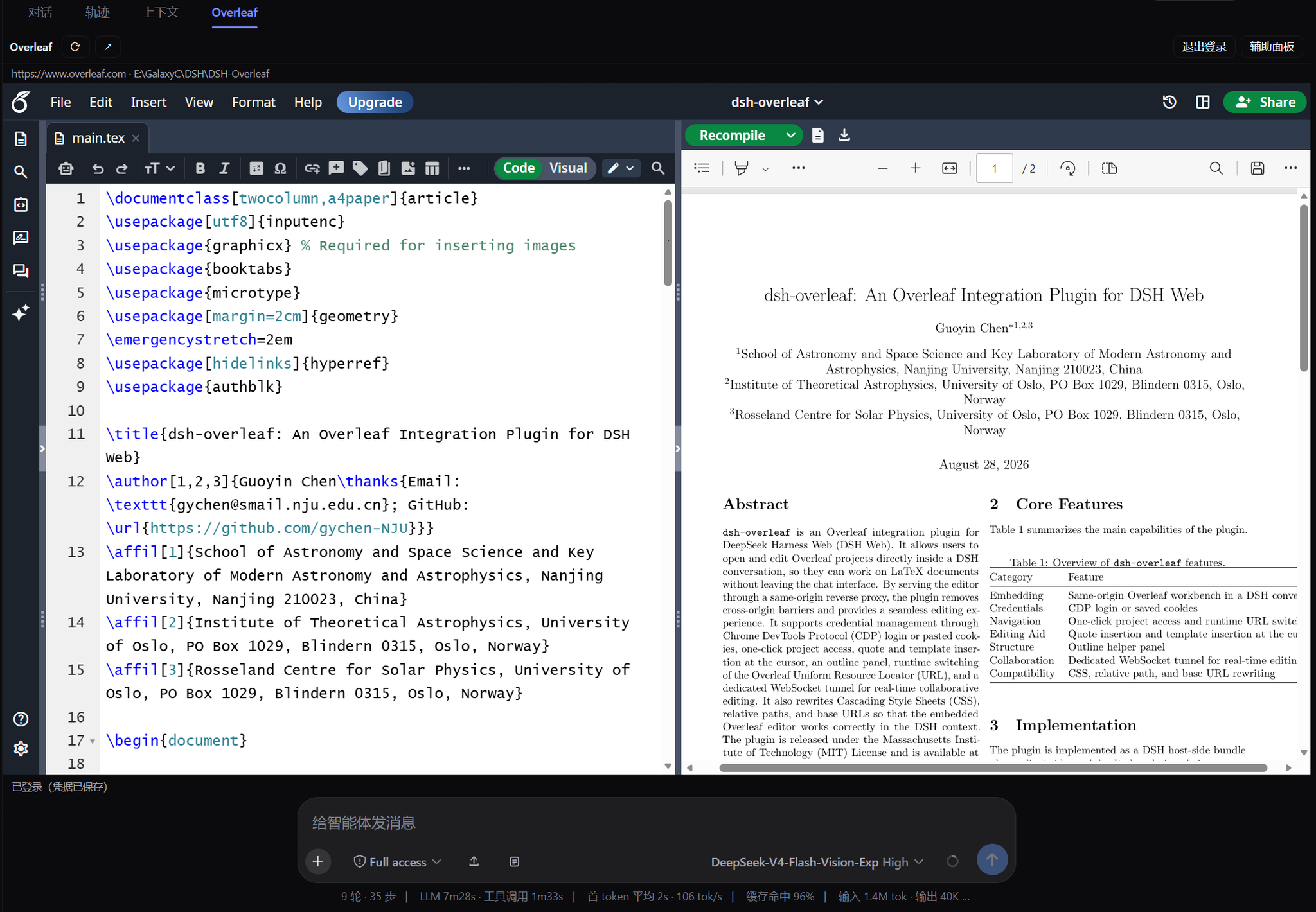
Split view: LaTeX source and PDF preview side by side, with Recompile — compile, preview, and iterate without leaving the conversation:
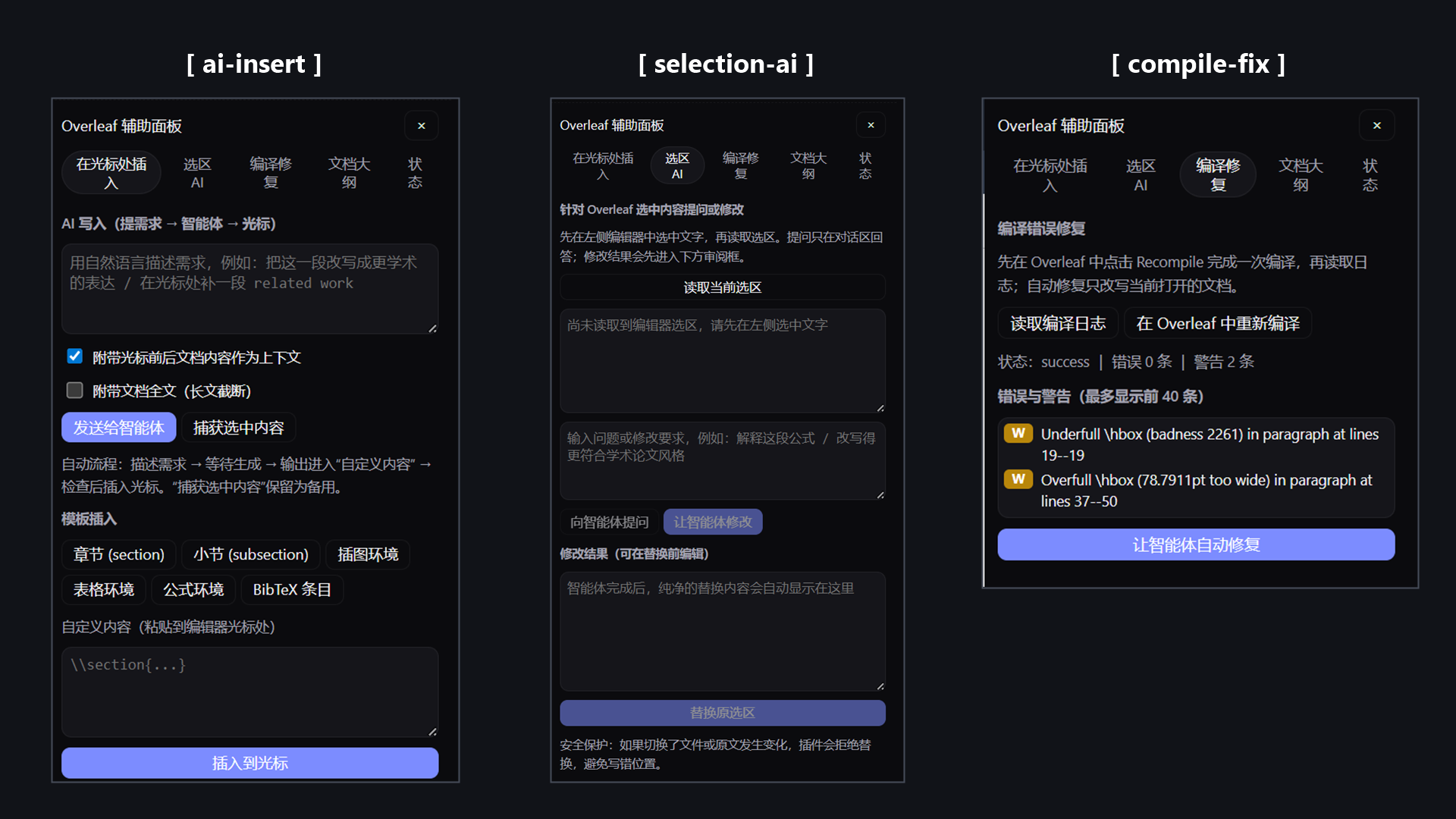
Assist panel — three tools side by side: AI write & auto-captured insert, selection AI with reviewed replace, and compile fix (log errors/warnings with one-click agent fixes):
-
[ ai-insert ]— describe the change, the DSH agent writes it, and the panel automatically captures the agent's output into the custom-content box — review it, then insert at the editor caret. -
[ selection-ai ]— select text in the editor, ask the agent to explain or rewrite it, review the replacement, then replace the original selection. Source/selection drift checks are on by default and can be unchecked to force replacement at the saved anchor (file switches are still refused). -
[ compile-fix ]— read the compile log's errors and warnings after a Recompile, then let the agent propose fixes for the currently open document. -
Local
.bibsync — bothai-insertandselection-aioffer “Update Overleaf .bib”: recursively auto-detect workspace bibliographies or accept an absolute/relative path inside the current DSH workspace, then update the same-named Overleaf document and wait for autosave confirmation.v0.3.20 supports both overleaf.com and tex.nju.edu.cn (TeXPage). Overleaf retains its document-ID and save-event lifecycle; TeXPage separately adapts its file tree, CM6 editor and server readback. Both require a unique same-named bibliography and preserve a pre-write snapshot. On TeXPage, enable the bottom status bar to verify the current file path and let pending edits save first. Restart DSH yourself and reload the embedded project after upgrading; no cookie clearing is needed. If a write is reported as unconfirmed, check the site's save state before repeating it.
v0.3.21 retries a transient TeXPage read once within its original deadline, never repeating the write. Errors identify the file-tree, baseline or save-verification phase plus an available HTTP status and safe error category. A read failure alone does not establish an expired login; permission, target and content-validation errors are not retried. v0.3.22 adds bidirectional current-
.texsynchronization for TeXPage. It binds the selected full tree path, footer path, loading state, unique CM6 editor, and the file tree API'sfileKey; reverse sync confirms persistence through isolated server readback. overleaf.com retains its existing document-ID, revision, anddoc:savedchecks. -
Bidirectional current
.texsync — the assist panel's Status page defaults to saving the current Overleaf source into the workspace: it recursively detects local.texfiles and creates a same-named root file when none exist. The reverse “Local → Overleaf” direction can use a selected local file or manually pasted complete LaTeX, but requires an explicit whole-document warning confirmation plus document-ID, revision, snapshot, write-verification, and save-event checks.v1.0.0 (milestone) adapts the plugin to DSH 0.1.7's configuration contract: every field is a volatile, hot-editable field, and settings now live under Settings → "Overleaf workbench settings" or sidebar → Plugins → Installed → dsh-overleaf (bundle page or row configuration). Saving applies the new proxy target and feature switches immediately, without a restart; older harness generations keep the legacy settings entry. The release also consolidates the TeXPage support delivered across v0.3.16–v0.3.22 (console and project loading, the Socket.IO tunnel, signed compile artifacts and logs,
.bib/.texbidirectional sync) into one maintainable milestone.
Why it exists
Overleaf sends X-Frame-Options / CSP frame-ancestors on every response, so a plain `` is refused by browsers. This plugin ships an HTTP/1.1 reverse proxy inside the DSH host process: all browser traffic goes to /overleaf-proxy/ which forwards to your configured upstream origin — one fixed origin, locked by configuration, no open SSRF surface. Because the iframe and the GUI then share one origin, browser-level bridges become possible: text selections flow out of the embedded editor into the composer as structured quotes, and generated content can be written back at the editor caret.
Feature map (spec coverage)
| Requirement | Status |
|---|---|
| R1 · fourth session-page tab | conversation.view entry id:"overleaf", order:30; visible whenever the tab bar shows (tabs >= 2) |
| R2 · configurable site address | Settings page (DSH 0.1.7+: the "Overleaf workbench settings" page in the Settings sidebar, or sidebar → Plugins → Installed → dsh-overleaf; older lines: Settings > Plugins > Plugin configuration) edits baseUrl; saving hot-swaps the proxy target without a restart |
| R3 · original site features usable | Streaming reverse proxy preserves paths and query strings; responses pass through minus framing headers; small HTML bodies get link/asset rebasing plus the bridge script |
| R4 · native composer below | The view replaces only the message area; composer, workspace recording, deliverables untouched |
| R5 · selection quoting | selectionchange in the iframe surfaces a floating quote button; clicking inserts a structured quote chip through the official reference pipeline (inputTriggers.registerSource({name:'quote-ref'}) codec), falling back to plain-text block quotes when absent |
| R6 · generate at caret | Template inserts and free-form/agent-generated LaTeX write to the live cursor through CodeMirror APIs (CM5 primary, CM6 probe, editable fallback); agent output is captured into a review box before insertion |
| R7 · assist features | Assist panel: AI writing; selection questions and reviewed replacement (safe checks by default, explicit force mode available); safe local .bib synchronization; bidirectional current Overleaf/workspace .tex synchronization (Overleaf-to-local by default, explicit confirmation and revision checks for reverse whole-document replacement); reviewed compile-log fixes; document outline navigation; login/logout/cookie management; status reporting |
Installation
The npm package name dsh-overleaf is occupied by another project, so this plugin is not published to npm — install it from GitHub instead. The repository commits the prebuilt lib/ bundle, so git installs need no build step and no allowBuilds authorization:
Using the DSH desktop app? The desktop shell needs the
desktopbranch — it fixes thedsh-app://scheme routing and TeXPage's Socket.IO origin construction. Everything outside the desktop shell behaves identically on both branches.
# From GitHub, tracking the main branch (recommended for latest features):
dsh plugin --profile web add github:gychen-NJU/dsh-overleaf

# Or pin an exact released version:
dsh plugin --profile web add github:gychen-NJU/dsh-overleaf#v1.0.0
From a release tarball (download the .tgz attached to the latest release):
dsh plugin --profile web add ./dsh-overleaf-1.0.0.tgz
Then restart the web service once (client bundles join the boot graph at startup):
dsh --profile web web # or however you normally start it
Verify composition survived:
dsh --profile web --dump-config # expect a "# == dsh-overleaf" block
The default upstream is https://www.overleaf.com. To point the workbench at any other instance (self-hosted Overleaf, tex.nju.edu.cn, ...), open the "Overleaf workbench settings" page in the Settings sidebar (DSH 0.1.7+; also reachable via sidebar → Plugins → Installed → dsh-overleaf; older lines: Settings > Plugins > Plugin configuration > dsh-overleaf), change baseUrl, and save — the proxy target hot-swaps without a restart.
Uninstall cleanly at any time:
dsh plugin --profile web remove dsh-overleaf
Coexistence guarantees
Deliberate isolation from existing plugins/configs:
| Surface | dsh-overleaf claim | Other known claims |
|---|---|---|
| Cordis row id | overleaf-workbench | overleaf (better-overleaf) |
| Client module id | dsh-overleaf (must equal the package name) | dsh-better-overleaf |
| HTTP routes | /overleaf-proxy/*, /overleaf/workbench/* | /overleaf/* (better-overleaf), /api/dsh-browser/* |
| WS upgrades | /overleaf-proxy/socket.io[/] exact | none known |
| Credential ref | OVERLEAF_WORKBENCH_COOKIE | OVERLEAF_COOKIE / OVERLEAF_GIT_TOKEN |
| Data dir | ~/.dsh/plugin-data/dsh-overleaf-workbench/browser-profile | ~/.dsh/plugin-data/dsh-overleaf/... |
| Conversation view id | overleaf order 30 | chat 0 / trajectory 10 / context 20 |
Both halves fail soft: a missing credentials service disables stored cookies (manual-paste mode degrades per request), missing settings skips the settings card, and any client-half exception logs instead of throwing so GUI boot never breaks.
Architecture
src/
  index.ts          host re-exports + default Service class (cordis loader target)
  service.ts        routes, status/login/projects ops, settings namespace wiring
  config.ts         schemastery schema + defaults + origin normalization
  proxy.ts          ReverseProxy: streaming HTTP proxy + raw upgrade tunnel
  inject-script.ts  source of the browser bridge script (bridge.js)
  login-cdp.ts      direct-CDP login (ported from Hoemr/dsh-better-overleaf, MIT)
  credentials.ts    OVERLEAF_WORKBENCH_COOKIE credentialRef
  types.ts          wire shapes
  client/
    index.ts        client half apply(): dictionaries, quote-ref source, view slot,
                    settings card slot (soft settingsScope wait)
    view.tsx        OverleafView component (toolbar/iframe/CTA/panel/dialog)
    workbench.ts    root ctx capture, quote registry, composer insertion helpers
    settings-card.tsx  staged settings form keyed by namespace 'dsh-overleaf'
    locales.ts      zh/en flat dictionaries (zh canonical)
scripts/
  smoke-offline.mjs fake-context harness: route census, JSON flows, HTML rewrite
                    assertions, cookie/logout lifecycle, client factory
                    materialization + apply() against stub services
  smoke-live.mjs    boots the REAL @deepseek-ai/dsh-host-webserver on an
                    OS-assigned port, aims the proxy at a local fixture upstream,
                    and verifies rebase/injection, Set-Cookie scoping, binary
                    streaming, JSON routes, a genuine RFC6455 tunnel round trip,
                    and the bridge.js asset route
Request path summary:
- Browser requests
/overleaf-proxy/ ?from the DSH server. - Host handler rebuilds headers (host rewritten to upstream, delegated
Origin, cookies merged with the stored credential when present, identity encoding kept for textual bodies). - Upstream response streams through; headers are adjusted:
X-Frame-Optionsdropped,frame-ancestorsremoved from CSP, absolute redirects rebased under the prefix,Set-Cookiedomain attributes stripped so cookies land host-only. text/htmlbodies up to 4 MB are buffered once: root-relativehref/src/action/poster/data-srcandsrcsetreferences get the prefix, andplus the bridge script are injected right after. Larger HTML and every other content type stream untouched.- WebSockets: the real webserver dispatches exact upgrade paths to a TCP/TLS tunnel that replays the handshake toward the upstream and splices both directions byte-for-byte.
Inside the proxied document the bridge script installs defensive wrappers (fetch, XMLHttpRequest.open, EventSource, WebSocket) so late-created root-relative URLs also land under the prefix, reports CodeMirror-native selections with safe anchor tokens, watches fresh/cached compile responses and Overleaf's own output-log requests to capture output.log/.blg for the auto-fix panel, exposes caret insertion/selection replacement with default conflict checks and explicit force mode/outline/reveal commands, and keeps a localStorage snapshot before each mutation for rollback.
Login
Two paths, both feeding the same credential store:
- Direct-CDP capture (recommended): the plugin launches your chosen Chromium-family browser (
autofinds installed browsers; explicit channel/path available) with a reserved loopback debug port and its own profile under~/.dsh/plugin-data/dsh-overleaf-workbench/browser-profile. Keep the window open until capture completes. Cookies must match the configured host, and the observed landing page must return 200 without a login form while anonymous access to that same URL is denied or requires login. Session names such asSESSIONIDandoverleaf_session2are supported. Closing the window early aborts capture; the view polls progress asynchronously. - Manual paste: copy the full Cookie request header from DevTools > Network for the current site into the toolbar dialog. The same protected-page check runs before saving. It starts at
/projectand falls back to the site root if that route is missing; 404 alone never proves authentication.
Both the embedded page and the open-window button enter through the site root, allowing upstream redirects to choose the dashboard (for example, /console on the TeXPage deployment at tex.nju.edu.cn). Verified login and upstream changes return the frame