hezi2020/dsh-plugin-wiki--plugins-AHGGG-dsh-side-chat ↗★ 0
@ahggg/dsh-side-chat
侧边栏对话插件:支持在不离开当前 DSH 主会话的情况下,针对选中的文本开启一个聚焦的侧边栏追问对话。
AI 分析
核心用途是提供不打断主线思路的局部文本追问功能,适合在阅读长回复时需要对特定词句进行临时探讨的用户。精准适配 DSH rc.6 版本。
安裝
npx -p @deepseek-ai/dsh dsh plugin --profile web add github:hezi2020/dsh-plugin-wiki#0f911a1b7aef331b19607a60c884be50e910c0ab&path:plugins/AHGGG-dsh-side-chat說明文件
閱讀完整 README ↗dsh-side-chat
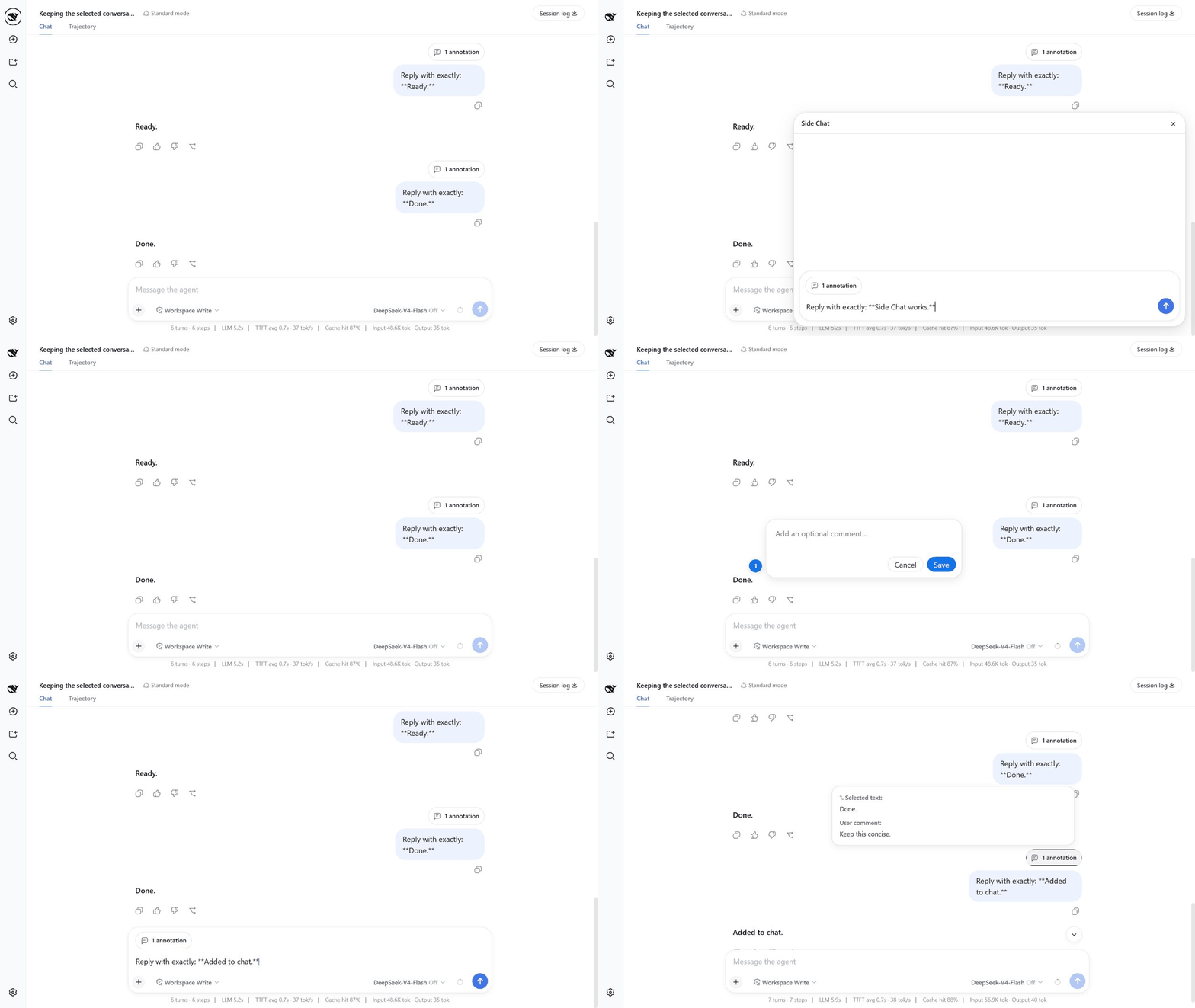
Ask a focused follow-up about selected text without leaving your current DeepSeek Harness conversation.
Compatibility: this release targets
@deepseek-ai/dsh@0.1.0-rc.6exactly.
Install
Install DSH rc.6 if it is not already available, then add the plugin to the Web profile:
npm install --global @deepseek-ai/dsh@0.1.0-rc.6
dsh plugin --profile web add @ahggg/dsh-side-chat
Start DSH from the project you want the agent to work in:
cd E:\path\to\your-project
dsh web --port 3080
Open the URL printed by DSH. The plugin loads automatically in the Web client.
Use Side Chat
- Complete at least one turn in the main conversation.
- Select text inside one completed user or assistant message.
- Click
Ask in side chat. - Enter a question and press
Enterto send it. - Press
Escor click×when you are done.
Useful details:
Shift+Enterinserts a newline.- The input grows with its content and becomes scrollable at its maximum height.
- Hover over
1 annotationto preview the selected text. - Before the first send, hover over the annotation and click
×to remove it. - The main conversation stays visible and is never switched to the child Session.
What happens to the conversation
The first send creates a real DSH Session fork at the selected message. The child inherits the complete event prefix, model configuration, presets, and workspace. Keeping the prefix unchanged is friendly to provider prompt caching, although a cache hit is never guaranteed.
Closing Side Chat stops active work, archives the child Session, and releases its Agent. It does not delete the child's history from disk. The child and copied prefix therefore consume normal DSH Session storage.
The parent and child share the same workspace. File changes, commands, and other tool side effects made in Side Chat are real and are not reverted when the panel closes.
Current limitations
- A selection must stay inside one completed message.
- Attachments,
Add to conversation, and/sideare not supported yet. - Closed Side Chats cannot be reopened from the panel.
- There is no automatic history cleanup or “keep as normal chat” action.
- An archived child may briefly appear in normal Session lists.
Upgrade or remove
Install the latest version and restart DSH:
dsh plugin --profile web add @ahggg/dsh-side-chat
Remove the plugin with:
dsh plugin --profile web remove @ahggg/dsh-side-chat
License
MIT