dsh-memory
Long-term experience memory for any LLM inside DeepSeek Harness: 5 model tools plus an interactive 3D star map.
同名套件的其他儲存庫
安裝
npx -p @deepseek-ai/dsh dsh plugin --profile web add github:hong1413/dsh-memory說明文件
閱讀完整 README ↗dsh-memory




Long-term experience memory for any LLM running inside DeepSeek Harness.
Your model forgets everything when the chat window scrolls away. dsh-memory gives it a local,
provider-agnostic memory store: it can search past experience before starting a task, save
lessons the user confirms, report how a lesson worked out, and see the whole library as an
interactive 3D star map.
No cloud, no vendor lock-in, no model-specific skill format — just five tools plus one settings page.
Features
🔎 memory_search | Cross-session retrieval with relevance, confidence, maturity, premise/counter, conflicts, provenance, staleness |
📄 memory_get | Full text and metadata for one entry |
📊 memory_status | Counts, archive, pending proposals, maturity distribution, data location |
💾 memory_save | Store a lesson — summary, detail, tags, premise, counter, score, case type, pin, source reference |
🔁 memory_feedback | good / bad / neutral outcome, advances maturity (draft → active → trusted, bad → flipped) |
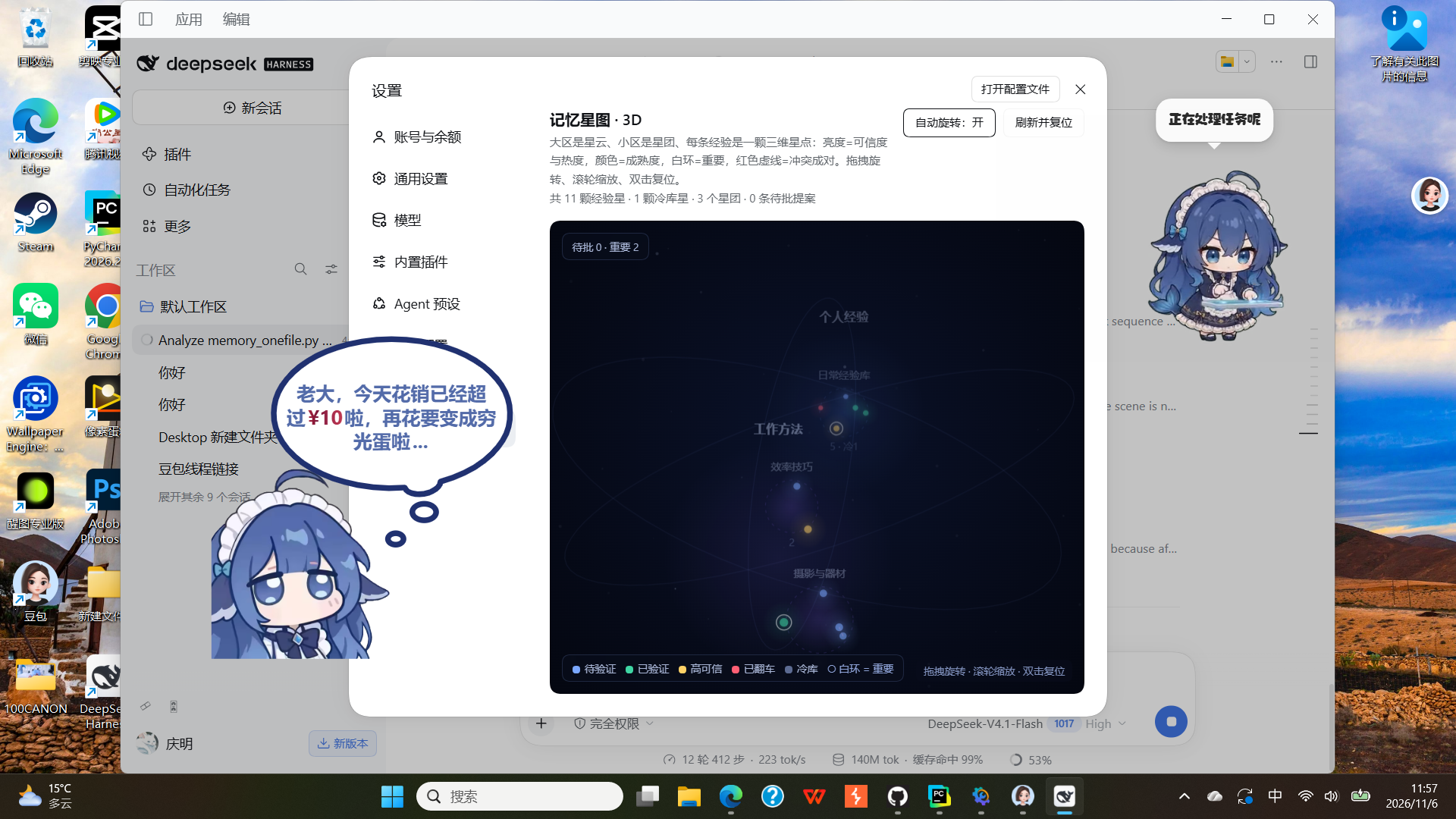
| 🌌 3D star map | Zones = nebulae, subzones = clusters, units = stars; orbit camera, click-to-focus, pending proposals fall as clickable meteors |
Design rules baked in:
- Human in the loop. Writes ask for approval through the Harness approval service and fail closed when it is unavailable.
- Nothing is silently overwritten. Conflicting lessons are kept and returned as a pair.
- Everything is auditable. Each entry has a version, a provenance field, and a maturity state driven only by explicit feedback.
Requirements
- DeepSeek Harness with plugin support (
plugin_manager), desktop or CLI profile - Python 3.8+ available as
python(Windows) /python3(macOS, Linux), or pointpythonExeat an interpreter - No npm dependencies. The client half is plain JavaScript and plain Canvas; there is no build step.
Install
1. Get the code
git clone https://github.com/hong1413/dsh-memory.git
Or download the repository ZIP and extract it — the folder itself is the plugin package.
2. Install into your DSH profile
Ask the agent (or the Plugins page) to install the bundle by directory:
plugin_manager: install_bundle target =
That is the whole installation: the manager links the package, applies cordis.patch.yml, and the
five tools appear in the model's tool list.
Client half needs one restart. The 3D star map lives in the Web UI. After the first install, quit and reopen DeepSeek Harness once; later edits to
client.jsonly need a page refresh.
3. Configure (optional)
Configuration is a plain object on the plugin row. Every field has a working default, so an empty config is valid:
- insert:
    - id: dsh-memory
      name: 'dsh-memory'
      config:
        dataDir: 'C:\Users\you\AppData\Local\doubao-memory\data'
        # pythonExe: 'python'
        # timeoutMs: 30000
        # maxResults: 6
        # allowWrites: true
        # requireApproval: true
        # allowUiWrites: true
        # promptHint: true
| Field | Default | Meaning |
|---|---|---|
dataDir | %LOCALAPPDATA%\doubao-memory\data (~/.local/share elsewhere) | Where the JSON memory store lives |
scriptPath | bundled memory_onefile.py | Point at your own copy of the engine |
pythonExe | python / python3 | Interpreter to run the engine |
maxResults | 6 | Default result cap for memory_search |
timeoutMs | 30000 | Per-command timeout |
allowWrites | true | Set false for a read-only deployment |
requireApproval | true | Ask the user before writes |
allowUiWrites | true | Enable the Approve/Reject buttons on the star map |
promptHint | true | Inject a short behavioural hint into the system prompt |
Use it
Ask the model in plain language:
Did I write down anything about pricing used cameras?   → it calls memory_search first
Remember this: always check the shutter count before buying a used camera.
How did that advice work out? It saved me.              → memory_feedback good
Or drive the same engine from a terminal (no Harness needed):
python memory_onefile.py remember "Used cameras: check shutter count first" \
  --premise "in-person inspection" --counter "online listings without a hands-on test" \
  --score 0.85 --case-type success --tags camera,used

python memory_onefile.py search "used camera inspection" --json
python memory_onefile.py status
python memory_onefile.py selftest      # 16 built-in assertions
The CLI has its own command reference: python memory_onefile.py --help.
The 3D star map
Settings → Memory star map:
- Zones render as nebulae, subzones as star clusters, each unit as a star whose size and brightness track confidence and heat, and whose colour encodes maturity (blue = draft, green = active, gold = trusted, red = flipped).
- Pinned entries carry a white ring; conflicts are joined by red dashed lines; archived (cold-storage) entries appear in a dim region of their own.
- Interactions: drag to orbit, scroll to zoom, double-click to reset, toggle auto-rotation, hover for a summary, click a star to fly the camera to it, and click a falling meteor to approve or reject a pending proposal.
- Camera distance is derived from the scene's bounding sphere, so any data volume stays framed.
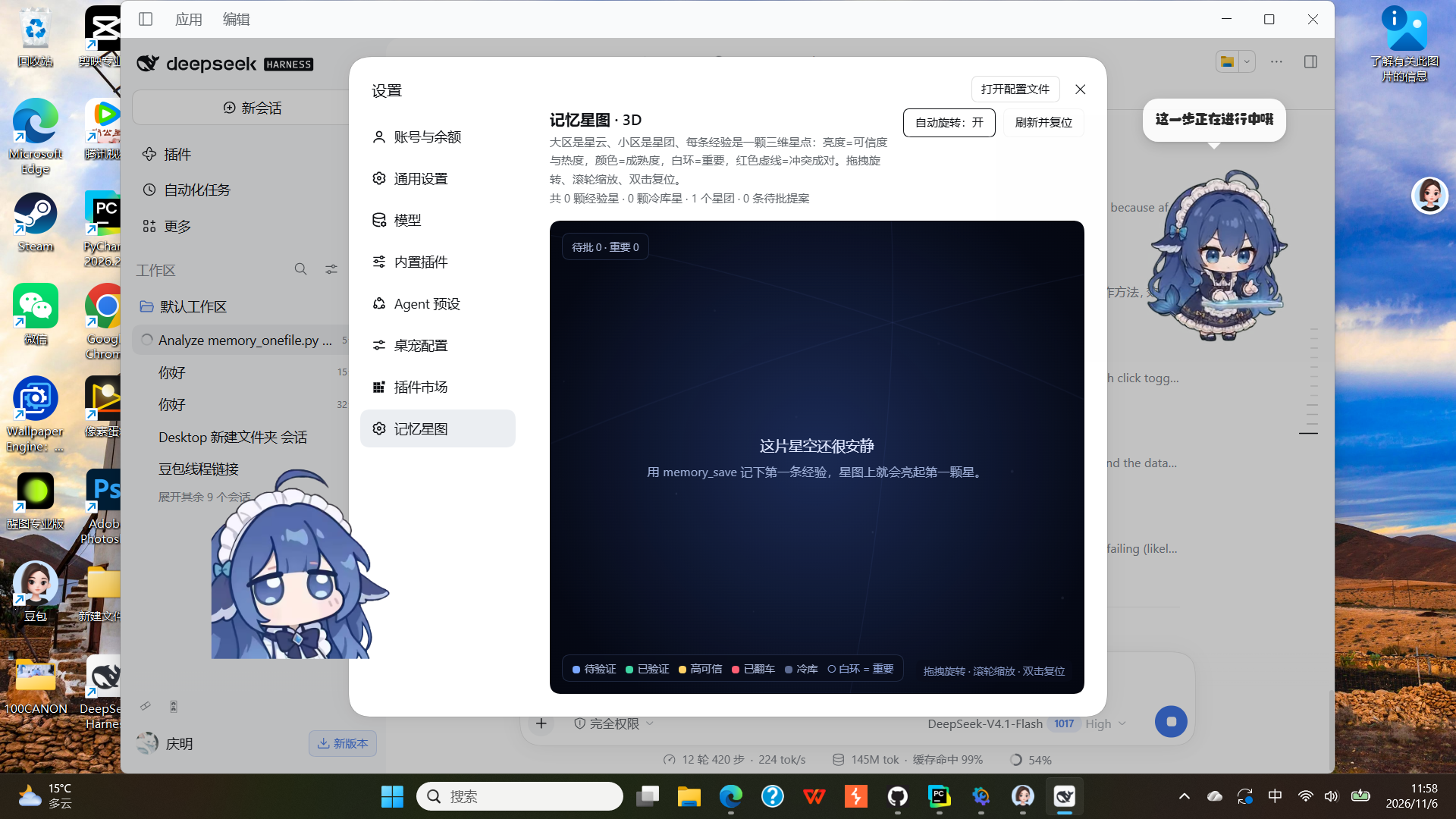
- Empty stores show a friendly hint instead of an empty void.
Read-only data route
The page renders from one same-origin endpoint, served by the Host half:
GET /dsh-memory/starmap.json
→ { ok, generatedAt, dataDir, zones[], subzones[], units[], cold[], mirrors[], proposals[], stats{} }
Proposal actions (the only write route)
The Approve/Reject buttons post here; it is the human click that authorises the write:
POST /dsh-memory/proposals   { "id": "p_xxxxxxxxxxxx", "action": "approve" | "reject" }
→ { ok: true, message: "..." }
Only pending proposals are accepted; approve runs approve --execute, reject runs
reject -r "界面驳回". Disable the route entirely with allowUiWrites: false.
Data model
One JSON file per unit under main_library/units/, version snapshots under forget_layer1/snapshots/,
archived units under forget_layer2/cold_units/, proposals under proposals/. The layout is stable
and human-readable; you can back it up, diff it, or migrate it with plain tools.
A unit carries: summary, content, tags, premise, counter, score, case_type, pinned,
source_ref, maturity, version, conflict_ids, active_score, access_unseal_count.
Security notes
- Both HTTP routes bind to the Harness Web server on
127.0.0.1only. There is no additional auth — the trade-off of a single-user local tool. SetallowUiWrites: falseif that matters to you. - Writes from the model go through the approval service; without it (or without a session context) they fail closed rather than writing silently.
- The plugin never edits the session log, never registers custom session events, and stores nothing
outside
dataDir.
FAQ
The star map page is missing after install. The client half is loaded from the app bundle at startup — restart DeepSeek Harness once.
Where is my memory stored? Run memory_status, or read dataDir from the "status" output. Point
several installations at the same dataDir to share one store.
Can I use it without DeepSeek Harness? Yes. memory_onefile.py is a complete standalone
CLI with 30+ subcommands.
How do I reset everything? Stop using it, delete dataDir, restart. Nothing is written elsewhere.
Contributing
Issues and pull requests are welcome. The engine has a self-test (python memory_onefile.py selftest, 16 assertions) and a regression script is included upstream for the retrieval and
lifecycle rules.
License
MIT © 2026 dsh-memory contributors