dsh-recap
提供会话上下文的智能摘要与工作进度回顾 适合需要快速接续历史会话、了解之前工作进度的用户。
同名套件的其他儲存庫
安裝
npx -p @deepseek-ai/dsh dsh plugin --profile web add github:lolipop-1x1/dsh-recap說明文件
閱讀完整 README ↗
DSH Recap
Pick up where you left off. A short recap of what you are working on, what is done, and what comes next — right inside DeepSeek Harness.
简体中文 · Quick start · Commands · Configuration · Report an issue



A small reminder, right where you work
Returning to a long conversation should not mean rereading every message. Run /recap to get a brief summary of the current task and its progress.
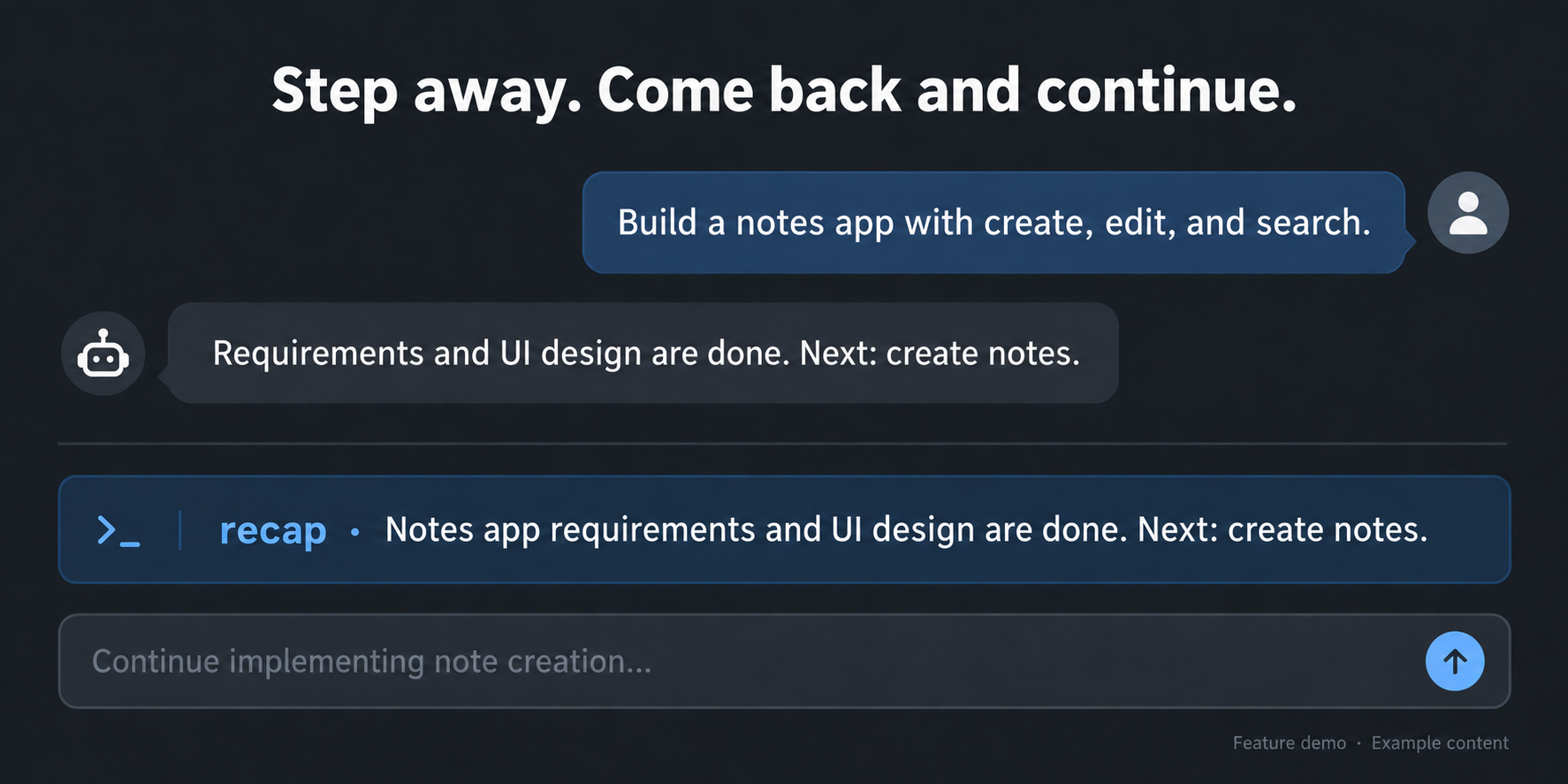
Illustrative demo with fictional content.
- On demand or while idle. Request a recap yourself, or let it appear after three minutes without activity in the visible session.
- Brief, with room to expand. About 160 characters by default, with a three-line preview and an expand control for longer results.
- Your choice of model. Follow the conversation model or select another configured model to control cost.
- Keep working. Generation runs in the background. Repeated requests share work; a failure preserves the previous recap and offers a retry.
Quick start
1. Install from GitHub
Open Plugins in the Harness sidebar, click Add plugin, and paste this URL into the package name or address field:
https://github.com/lolipop-1x1/dsh-recap
Click Install. If build-script approval is requested, review the source and listed scripts, then allow them and retry; GitHub installation builds the plugin from source.
After installation, restart Harness if prompted, then refresh the browser. If another plugin already owns /recap, disable that plugin first.
2. Get your first recap
Open a conversation with some work in it and send:
/recap
To choose a model or adjust automatic recaps, send /recap settings or open Settings → Recap. Changes save automatically.
Commands
| Command | What it does |
|---|---|
/recap | Generate a recap, or reuse an unchanged result. |
/recap refresh | Generate again, bypassing the cache. |
/recap hide | Hide the recap and pause automatic recaps for this session until a manual request. |
/recap status | Show status without generating or revealing a hidden recap. |
/recap settings | Open the recap settings dialog directly. |
/recap help | Show command help. |
The submitted command clears immediately while generation continues. A new draft you type is left alone. Manual recaps appear at their command position; opening settings or checking status does not move them.
Make it yours
Open /recap settings to adjust triggers without leaving the conversation. Edits save automatically.
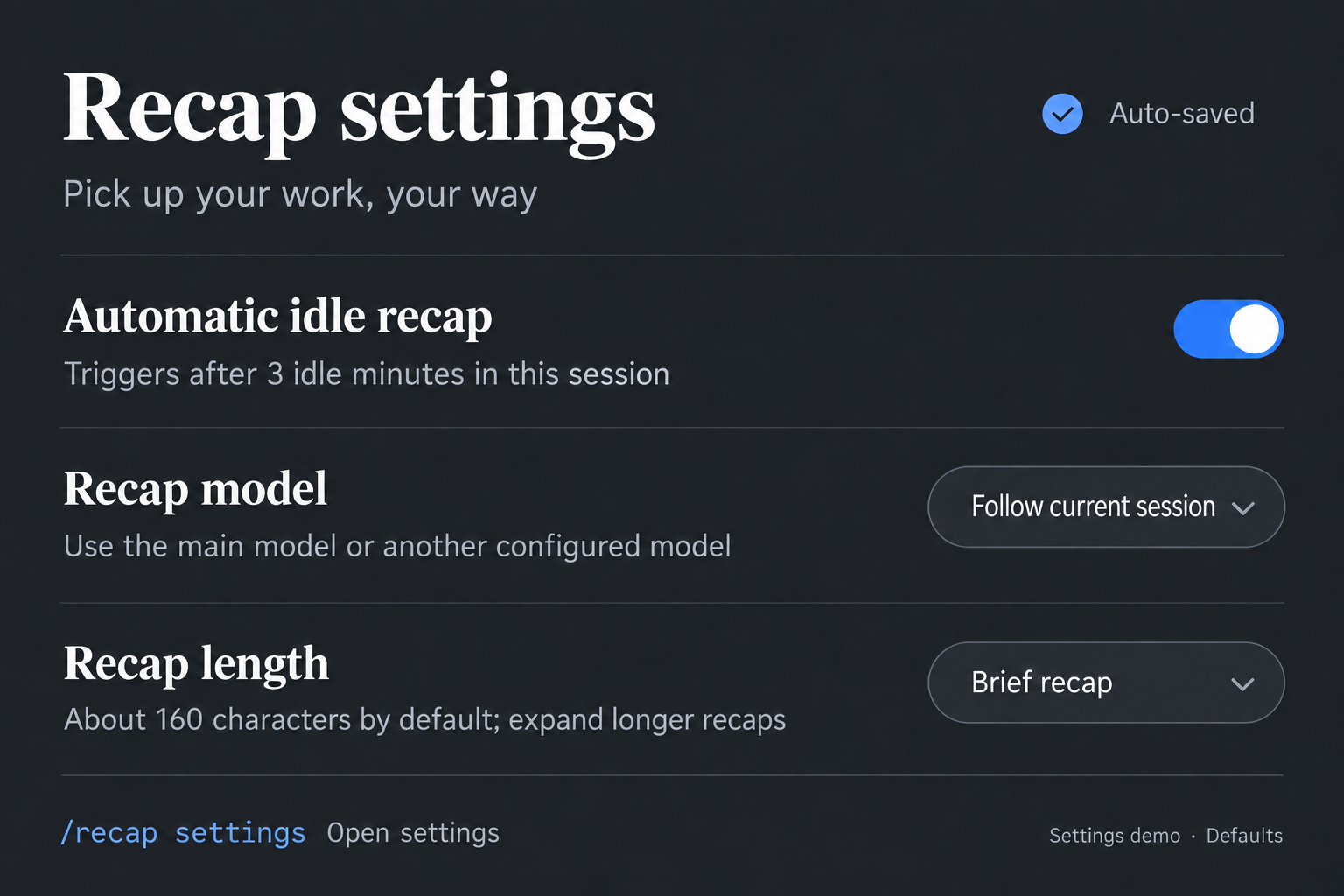
Illustrated settings overview; defaults and generation budgets are listed below.
| Setting | Default |
|---|---|
| Recap model | Follow the current conversation; optionally choose another configured model |
| Language | Follow the interface, or choose Chinese / English |
| Automatic recap | After 3 minutes idle, once 3 meaningful turns have completed |
| Target length | About 160 characters, preserving complete sentences |
| Generation budget | Up to 12 recent messages, 6,000 source characters and 512 output tokens |
These budgets limit input material and output; they are not a fixed per-request charge. Advanced options are collapsed in settings. See the configuration reference for all fields and legacy compatibility.
Opening or switching sessions does not immediately generate a recap. Keyboard, pointer and scroll activity reset the idle timer; generation waits until the main agent is idle. Completed recaps stay visible when the page loses focus. Continuing the conversation, refreshing or closing the page hides them. Refreshing one tab does not clear another tab's recap.
Further reading
- Configuration reference — defaults, limits and compatibility
- Design — behavior and scope
- Validation notes — automated coverage, live Harness checks and remaining gaps
- Changelog — changes
Live checks have covered model generation, direct settings dialogs, timeout/retry and per-tab refresh behavior. Fresh-profile installation, long-running behavior and other providers are not fully verified. Detailed project documentation is currently in Chinese.
License
MIT.