riverzhou/dsh-gitbash-new ↗★ 1
@riverzh/dsh-gitbash
在Windows上将默认终端工具替换为Git Bash。 适合Windows上习惯使用Bash而非PowerShell的用户,需DSH 0.2.1及以上。
安裝
npx -p @deepseek-ai/dsh dsh plugin --profile web add github:riverzhou/dsh-gitbash-new說明文件
閱讀完整 README ↗dsh-gitbash
English | 简体中文
A Windows terminal bridge for DeepSeek Harness (DSH). It replaces the
model-facing pwsh tool with a real bash tool, with selectable Git for
Windows and MSYS2 profiles, while keeping the official terminal-tool
behaviour: working directory, background jobs, timeout promotion, permission
escalation, terminal cards, PTC and meta.cwd.
This is the complete user manual and reference. It covers installation, daily usage, the security model, settings, troubleshooting and development.
Minimum DSH: 0.2.1. Windows 10/11 only. The replacement applies to new sessions; existing sessions keep the tools they were created with.
Contents
- What you get
- Requirements
- Install
- Quick start
- Security model (read this first)
- Using the bash tool
- Shell profiles
- Settings
- Cookbook
- Troubleshooting
- Diagnostics
- Compatibility and upgrades
- Development
- Limitations and non-goals
- License
What you get
-
One
bash, nopwshin the model tool catalogue:tools.restricthidespwsh, thetool:pwshprompt section is shadowed, andtool:bashis added. The replacement applies to new sessions; existing ones are not retrofitted. -
Two shell families, one selector: Git for Windows (default priority) or MSYS2 (
UCRT64,MINGW64,CLANG64,CLANGARM64,MINGW32,MSYS). Discovery reads the registry,where.exe, PATH and the usual install roots, validates the candidate withbash --version, and never proposes WSL'sbash.exe. -
Official tool contract:
description,command,timeoutMs,workdir,run_in_background,sandbox_permissions/justification, POSIX and Windows-form workdirs, the same[exit code: N],[stderr]and truncation spill markers, andmeta.cwdfor the terminal card. -
Background work:
run_in_backgroundreturns a job id; collect withjob_output, stop withjob_kill, and a foreground call past its deadline is promoted to a job instead of being killed. -
Isolation instead of improvisation: PATH entries from the other bash family are filtered out,
MSYSTEMmatches the selected profile, and Git'sbin\bash.exelauncher is canonicalized tousr\bin\bash.exe, so the environment the plugin composes is the one that actually runs. -
Windows-specific correctness: the
signalNumber = 0.2.1(tested on desktop runtime0.2.1-rc.2) | | Windows | Windows 10/11, x64; MSYS2 arm64 environments are also supported | | bash provider | Git for Windows and/or MSYS2 | | Node.js |^22.19.0or>=24, development/build only | | Optional | Cygwin, best-effort and not recommended | -
Git Bash and MSYS2 both use the MSYS2 runtime. That runtime cannot start inside DSH's Windows ACL sandbox; this is an OS constraint, not a plugin bug (evidence in docs/DESIGN.md).
-
WSL's
bash.exeis intentionally excluded. WSL is not Git Bash and does not fit this profile/environment model.
Install
Use the CLI that ships with DSH Desktop
Do not use an old global npm dsh (for example 0.1.7); it does not know
the 0.2.1 plugin/profile contract. Use the CLI under the desktop install:
set "DSH_CLI=%LOCALAPPDATA%\Programs\DeepSeek Harness\resources\runtime\cli\bin\dsh.cmd"
%DSH_CLI% --version
:: expect 0.2.1-rc.2 or newer
Fully quit DSH Desktop before changing a profile.
From a local checkout (development)
%DSH_CLI% plugin --profile desktop add link:D:/GitHub/dsh-gitbash-new
Reopen DSH, then hard-refresh the Web UI (Ctrl+Shift+R).
From GitHub (after publishing)
%DSH_CLI% plugin --profile desktop add github:riverzhou/dsh-gitbash-new
From npm (published)
%DSH_CLI% plugin --profile desktop add @riverzh/dsh-gitbash@0.2.2
Use @riverzh/dsh-gitbash@latest for the newest release.
Upgrade
Use the same CLI, restart DSH, hard-refresh:
%DSH_CLI% plugin --profile desktop remove @riverzh/dsh-gitbash
%DSH_CLI% plugin --profile desktop add link:D:/GitHub/dsh-gitbash-new
For a released version, replace link:... with @riverzh/dsh-gitbash@.
Uninstall
%DSH_CLI% plugin --profile desktop remove @riverzh/dsh-gitbash
Restart DSH. The settings row disappears with the plugin. A dsh-gitbash
entry left in the profile's cordis.patch.yml is inert and can be deleted
manually.
Do not run two “bash instead of pwsh” plugins
dsh-tweaks' git-bash-terminal-tool also hides pwsh and registers bash.
If it is already installed, remove or disable it first:
%DSH_CLI% plugin --profile desktop remove dsh-tweaks-git-bash-terminal-tool
When both are present, the first one to replace wins; the later one usually
skips because pwsh is no longer restrictable. The log contains
skipped ... pwsh is not restrictable.
Quick start
- Install and restart DSH.
- Open Settings → General → Terminal tool (Git Bash / MSYS2).
- Leave Shell at Auto (recommended), or pick a specific Git/MSYS2 profile.
- Keep Compatibility at Compatibility mode (recommended) unless you want strict mode.
- Start a new session and ask the model to run something: “Use bash to print the shell, cwd and Git status.”
- Confirm the model calls
bash(notpwsh) and the result carries the expected cwd.
The settings row looks like this:
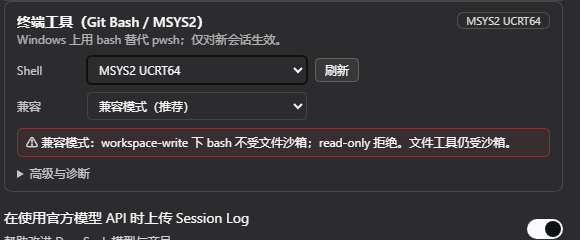
The Shell, Compatibility and MSYS2-environment dropdowns use the DSH light/dark surface tokens, so both the closed control and the open list stay readable:
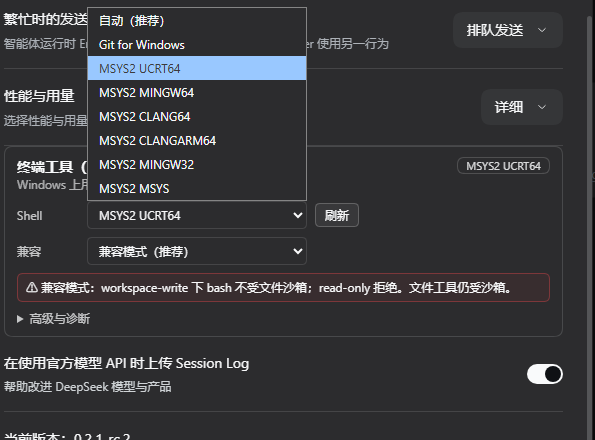
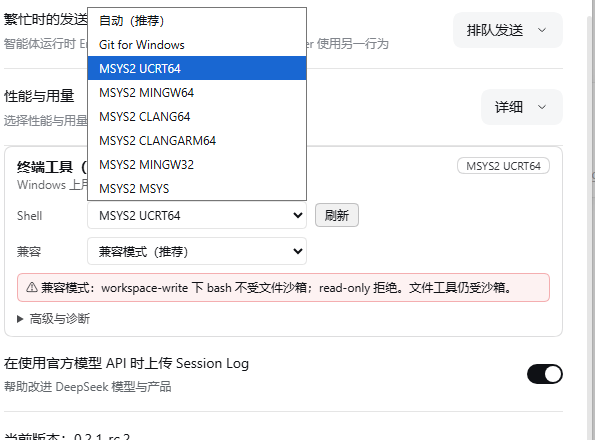
Security model (read this first)
The MSYS2 runtime cannot start under DSH's Windows ACL sandbox: restricted
tokens break its named shared memory, signal pipe and BaseNamedObjects. Adding
the user SID defeats write confinement; lowering to Low integrity breaks
BaseNamedObjects again. There is no configuration in which Git Bash both runs
and stays inside that sandbox.
The plugin therefore makes the trade-off explicit:
| Session permission | compat: auto (default) | compat: strict |
|---|---|---|
danger-full-access | bash runs normally | bash runs normally |
workspace-write | bash runs outside the file sandbox, result carries [compat: ...] | refused |
read-only | refused | refused |
- File tools remain sandboxed by DSH. Only the bash process is unconfined.
- Under
workspace-write+auto, bash can write outside the workspace. Treat paths outside the workspace as read-only unless the user explicitly asks otherwise. - The plugin never silently widens permissions. The warning is always in the settings row, the tool description, the system prompt and the result text.
read-onlydeliberately refuses rather than breaking the read-only promise.strictis for security-sensitive users: bash is available only underdanger-full-access.- A blocked call can be retried with
sandbox_permissionsplus a one-sentencejustification; DSH asks the user for approval, and the wider mode applies to that call only.
Using the bash tool
Parameters
| Parameter | Type | Required | Notes |
|---|---|---|---|
description | string | yes | Clear 5–10 word description shown in the UI |
command | string | yes | Executed as bash -c ''; use POSIX syntax |
timeoutMs | number | no | Positive; default 120000, capped at 600000 |
workdir | string | no | Working directory; relative paths resolve against the session cwd |
run_in_background | boolean | no | Return a job id immediately; no timeout applies |
sandbox_permissions | workspace-write | danger-full-access | no | Request a wider mode when the session policy blocks the command |
justification | string | with escalation | One sentence for the user explaining why this command needs wider access |
run_in_background and sandbox_permissions are feature-detected. The standard
web preset composes the job service and sandboxing executor, so both are
available; a minimal composition may expose only the basic parameters.
The tool runs a fresh shell for every call; it is bash -c, not a persistent
PTY. Use workdir rather than cd.
Result format
- stdout is returned as-is; stderr is appended under a
[stderr]header. - An empty result is
(no output). - A non-zero exit adds
[exit code: N]as the last line; a signal adds[killed by signal: X]. A successful foreground result usually has no exit marker; the terminal card shows the exit status pill. - A timeout that kills the call adds
[timed out after Nms]. - A timeout that promotes the call adds
[still running after Nms; moved to background job ]. - Large output is truncated to the tail (64,000 bytes per stream by default)
with
[output truncated; full output: ]; the full output is spilled to a file (up to 64 MiB). - The compatibility notice is
[compat: bash runs outside the DSH file sandbox (session mode workspace-write)]. It is a deployment notice, not command stderr. - A background start returns
started background joband no stdout; read it later withjob_output.
tool/result.meta.cwd is the Windows absolute path actually used. Inside
bash, pwd is the MSYS POSIX form (for example /d/project).
Working directory and paths
- No
workdir: uses DSH's current session working directory. - Relative
workdir: resolved against the session cwd. - Windows absolute paths (
C:\...) and POSIX drive paths (/c/...,/d/...) are accepted;/tmpmaps to the Windows temp directory. - Other POSIX absolute paths (for example
/home/...) are refused rather than guessed, because the Windows mapping is ambiguous. - Prefer POSIX paths inside commands; use
$VARand${VAR:?}instead of PowerShell syntax.
Background jobs
run_in_background: truereturns a job id and continues the turn.- Use
job_output(withwait: trueto block) andjob_killto collect or stop it. These are DSH's built-in job tools; the plugin registers the job as kindbash. - The Web UI shows a background-task badge on the session header and job cards in the work steps.
- Background jobs have no timeout; stop them explicitly.
Timeouts and promotion
- A normal foreground call is bounded by
timeoutMs(default 120 s, cap 10 min). - When the job service is available, a foreground timeout promotes the call to a background job instead of killing it; the result says so and gives the job id.
- If the job service is unavailable, the call is killed at the deadline and reported as timed out.
Permission escalation
If the session policy blocks a command, retry with the narrowest wider mode and a justification:
sandbox_permissions: "workspace-write"   (or "danger-full-access")
justification: "Need to write the build cache under
 because ..."
DSH asks the user. Approval applies to that one call. In compat: strict,
workspace-write is refused, so escalation must target danger-full-access.
Subagents, PTC and the UI
- A DSH subagent inherits the parent's tool layer. After this plugin replaces
pwshin the parent, a new child hasbashand nopwsh; this was verified for Git and MSYS2. - The child runs its own bash calls in its own session; the parent receives a
subagent card/notice and the header shows
1 subagent. Use View subagent to inspect the child conversation. - PTC (
run_code) sees the samebashtool; the plugin supplies presenters andpresentationMeta.cwd. The Web UI derives terminal cards from the tool name, arguments, result markers andmeta.cwd.
Shell profiles
A profile is more than a bash.exe path; it carries the flavour, install root,
MSYS2 environment and PATH rules.
| Flavour | Selector label | MSYSTEM | bash path |
|---|---|---|---|
| Git for Windows | Git for Windows | always MINGW64 | \usr\bin\bash.exe |
| MSYS2 | MSYS2 UCRT64, MSYS2 MINGW64, … | the selected environment | \usr\bin\bash.exe |
| Cygwin | Cygwin (experimental) | unset | \bin\bash.exe |
- Auto prefers Git for Windows; without Git it picks the best installed
MSYS2 environment (
UCRT64first, thenMINGW64,CLANG64,MSYS). - Git for Windows has exactly one profile. MSYS2 has one profile per
installed environment; all share the same
usr\bin\bash.exe, sobashPathalone cannot distinguish them —msystemis persisted too. MSYS2environments must exist (\ucrt64\bin, etc.). A missing environment makes that profile invalid rather than silently falling back.
Git bin\bash.exe is canonicalized
Git for Windows ships two entry points:
bin\bash.exeis a launcher. It resetsMSYSTEMand PATH from the installation (Git 2.56 uses UCRT64), overriding the requested environment.usr\bin\bash.exeis the runtime and honours the environment we compose.
If you enter \bin\bash.exe, the plugin normalizes the profile to
\usr\bin\bash.exe. The effective path is shown in the settings row.
This was a real-machine bug: before normalization, a Git profile reported
MSYSTEM=UCRT64; after it, MSYSTEM=MINGW64.
Environment isolation
| Profile | MSYSTEM | PATH prefix (before inherited PATH) |
|---|---|---|
| Git | MINGW64 | \bin, \usr\bin, existing \ucrt64\bin / mingw64\bin / mingw32\bin |
| MSYS2 | selected | \bin, \usr\bin, \usr\local\bin |
| Cygwin | unset | \bin |
- Common overrides:
NO_COLOR=1,TERM=dumb,PAGER=cat,GIT_PAGER=cat,CHERE_INVOKING=1. - MSYS2 also gets
MSYS2_PATH_TYPE=inherit. - The other family's roots are filtered out. A Git session does not inherit
C:\msys64\usr\bin; an MSYS2 session does not inherit Git'susr\bin. DSH_*facts are merged last, so they win.HOME,TMP,TEMPandLANGare not overridden.
Discovery order
- The configured
bashPath+msystem(highest priority; invalid means a clear error, not a silent fallback). - Git registry
InstallPath(HKLM/HKCU). - Known roots: Git (Program Files, LocalAppData,
C:\Git,D:\Git), MSYS2 (C:\msys64,D:\msys64, LocalAppData,C:\msys32), Cygwin (C:\cygwin64,C:\cygwin). where git(derive the root fromgit.exe) andwhere bash.bash.exe/git.exeonPATH.
WSL is exclu