dsh-git-graph
在侧边栏绘制Git提交拓扑图及文件差异。 适合开发人员,在对话窗口旁直观查看代码仓库的提交历史与代码变更。
同名套件的其他儲存庫
安裝
npx -p @deepseek-ai/dsh dsh plugin --profile web add github:songgms/dsh-git-graph說明文件
閱讀完整 README ↗DeepSeek Git Graph
A Git Graph panel for DeepSeek Harness — commit topology, refs, commit details and per-file diffs, in the same window as your conversation.


English · 中文
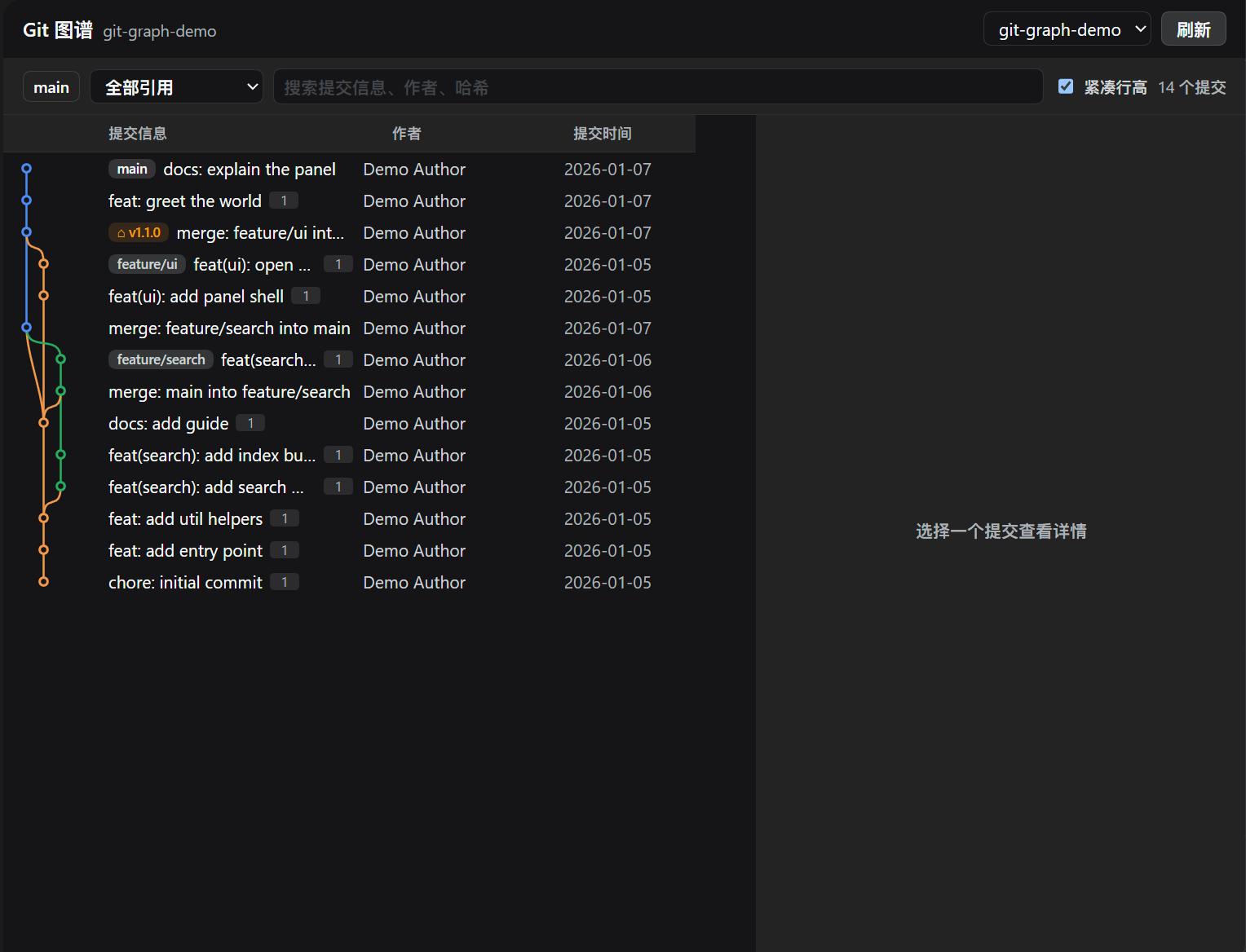
What it does
A sidebar panel, next to the conversation, that draws the commit graph of the repository you are working in.
- The graph — branch lanes as SVG, drawn newest-first, coloured per line so a branch keeps one colour from its tip to the ref it merges into.
- Refs — local branches, remotes and tags as chips on the rows that carry
them, with the current
HEADmarked. - Filtering — walk a single ref, or search messages, authors and hashes as you type.
- Commit details — the full hash, parents, author and committer with dates,
the commit body, and every changed file with its
+/−counts. - Diffs — click a file for a unified diff with additions, deletions and hunk headers styled through the harness's own tokens.
- Copy and export — copy the full hash, the abbreviation, the subject or the
whole message; save the commit as a
.patchfile. - Create refs — make a branch or a tag at the selected commit.
The panel follows the harness theme, so it reads correctly in light and dark beside the shipped pages.
Layout
sidebar icon ──▶ main panel
                 ├── repo picker · pull · push · stash · refresh
                 ├── toolbar: ref filter · text search · row density
                 ├── commit table  → lane graph (SVG) · refs · subject · author · date
                 └── detail pane   → hash, parents, author/committer, body,
                                     changed files, unified diff, copy + patch + new ref
Install
The package is a DeepSeek Harness bundle: a Host half that registers HTTP routes and a browser half that renders the panel. Installing it takes two steps: get the package, then install the bundle into a profile.
1. Get the package
From npm — once the package is published to the registry:
npm install dsh-git-graph
It is not published yet; until it is, install it straight from GitHub:
npm install github:songgms/dsh-git-graph
# or
npm install git+https://github.com/songgms/dsh-git-graph.git
2. Install the bundle into DeepSeek Harness
From a Harness session, point the bundle installer at the package directory:
plugin_manager action=install_bundle target=
The target is the package directory: node_modules/dsh-git-graph when the
package was installed with npm, or this checkout's own directory when you are
developing it.
install_bundle performs the package installation and the bundle selection, and
the change survives a restart. Do not hand-edit the profile's package.json or
cordis.patch.yml — the installer owns those.
Then:
- Reload the page. The browser half is a client module, and a running page's boot graph does not contain it until the shell reboots.
- Restart the profile if this package was already installed before the
change: the loader caches a plugin module by URL, so a
link:-installed bundle keeps executing the JavaScript the process first imported.
Verify it is live with cordis_inspect_query: Slots.listSubTree on
sidebar.panellist should show id: git-graph, and on main a key: git-graph.
The Host row is include:git-graph.
Configure
Everything is optional; the defaults work without a patch layer.
- id: git-graph
  name: dsh-git-graph
  config:
    extraRoots: []        # extra repositories always offered in the picker
    probeRoots: []        # extra paths probed for a containing repository
    discoverMaxDepth: 6   # parent levels walked when looking for a repository
    scanChildren: true    # also probe each candidate's immediate subdirectories
    maxChildren: 24       # cap on subdirectories probed per candidate
    discoverCacheMs: 5000 # probe-result TTL
    timeoutMs: 30000      # ceiling for one git invocation
    maxCommits: 5000      # maximum commits one page may request
An invalid value is reported with its path and falls back to the default, so a typo in a patch layer never leaves the panel unable to open.
How the panel finds a repository
Two independent sources, merged:
- The open workspace — the page's session snapshot carries the directory and
the Host probes it, then its parents (
discoverMaxDepth), then its immediate subdirectories (scanChildren). A workspace that is a repository is found by the first; a session opened on a parent folder holding several checkouts is found by the last. - The Harness process directory — plus any configured
extraRootsorprobeRoots.
A repository is identified by git rev-parse --show-toplevel, so the picker shows
the repository root rather than whichever subdirectory happened to match. When
nothing is found, the empty state accepts a pasted absolute path.
What it writes
Everything the panel does is a read except a small, deliberate set of repository operations, all of which live in the header's top-right corner and are user-only: the agent cannot reach them.
| Operation | What it runs | Why it is safe here |
|---|---|---|
| New branch / New tag | git branch / git tag | Add one ref, touch nothing else. An existing name is refused, and a name is checked locally and then by git check-ref-format --branch. |
| Pull | git pull (merge / rebase / ff-only) | The one operation that can leave conflicts. The panel detects them (git's own markers and unmerged paths), shows a banner, and offers Abort — the machinery the read-only design deferred is now in place. |
| Push | git push to the branch's upstream | Never touches the working tree; a refused push leaves the repository exactly as it was. |
| Stash | git stash push -u, list, pop, drop | Fully reversible: saving captures the changes (untracked files included by default, with an optional message) and the menu restores or deletes entries; a conflicting pop keeps the stash intact. |
Save as patch is a read: git format-patch -1 --stdout renders the commit as
an mbox patch and the browser turns it into a download, so the plugin still
creates no file on disk.
Every state-changing route is POST-only and requires the x-dsh-plugin CSRF
header, so a cross-site page cannot drive any of them.
Cherry-pick, revert, rebase by hand, fixup/squash and reset are still not
exposed. They need machinery this plugin does not have — a confirmation flow that
distinguishes a destructive action from a clipboard copy, a rebase todo editor,
and a pre-flight check for uncommitted work. Shipping them without that would
turn a plugin that is safe by construction into one that is safe by luck.
Architecture
| Piece | Path | Role |
|---|---|---|
| Host half | index.js | Mount only: config schema, webServer route registration. |
| Git layer | lib/git.js | Every git invocation: argument arrays, no shell, non-interactive env, hard timeout. Parses log --numstat and show --numstat. |
| HTTP surface | lib/routes.js | The /api/dsh-git/* handlers. |
| Live loader | lib/live.js | Re-imports the two modules above when their bytes change. |
| Layout | lib/graph.js | Pure lane assignment for the commit DAG. No DOM, no React. |
| Client half | client.js | Sidebar icon, panel, graph renderer, detail and diff view. Generated artifact. |
| Styles | client.css | Theme tokens only (--dsw-alias-*), light and dark. |
Design notes
- One request per page.
git log -z --topo-order --numstatcarries both the topology and every commit's change size.-zis not optional: without it git emits the whole numstat stream after the last formatted commit, so every file list lands on the wrong commit. - Lanes, not merge geometry. A lane is handed to exactly one parent, so a merge is a plain horizontal edge into the node rather than a special case.
- Windowed rendering. Only the rows inside the viewport exist in the DOM, and the graph is one absolutely positioned SVG translated to the window, so a line running past the viewport still draws into it.
- Truncated history is visible. An edge whose parent falls outside the loaded window is dashed to the bottom of the graph.
- The panel installs its own stylesheet. The client runner's
stylesbuiltin is a closure symbol of dynamic packages; an installed client module's factory never receives it. The panel asks the composition for astylesservice and otherwise appends its own `` element.
Why index.js is nearly empty
The loader caches a plugin module by URL, so a link:-installed bundle keeps
executing the JavaScript the profile first imported — a set_plugin cycle
remounts the fiber but reuses the cached module. So index.js does nothing but
mount, and everything behavioural is imported through lib/live.js behind a
content stamp:
| Edited file | Takes effect |
|---|---|
lib/git.js, lib/routes.js | On the next HTTP request — no restart |
index.js, cordis.patch.yml | After a profile restart |
client.js, client.css | After a page reload (the bundle URL is content-revisioned) |
Development
npm run build     # inline lib/graph.js and client.css into client.js
npm run check     # parse-check client.js and confirm it is up to date
npm run verify    # every offline suite (needs pwsh)
client.js is a committed build artifact: it is a hand-written
window.__ModuleLoader__ package shell, and tools/build-client.mjs inlines
lib/graph.js and client.css between markers inside it. Edit those two files,
never their inlined copies, then run npm run build.
Verifying
pwsh tools/verify-offline.ps1 [repository-path]   # 232 checks, no server

node tools/serve-routes.mjs 19417                 # the real route table, no app
pwsh tools/verify-live.ps1   -Base http://127.0.0.1:19417/api/dsh-git   # 42
pwsh tools/verify-routes.ps1 -Base http://127.0.0.1:19417/api/dsh-git   # 30
| Suite | Covers |
|---|---|
tools/verify.mjs | parseLog framing, lane assignment and its invariants, edgePath, the browser half's shell and slot registrations, the rendered tree, and the copy menu and ref-action controls driven through their real state machines. |
tools/verify-host.mjs | The whole Host half against a real repository: discovery, status, refs, log, commit detail, diff, patch rendering, and every refusal — 13 malformed ref names, duplicate names, unknown kinds, missing commits. The writing path runs against a throwaway repository it creates and cleans up. |
tools/verify-reload.mjs | That lib/live.js genuinely re-imports changed bytes. |
tools/verify-live.ps1 | Every route over real HTTP. |
tools/verify-routes.ps1 | /ref and /patch over real HTTP: method and CSRF refusal, creation, duplicate refusal, and that the working tree and HEAD are untouched. |
tools/make-demo-repo.ps1 builds the fixture the first two run against — a
deliberate merge topology with two feature branches, a nested merge, an annotated
tag and a hotfix branch.
Why a harness. A route added to lib/routes.js does not exist in an
already-running profile until it restarts, so tools/serve-routes.mjs mounts the
same route table on a throwaway port. It adds only exact-path dispatch;
everything it answers is the plugin's own handler, guard and CSRF check.
Why nothing captures a child's stdout. The development sandbox refuses the
pipes execFile and spawnSync need, so each suite routes git's bytes through a
file. The code under test is unchanged either way.
What the suites do not establish: pixels. Rendering, theme resolution and scrolling need the live page.
Contributing
Issues and pull requests are welcome. Two ground rules:
client.jsis generated. Changelib/graph.jsorclient.cssand runnpm run build; a PR that edits the inlined regions directly will be asked to regenerate.- New writes need a safety story. If you want cherry-pick or reset in here, open an issue describing the confirmation, conflict and pre-flight handling first — see What it writes for why.
License
MIT © 2026 songgms
DeepSeek Harness is a separate project developed by DeepSeek; dsh-git-graph is an independent contribution to its plugin ecosystem.
dsh-git-graph is a plugin for DeepSeek Harness.