@zhang-guo-wen/dsh-drawio
在侧边栏安全预览.drawio文件,解析为只读SVG图像 适合审阅架构图或流程图需求,支持两种保存格式且不执行外部脚本。
安裝
npx -p @deepseek-ai/dsh dsh plugin --profile web add github:zhang-guo-wen/dsh-drawio說明文件
閱讀完整 README ↗dsh-drawio
English | 中文
A standalone plugin for DeepSeek Harness (DSH) that previews
.drawio files as diagrams in the Web Sidebar.
Open a .drawio file from the Sidebar's file tree and it renders as the diagram you drew, instead of opening as
mxGraph XML source.
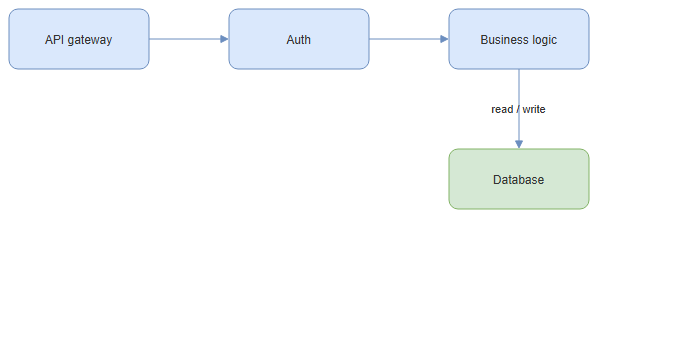
What it does
- Read-only and inert. The file is decoded and laid out offscreen; the pane receives an SVG
data:URL and never an engine instance or a live DOM. The markup never enters the application DOM, so a diagram's content cannot script the page. - Both draw.io save formats. Plain mxGraph XML, and draw.io's compressed body (base64 + raw DEFLATE + percent escape). A multi-page `` renders its first page.
- No file leaves your machine. Rendering is fully local. Unlike a hosted viewer, nothing is uploaded anywhere.
- draw.io's styling, not the engine's. The renderer applies a stylesheet matching draw.io's defaults, so a cell whose style string omits a color does not inherit the storage engine's own palette. A cell's own style still wins.
Install
The built lib/ is committed, so the repository installs and runs directly — no build step on your machine.
# over HTTPS
npx @deepseek-ai/dsh plugin --profile web add git+https://github.com/zhang-guo-wen/dsh-drawio.git

# or over SSH
npx @deepseek-ai/dsh plugin --profile web add git+ssh://git@github.com/zhang-guo-wen/dsh-drawio.git
To develop against a local checkout, install the directory. pnpm creates a symlink, so a rebuilt lib/ reaches
the host on the next start with no reinstall:
npx @deepseek-ai/dsh plugin --profile web add /absolute/path/to/dsh-drawio
Then restart the host:
npx @deepseek-ai/dsh web
You do not edit the profile manifest by hand: dsh plugin add adds both the dependency and the bundle entry.
Remove it, dependency and layer together, with dsh plugin --profile web remove @zhang-guo-wen/dsh-drawio.
The profile must already compose @deepseek-ai/dsh-client-ui-sidebar-documentpreview, which owns the registry this
plugin contributes to. Every shipped web profile does.
Known limitations
Edge routing and edge-label placement do not match draw.io. A .drawio file stores an edge's endpoints and its
edgeStyle name, but not the path between them:
Both viewers therefore compute the bend points and the label position at render time, from the same inputs, using different code. draw.io's editor adds its own routing and label-avoidance behaviour on top of the shared engine, and this plugin's engine does not carry that code, so the two can differ: an edge may take a different route, and a label may land on a node label when the gap between two nodes is narrower than the label.
The second is geometric, not cosmetic: when two nodes are 50px apart and the label is 66px wide, it cannot be placed outside both boxes without moving a node. Giving the label an opaque background only paints a box over the text it covers, which reads worse, so the renderer does not do it.
Workaround. In draw.io, drag the edge label where you want it: the editor then writes an explicit `` into the file, and every viewer — including this one — honours it. Widening the gap between the two nodes works equally well. Both fix the diagram at its source rather than in one viewer.
Shapes outside the engine's set are drawn as rectangles. draw.io ships several hundred stencil shapes; the bundled engine carries its own smaller set, so a shape it does not know is rendered as a plain rectangle rather than omitted.
Development
The repository root is the plugin package: its root package.json is @zhang-guo-wen/dsh-drawio. npm install and dsh plugin add both package the repository root, so a plugin under packages/* would install as the
wrong thing.
npm install
npm run build      # host half via tsdown; browser half via build-client.mjs
npm run typecheck  # tsc against the PUBLISHED @deepseek-ai/* packages
npm test           # loads the built bundle the way the browser does
lib/ is committed — that is what lets someone install this repository with no build on their side. Re-run
npm run build and commit lib/ whenever you change src/.
Why the browser half has its own bundler
The harness monorepo builds its client bundles with a script it does not publish, so this repository bundles the browser half itself. Two details are load-bearing:
platform: 'browser'is set explicitly. Under the bundler'snodeplatform every dependency resolves through itsnodeexport condition, so a library whoseexportslists a platform condition beforeimportgets its server entry inlined — and those entries can callcreateRequire('module')at module scope, producing arequire("module")the browser module table cannot answer.- Only react and the DSH client packages stay external. Implementation libraries are inlined, so the deployed artifact has no install-time dependency.
npm test verifies both: it loads the built bundle with a module table containing nothing but those externals, and
fails if the bundle asks for anything else.
License
Apache License 2.0 — see LICENSE. Bundled third-party code is attributed in NOTICE. "draw.io" is a trademark of its owner; this package is not affiliated with or endorsed by draw.io.