anonRTtty/dsh-api-balance-displayer-plugin ↗★ 1
dsh-plugin-balance
DeepSeek API balance display in the DSH web session header (balance capsule beside the Session log button) 核心用途是让用户在 DSH 界面中直观、便捷地查看 DeepSeek API 账户余额。适合需要随时监控 API 余额、防止因欠费导致服务中断的用户。
Other repositories with this package name
Install
npx -p @deepseek-ai/dsh dsh plugin --profile web add github:anonRTtty/dsh-api-balance-displayer-pluginREADME
Read the full README ↗dsh-plugin-balance
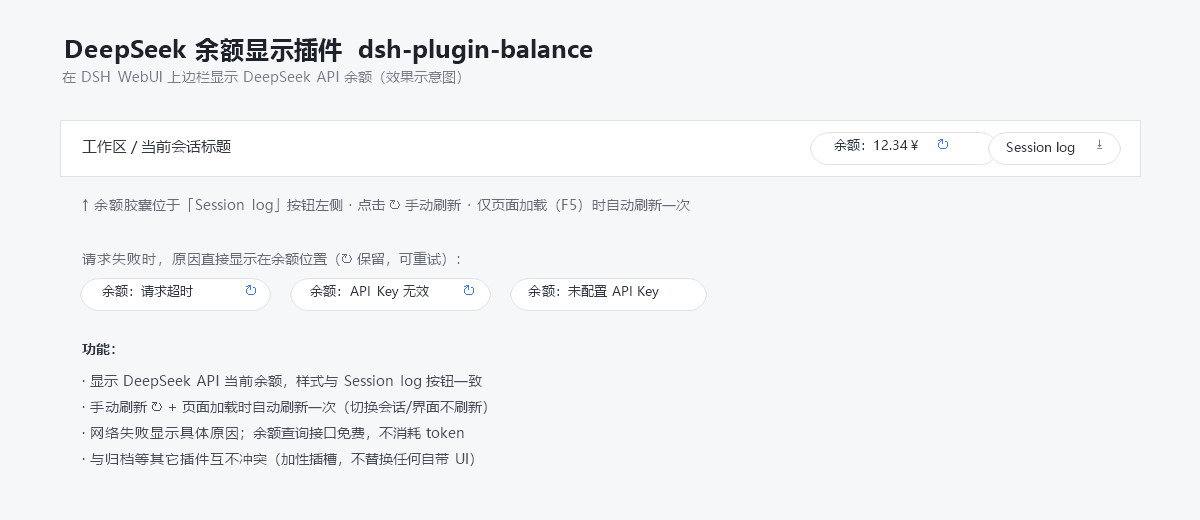
A lightweight, zero-build plugin for DeepSeek Harness (DSH) that shows your DeepSeek API account balance in the web session header, right next to the built-in "Session log" button:
[Balance: 12.34¥ ↻] [Session log]
Features
- Displays the current DeepSeek API balance at the top-right of the session header, styled to match the built-in "Session log" button.
- Manual refresh: click the ↻ button.
- Auto refresh: once per page load (F5) only — switching sessions or views never triggers a refresh.
- Localized UI: the label (
Balance/余额), the loading text, and every error reason follow your DSH UI language (English / Simplified Chinese). - Clear failure reasons: on network or credential errors the capsule shows the concrete reason in the active language (e.g.
Balance: Request timed out,Balance: Invalid API key,Balance: No API key configured). - Free to use: the balance query (
GET https://api.deepseek.com/user/balance) consumes no API tokens. - No conflicts: registered in the additive slot
conversation.session.header.utilities(replaceRisk: none) — it never replaces any built-in UI.
The API key is resolved through DSH's own credential seam (~/.dsh/.credentials.yaml → DEEPSEEK_API_KEY) and never leaves the host process.
Download
Clone:
git clone https://github.com/anonRTtty/dsh-api-balance-displayer-plugin.git
Or download the ZIP: open the repository page → Code → Download ZIP, then extract dsh-plugin-balance/.
Install
Pick one of the three methods — do not mix them (mixing may register the plugin twice). After installing, restart DSH (or let the patch HMR apply), then hard-refresh the browser (
Ctrl+Shift+R).
Method 1 — One-command install (Windows PowerShell, recommended)
No clone needed; the script downloads the release ZIP, copies it into the profile and enables it:
irm https://raw.githubusercontent.com/anonRTtty/dsh-api-balance-displayer-plugin/main/scripts/install.ps1 | iex
Or after cloning/extracting:
cd dsh-plugin-balance
powershell -ExecutionPolicy Bypass -File .\scripts\install.ps1
Non-default profile: powershell -ExecutionPolicy Bypass -File .\scripts\install.ps1 -ProfileName headless
Method 2 — Official CLI (dsh plugin)
dsh plugin --profile web add github:anonRTtty/dsh-api-balance-displayer-plugin
This plugin declares dsh.bundle, so the official command adds it to dsh.profile.bundles and applies the in-package cordis.patch.yml automatically — no manual config editing needed.
Method 3 — Manual install
-
Copy the whole
dsh-plugin-balance/directory to:C:\Users\Administrator\.dsh\profiles\node_modules\dsh-plugin-balance\ -
Append to the insert list in
C:\Users\Administrator\.dsh\profiles\web\cordis.patch.yml:- insert: - id: dsh-plugin-balance name: dsh-plugin-balance -
Restart DSH.
Uninstall
One-command (Windows PowerShell):
irm https://raw.githubusercontent.com/anonRTtty/dsh-api-balance-displayer-plugin/main/scripts/uninstall.ps1 | iex
Or locally: powershell -ExecutionPolicy Bypass -File .\scripts\uninstall.ps1
Or manually: remove the dsh-plugin-balance entry from cordis.patch.yml, delete C:\Users\Administrator\.dsh\profiles\node_modules\dsh-plugin-balance\, then restart DSH.
(If you installed via Method 2, also run dsh plugin --profile web remove dsh-plugin-balance.)
File structure
dsh-plugin-balance/
├── package.json        # package manifest + dsh.bundle (auto-activate via CLI) + dsh.client
├── cordis.patch.yml    # bundle patch (applied automatically on CLI installs)
├── src/
│   ├── index.js        # Host half: /api/plugin.balance route (webServer exact route)
│   └── client.js       # Browser half: localized balance capsule (module-loader bundle)
├── scripts/
│   ├── install.ps1     # Windows one-command install script
│   └── uninstall.ps1   # Windows uninstall script
├── screenshot.png      # Screenshot
├── README.md           # English
├── README.zh-CN.md     # Simplified Chinese
└── LICENSE
Notes
- Balance endpoint:
GET https://api.deepseek.com/user/balance(free, consumes no tokens). The credential is read fromDEEPSEEK_API_KEYin~/.dsh/.credentials.yaml(the same seam the built-in model route uses); the key never leaves the host process. - The host registers the exact route
/api/plugin.balanceviawebServer(same extension point as dsh-plugin-session-delete); the browser fetches it same-origin. - License: MIT