anonRTtty/dsh-plugin-balance ↗★ 0
dsh-plugin-balance
DeepSeek API balance display in the DSH web session header (balance capsule beside the Session log button) 核心用途是在 DSH 界面右上角直观展示 DeepSeek API 余额,支持手动刷新和单次页面加载自动刷新。适合需要实时监控 API 额度的用户。
Other repositories with this package name
Install
npx -p @deepseek-ai/dsh dsh plugin --profile web add github:anonRTtty/dsh-plugin-balanceREADME
Read the full README ↗dsh-plugin-balance
DeepSeek API 余额显示插件(DSH WebUI) · A DeepSeek API balance display plugin for the DSH web session header
English / 介绍(Overview)
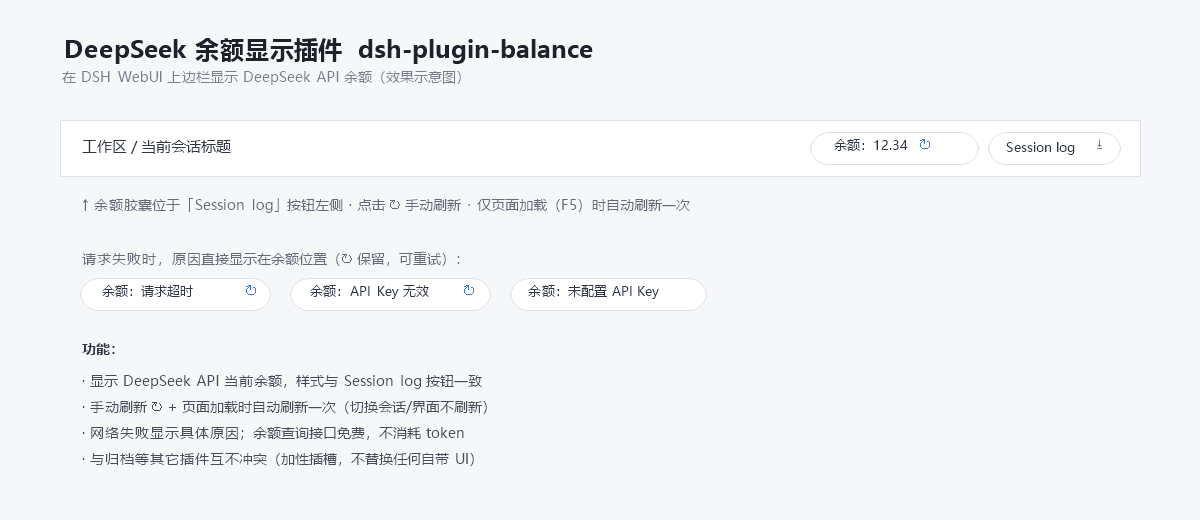
A lightweight, zero-build plugin for DeepSeek Harness (DSH) that shows your DeepSeek API account balance in the web session header, right next to the built-in "Session log" button:
[余额:12.34 ↻] [Session log]
What it does
- Displays the current DeepSeek API balance in the top-right of the session header, styled to match the built-in "Session log" button.
- Manual refresh: click the ↻ button.
- Auto refresh: once per page load (F5) only — switching sessions/views never triggers a refresh.
- Clear failure reasons: on network/credential errors the capsule shows the concrete reason (e.g.
余额:请求超时timeout,余额:API Key 无效bad key,余额:未配置 API Keymissing key). - Free to use: the balance query (
GET https://api.deepseek.com/user/balance) consumes no API tokens. - No conflicts: registered in the additive slot
conversation.session.header.utilities(replaceRisk: none) — it never replaces any built-in UI.
The API key is resolved through DSH's own credential seam (~/.dsh/.credentials.yaml → DEEPSEEK_API_KEY) and never leaves the host process.
下载 / Download
方式一(Git clone):
git clone https://github.com/anonRTtty/dsh-plugin-balance.git
方式二(ZIP):打开 仓库页面 → Code → Download ZIP,解压后得到 dsh-plugin-balance/ 目录。
安装 / Install
三选一,不要混用(混用可能重复注册插件)。装完都要重启 DSH(或等 patch HMR 生效),然后硬刷新浏览器
Ctrl+Shift+R。
方式一:一键安装(Windows PowerShell,推荐)
无需 clone,直接运行(脚本会自动下载 release ZIP、复制到 profile 并启用):
irm https://raw.githubusercontent.com/anonRTtty/dsh-plugin-balance/main/scripts/install.ps1 | iex
或先 clone/解压后本地运行:
cd dsh-plugin-balance
powershell -ExecutionPolicy Bypass -File .\scripts\install.ps1
非默认 profile:powershell -ExecutionPolicy Bypass -File .\scripts\install.ps1 -ProfileName headless
方式二:官方 CLI(dsh plugin)
dsh plugin --profile web add github:anonRTtty/dsh-plugin-balance
本插件声明了 dsh.bundle,官方命令会把它加入 dsh.profile.bundles 并自动应用包内 cordis.patch.yml,无需手动改任何配置文件。
方式三:手动安装
-
把整个
dsh-plugin-balance/目录复制到:C:\Users\Administrator\.dsh\profiles\node_modules\dsh-plugin-balance\ -
在
C:\Users\Administrator\.dsh\profiles\web\cordis.patch.yml的 insert 列表中追加:- insert: - id: dsh-archive-manager name: dsh-archive-manager - id: dsh-plugin-balance name: dsh-plugin-balance -
重启 DSH。
卸载 / Uninstall
一键卸载(Windows PowerShell):
irm https://raw.githubusercontent.com/anonRTtty/dsh-plugin-balance/main/scripts/uninstall.ps1 | iex
或本地运行:powershell -ExecutionPolicy Bypass -File .\scripts\uninstall.ps1
或手动:删除 cordis.patch.yml 中 dsh-plugin-balance 那两行,删除 C:\Users\Administrator\.dsh\profiles\node_modules\dsh-plugin-balance\,然后重启 DSH。
(若使用方式二安装,卸载时也请执行 dsh plugin --profile web remove dsh-plugin-balance。)
文件结构 / File structure
dsh-plugin-balance/
├── package.json        # 包声明 + dsh.bundle(官方 CLI 自动激活)+ dsh.client 注入
├── cordis.patch.yml    # bundle patch(官方 CLI 安装时自动应用)
├── src/
│   ├── index.js        # Host 半部:/api/plugin.balance 路由(webServer 精确路由)
│   └── client.js       # 浏览器半部:__ModuleLoader__ 加载的余额胶囊
├── scripts/
│   ├── install.ps1     # Windows 一键安装脚本
│   └── uninstall.ps1   # Windows 卸载脚本
├── screenshot.png      # 效果示意图
├── README.md
└── LICENSE
说明 / Notes
- 余额接口:
GET https://api.deepseek.com/user/balance(免费,不消耗 token);凭据读取~/.dsh/.credentials.yaml中的DEEPSEEK_API_KEY(与 DSH 内置模型路由同一凭据通道),Key 不离开宿主进程。 - 主机端通过
webServer注册精确路由/api/plugin.balance(与 dsh-plugin-session-delete 同款扩展点);浏览器端通过同源 fetch 获取余额。 - License: MIT