@nono-neko/dsh-browser
Embedded browser for the DSH web and desktop GUI with multi-tab browsing, workspace frontend review comments, a lightweight CodeMirror editor, and agent tools. Hot-pluggable as a standalone cordis bundle with no DSH source changes. Requires DSH v0.1.1-rc.1 or later. 适合需要在 DSH 界面内浏览网页、预览前端及编辑工作区文件的用户。
インストール
npx -p @deepseek-ai/dsh dsh plugin --profile web add github:Nono-neko/dsh-browserドキュメント
README 全文を読む ↗Configuration
The plugin reads its settings from a layered source: schema defaults, then the
plugin's cordis.yml entry (composition base), then the user settings
document. All fields are optional.
| Field | Type | Default | Description |
|---|---|---|---|
enabled | boolean | true | Mount the sidebar entry, tools, and proxy routes. |
announceToAgent | boolean | true | Inject a system-prompt section telling agents about the browser and review tools. |
autoCheckUpdates | boolean | true | Check public plugin releases at startup and every six hours. |
followRepositoryUpdates | boolean | false | Source installs only: compare the built commit with the repository default branch instead of stable Releases. |
defaultHome | string | https://www.bing.com | URL loaded by the new-tab / home button. |
maxTabs | number | 10 | Per-workspace tab cap; oldest inactive tab is trimmed. |
allowPrivateAccess | boolean | false | Let browser_read fetch private / loopback addresses. |
browserExecutable | string | auto-detect | Absolute path to a Chromium-based browser (Chrome / Edge / Chromium). |
proxyServer | string | empty | Route Puppeteer traffic through a proxy, e.g. http://127.0.0.1:7890. |
Visual settings card
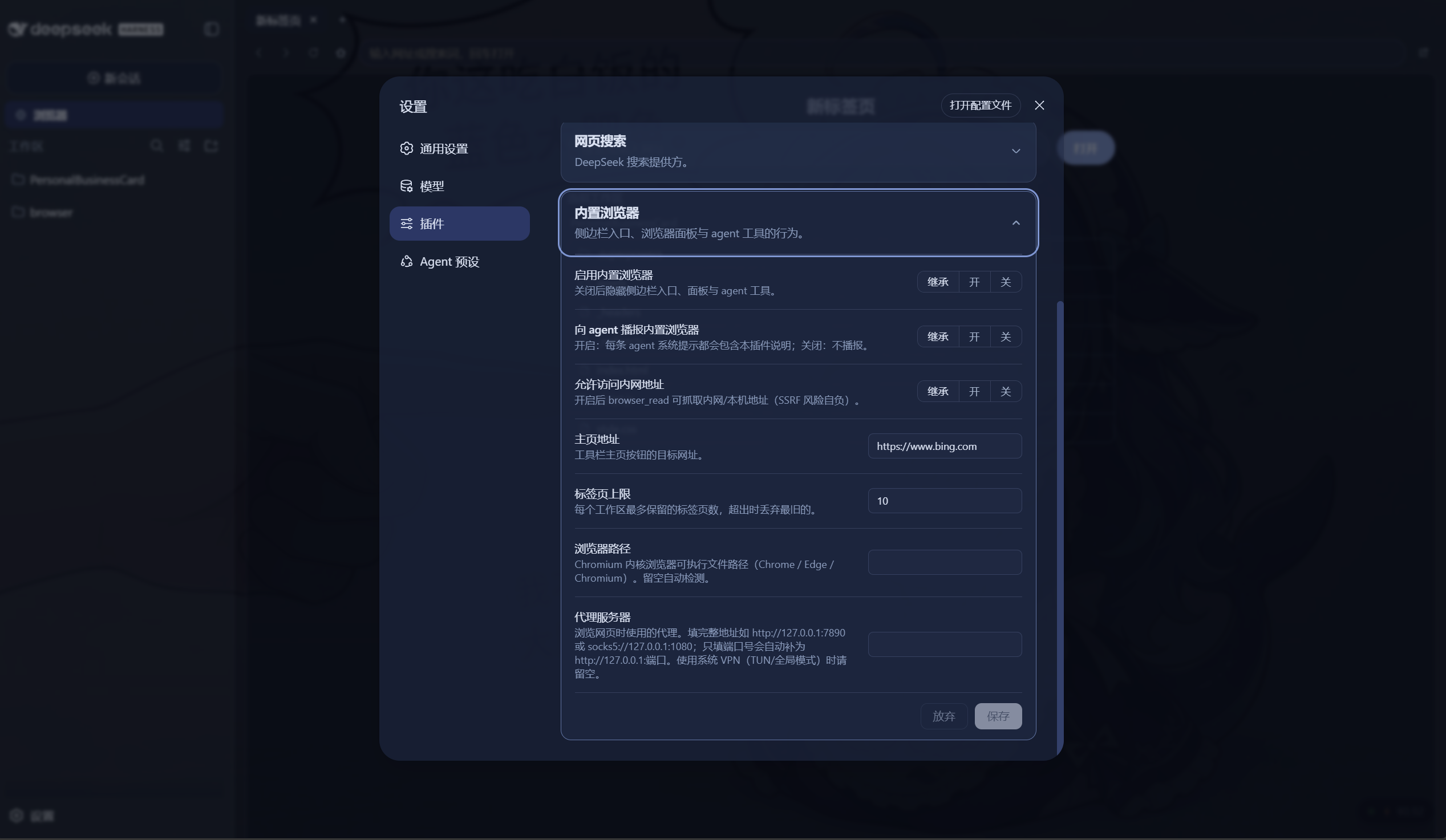
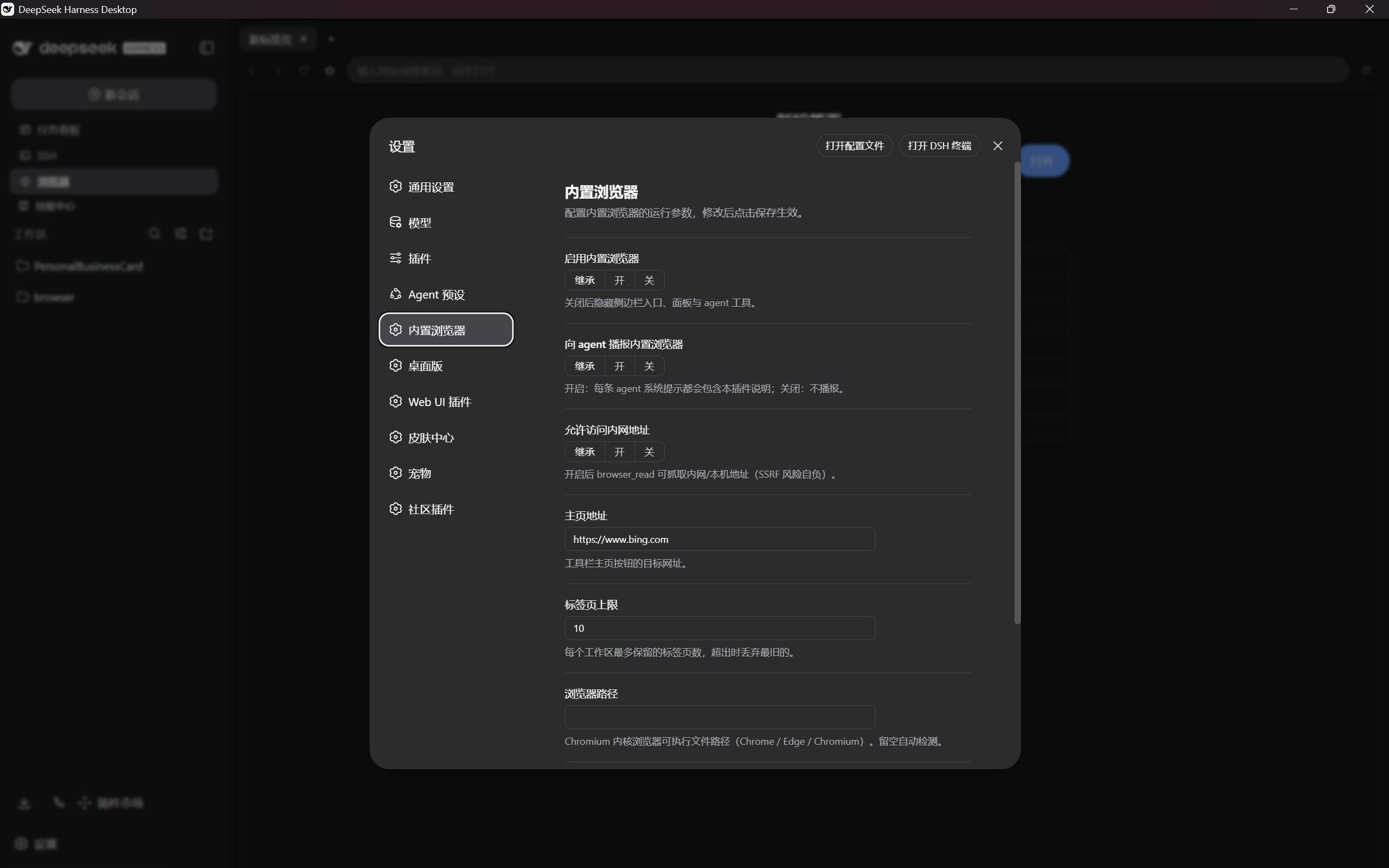
The plugin provides an interactive settings form out of the box (requires DSH v0.1.1-rc.1 or later):
- Web: Settings → Plugins → Embedded browser
- Desktop: standalone Embedded browser entry in the left nav
| Web settings card | Desktop settings page |
|---|---|
 |  |
Config file method (without the visual settings card)
If you prefer not to use the visual settings card, set the same fields directly. Two layers are available:
Plugin entry config (cordis.yml or your profile's plugin config) — the
composition base, applies to every user of that profile:
plugins:
  dsh-browser:
    defaultHome: https://www.google.com
    maxTabs: 20
    proxyServer: http://127.0.0.1:7890
User settings document (~/.dsh/settings.yaml) — per-user overrides that
layer on top of the entry config:
dsh-browser:
  browserExecutable: C:\Program Files\Google\Chrome\Application\chrome.exe
  allowPrivateAccess: true
Update notification behavior
- The Host checks
@nono-neko/dsh-browseron npm and stable Releases inNono-neko/dsh-browseron GitHub. npm installations follow the stable version at thelatesttag; source checkouts follow GitHub Releases. A GitHub-only release is not advertised as installable from npm. Prereleases, equal versions, and downgrades do not trigger a badge. Unknown installations are labeled and may display either source; confirm your installation method before updating. - The running version is stamped from this plugin's package at build time, not
from the active workspace. A package-root
.gitidentifies source installs; anode_modulespackage identifies npm installs. Other layouts are unknown. Optional default-branch tracking compares a clean build's commit with the remote tip and only prompts when that tip is ahead. Dirty/watch builds, missing revisions, unpublished local commits, and diverged histories cannot be reliably compared; consult the repository instead. Rebuild and restart the Host after updating source, then refresh the GUI. - Results and ETags are cached in Host memory. Concurrent requests are coalesced; manual checks are limited to once per minute. Automatic checks run six hours after the last completed check. Turning them off still permits manual checks; disabling the plugin or disposing it stops background checks. The GUI polls only the local cache, not GitHub/npm. Network and rate-limit failures are displayed as unavailable, never as "no newer version".
- Ignoring a version suppresses only that version's sidebar badge, not its details. The choice is stored per GUI origin in localStorage (memory-only if storage is unavailable). A subsequent version can notify again. These settings and results are plugin-wide, not per workspace.
- Checks use the Host's network connection, not Puppeteer's
proxyServeroption. Save editor contents and local changes before manually updating. No automatic upgrade, Git operation, or restart is exposed by the update button.