dsh-skin
Customizable skinning tool for the DeepSeek Harness Web UI — presets, image wallpapers, translucency, and accent colors, all persisted in user settings
AI 분석
核心用途是为 DSH Web UI 提供个性化换肤。适合追求界面美化、希望自定义背景图或主题色的用户。支持上传本地图片或使用外链。
설치
검증된 bundle이 없거나 호환성 검사에 실패했습니다. 먼저 저장소 설명을 읽어 주세요. 전체 README 읽기 ↗
dsh-skin — 自定义换肤工具(支持图片换肤)
📖 中文使用教程:使用教程.md · 📦 源码:github.com/Yugitan/dsh-skin · 🏷 dsh-plugin
A customizable skinning plugin for the DeepSeek Harness Web UI. It adds a 「换肤 / Skin」panel to 设置 → 通用 (Settings → General) that lets you:
- Toggle the skin on/off with one switch.
- Pick a built-in gradient preset (深海 Ocean / 极光 Aurora / 落日 Sunset / 薄荷 Mint / 樱花 Cherry).
- Upload your own wallpaper image (PNG / JPG / WebP / GIF, ≤ 10 MB) — stored
under
~/.dsh/skins/and served from/skins/(no base64 bloat in settings). - Paste any image URL (local
/skins/...or external). - Tune fit (铺满/适应/拉伸/平铺), position, image opacity, background blur, a dim overlay for readability, and panel translucency (glass effect).
- Override the brand accent color (swatches + color picker).
- Reset everything back to the default appearance.
效果预览 / Preview
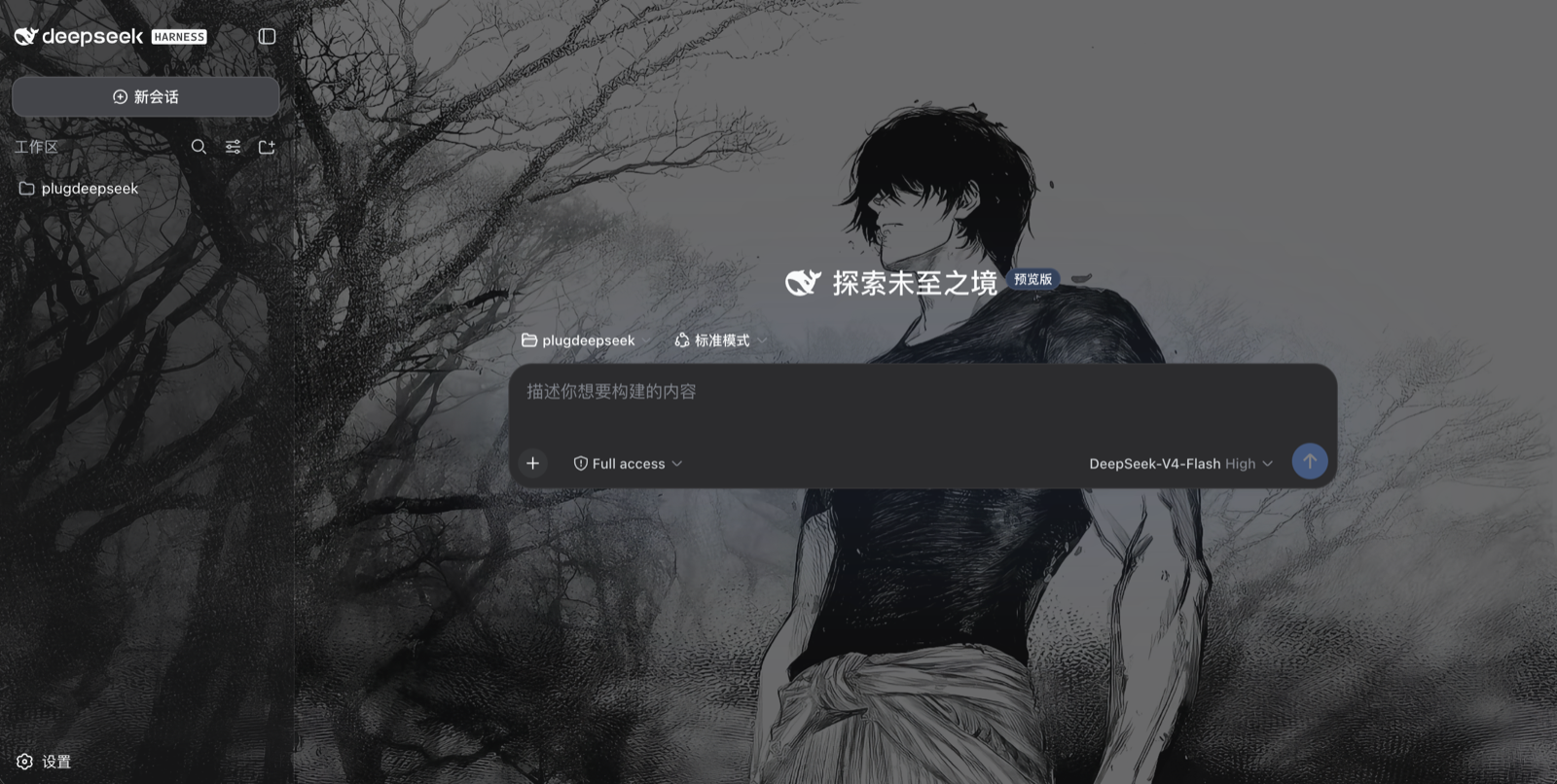
Everything is persisted in the DSH user-settings document
(~/.dsh/settings.yaml → skin: section), survives restarts, and re-applies
before the React app mounts (host-injected boot style, no flash).
How it works
- Host half (
lib/index.js, runs in thedsh webprocess)- registers the
skinsettings namespace + schema, - serves
POST /skin/upload(magic-byte image sniffing, 10 MiB cap) andGET/HEAD /skins/(immutable cache, path-traversal guarded), - taps the index HTML with a pre-plugin boot script/style that projects the
durable skin onto
--dsh-skin-*CSS custom properties and thebody[data-ds-skin]attribute.
- registers the
- Browser half (
lib/client.js, loaded by the client module system)SkinRuntimemirrors the settings section into CSS custom properties, togglesdata-ds-skin/data-ds-skin-accenton ``, and removes the host boot nodes once active,- registers the「换肤 / Skin」row into the
settings.general.itemslot (order 20, right below the built-in Appearance row).
The wallpaper is painted by a fixed full-viewport body::before layer
(z-index: -1), the dim overlay by body::after, and the app surfaces are
made translucent through --dsw-alias-bg-* token overrides (!important
beats the ui-layout ThemePresenter's inline tokens), so the image shows
through panels while text stays readable via the dim overlay.
Install into a running profile
Install from GitHub
git clone https://github.com/Yugitan/dsh-skin.git
cd dsh-skin
node manage.mjs install        # one-click install (links + registers + patches)
# restart the server, then refresh the browser:
#   cd ~ && npm exec @deepseek-ai/dsh web
On a new machine, recreate the
node_modulessymlink inside the clone (ln -s ~/.dsh/profiles/node_modules node_modules) or runnpm installthere so the harness resolvesreact/@deepseek-ai/*.
One-command install / uninstall (recommended)
From the dsh-skin/ directory, run the bundled manager script. It does all
three steps — module link, cordis.patch.yml entry, host allowlist patch —
and is idempotent (safe to re-run):
node manage.mjs install        # one-click install
node manage.mjs status         # verify (also checks the live server bundle)
node manage.mjs uninstall      # one-click uninstall
node manage.mjs uninstall --clean   # also delete ~/.dsh/skins/ + the skin: settings
node manage.mjs install --profile ~/.dsh/profiles/   # custom profile
node manage.mjs --help
Or via npm scripts in this package: npm run plugin:install /
npm run plugin:uninstall / npm run plugin:status.
Restart the server afterwards and refresh the browser:
dsh --profile web (or npm exec @deepseek-ai/dsh web).
Manual install (advanced)
# from this repository root
PROFILE=~/.dsh/profiles/web
ln -s "$PWD/dsh-skin" "$PROFILE/node_modules/dsh-skin"
Append to $PROFILE/cordis.patch.yml:
- insert:
    - id: skin
      name: 'dsh-skin'
Then apply the one-line platform patch (required — see below), and restart the
server: dsh --profile web (or npm exec @deepseek-ai/dsh web).
node patch-host.mjs        # adds the "skin" settings namespace to the API-gateway allowlist
node patch-host.mjs --check
Platform patch (required). DeepSeek Harness's API gateway (
dsh-host-apiproxy) only lets configuration clients read/write a hard-coded allowlist of settings namespaces (WEB_SETTINGS_NAMESPACES). A third-party namespace — even one registered throughsettings.register()— is refused withsettings-not-exposed, so the skin row would render but every toggle/preset write silently fails and nothing persists (nothing is written tosettings.yaml).patch-host.mjsidempotently adds"skin"to that allowlist (with--check/--revertmodes). Re-run it after any harness reinstall/update, then restart the server.
While developing, edit dsh-skin/lib/client.js — the client HMR watcher
polls the bundle and hot-reloads it in the browser without a server restart.
Development
node patch-host.mjs— reapply the one-line API-gateway allowlist patch (--checkto verify,--revertto undo); needed after a harness reinstall.node test-client.mjs/node test-runtime.mjs— execute the browser bundle in Node and render the Skin row withreact-dom/server(smoke + runtime projection + row actions).node test-host.mjs— mounts the upload/skins handlers on a throwawaynode:httpserver and exercises upload, serving, traversal guard, and the index tap.- The
node_modulessymlink inside the package points at the profile module fallback so the harnesses resolvereact/@deepseek-ai/*without an install.
Optional config
The plugin row accepts a config to relocate the image storage root:
- id: skin
  name: 'dsh-skin'
  config:
    root: /absolute/path/to/skins
Default: ~/.dsh/skins.